
Hi everyone, now that we have installed Grid Infrastructure 12c for our Standalone Server and Oracle Database 12c, and created the database, we need to know how to administer this environment.
Let’s look at some commands to perform administrative tasks on our Standalone Server.
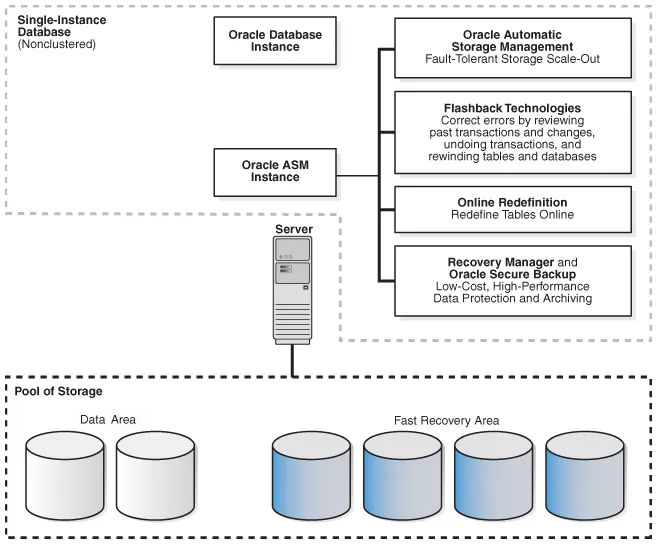
Standalone Server
To administer Oracle High Availability Services on a Standalone Server you must be connected as root. HAS is a group of services responsible for detecting failures and for starting, stopping and reporting errors of the environment. When you start or stop HAS, all the other services that depend on it are affected as a consequence. If you shut down the Linux server, the whole HAS stop process happens automatically, and it starts the same way at boot.
[root@loredata-srv ~]# . oraenv
ORACLE_SID = [root] ? +ASM
The Oracle base has been set to /u01/app/oracle
CRSCTL
[root@loredata-srv ~]# crsctl check has
CRS-4638: Oracle High Availability Services is online
[root@loredata-srv ~]# crsctl stop has
CRS-2791: Starting shutdown of Oracle High Availability Services-managed resources on 'loredata-srv'
CRS-2673: Attempting to stop 'ora.CRS.dg' on 'loredata-srv'
CRS-2673: Attempting to stop 'ora.loredb.db' on 'loredata-srv'
CRS-2673: Attempting to stop 'ora.LISTENER.lsnr' on 'loredata-srv'
CRS-2673: Attempting to stop 'ora.DBLISTENER.lsnr' on 'loredata-srv'
CRS-2677: Stop of 'ora.CRS.dg' on 'loredata-srv' succeeded
CRS-2677: Stop of 'ora.loredb.db' on 'loredata-srv' succeeded
CRS-2673: Attempting to stop 'ora.DATA.dg' on 'loredata-srv'
CRS-2677: Stop of 'ora.DATA.dg' on 'loredata-srv' succeeded
CRS-2673: Attempting to stop 'ora.asm' on 'loredata-srv'
CRS-2677: Stop of 'ora.DBLISTENER.lsnr' on 'loredata-srv' succeeded
CRS-2677: Stop of 'ora.LISTENER.lsnr' on 'loredata-srv' succeeded
CRS-2677: Stop of 'ora.asm' on 'loredata-srv' succeeded
CRS-2673: Attempting to stop 'ora.evmd' on 'loredata-srv'
CRS-2677: Stop of 'ora.evmd' on 'loredata-srv' succeeded
CRS-2673: Attempting to stop 'ora.cssd' on 'loredata-srv'
CRS-2677: Stop of 'ora.cssd' on 'loredata-srv' succeeded
CRS-2793: Shutdown of Oracle High Availability Services-managed resources on 'loredata-srv' has completed
CRS-4133: Oracle High Availability Services has been stopped.[root@loredata-srv ~]# crsctl start has
CRS-4123: Oracle High Availability Services has been started.If you want to disable HAS so it doesn’t start automatically at boot of the Standalone Server:
[root@loredata-srv ~]# crsctl disable has
CRS-4621: Oracle High Availability Services autostart is disabled.
To enable it again:
[root@loredata-srv ~]# crsctl enable has
CRS-4622: Oracle High Availability Services autostart is enabled.
Disabling doesn’t stop the services, and likewise enabling doesn’t start them.
To check the resources running on the server and also know their status:
[root@loredata-srv ~]# crsctl status resource -t
--------------------------------------------------------------------------------
Name Target State Server State details
--------------------------------------------------------------------------------
Local Resources
--------------------------------------------------------------------------------
ora.CRS.dg
ONLINE ONLINE loredata-srv STABLE
ora.DATA.dg
ONLINE ONLINE loredata-srv STABLE
ora.DBLISTENER.lsnr
ONLINE OFFLINE loredata-srv STABLE
ora.LISTENER.lsnr
ONLINE OFFLINE loredata-srv STABLE
ora.asm
ONLINE ONLINE loredata-srv Started,STABLE
ora.ons
OFFLINE OFFLINE loredata-srv STABLE
--------------------------------------------------------------------------------
Cluster Resources
--------------------------------------------------------------------------------
ora.cssd
1 ONLINE ONLINE loredata-srv STABLE
ora.diskmon
1 OFFLINE OFFLINE STABLE
ora.evmd
1 ONLINE ONLINE loredata-srv STABLE
ora.loredb.db
1 ONLINE ONLINE loredata-srv Open,STABLE
--------------------------------------------------------------------------------
To check a specific resource:
[root@loredata-srv ~]# crsctl status resource ora.loredb.db
NAME=ora.loredb.db
TYPE=ora.database.type
TARGET=ONLINE
STATE=ONLINE on loredata-srv
The -t option shows the output in tabular format:
[root@loredata-srv ~]# crsctl status resource ora.loredb.db -t
--------------------------------------------------------------------------------
Name Target State Server State details
--------------------------------------------------------------------------------
Cluster Resources
--------------------------------------------------------------------------------
ora.loredb.db
1 ONLINE ONLINE loredata-srv Open,STABLE
--------------------------------------------------------------------------------
It is not possible to stop resources with the crsctl command:
[root@loredata-srv ~]# crsctl stop resource ora.loredb.db
CRS-4995: The command 'Stop resource' is invalid in crsctl. Use srvctl for this command.
[root@loredata-srv ~]# crsctl stop resource ora.DBLISTENER.lsnr
CRS-4995: The command 'Stop resource' is invalid in crsctl. Use srvctl for this command.
[root@loredata-srv ~]# crsctl stop resource ora.asm
CRS-4995: The command 'Stop resource' is invalid in crsctl. Use srvctl for this comando.
SRVCTL
The resource type and name must be passed for the command to work:
[root@loredata-srv ~]# srvctl stop database -db ora.loredb.db
PRCD-1120 : The resource for database ora.loredb.db could not be found.
PRCR-1001 : Resource ora.ora.loredb.db.db does not exist
Only the database name, not the resource name:
[root@loredata-srv ~]# srvctl stop database -db loredb
[root@loredata-srv ~]#
The command above does a “shutdown immediate”, as we can confirm in alert_loredb.log:
Wed Jan 27 20:28:50 2016
Shutting down instance (immediate)
Stopping background process SMCO
Shutting down instance: further logons disabled
In the same way, “start” does a “startup”, going through all the database startup stages up to its supposed opening:
[root@loredata-srv ~]# srvctl start database -db loredb
Again we can verify what was done by looking at alert_loredb.log:
Wed Jan 27 20:30:33 2016
Starting ORACLE instance (normal) (OS id: 4938)
To check whether the database is running:
[root@loredata-srv ~]# srvctl status database -db loredb
Database is running.
All srvctl commands can be run as the oracle user, because we configured our Standalone Server without a dedicated user for Grid Infrastructure. Let’s now test operations on the ASM instance.
[root@loredata-srv ~]# su - oracle
[oracle@loredata-srv ~]$ ps -ef|grep pmon
oracle 3912 1 0 20:07 ? 00:00:00 asm_pmon_+ASM
oracle 5385 1 0 20:33 ? 00:00:00 ora_pmon_loredb
oracle 5832 5801 0 20:35 pts/1 00:00:00 grep pmon
[oracle@loredata-srv ~]$ . oraenv
ORACLE_SID = [loredb] ? +ASM
The Oracle base remains unchanged with value /u01/app/oracle
[oracle@loredata-srv ~]$ srvctl status asm
ASM is running on loredata-srvIt is not possible to stop ASM without first stopping the diskgroups, except with the “force” option:
[oracle@loredata-srv ~]$ srvctl stop asm
PRCR-1065 : Failed to stop resource ora.asm
CRS-2529: Unable to act on 'ora.asm' because that would require stopping or relocating 'ora.CRS.dg', but the force option was not specified
The “force” (-f) option makes the database instances shut down immediately (like an “abort”) and the diskgroups get dismounted:
[oracle@loredata-srv ~]$ srvctl stop asm -f
In alert_+ASM.log you can see that ASM dismounts the diskgroups.
NOTE: halting all I/Os to diskgroup 2 (DATA)
Wed Jan 27 20:38:18 2016
NOTE: LGWR doing non-clean dismount of group 2 (DATA) thread 1
NOTE: LGWR sync ABA=5.603 last written ABA 5.603
Wed Jan 27 20:38:18 2016
NOTE: cache dismounted group 2/0x2D692230 (DATA)
Wed Jan 27 20:38:18 2016
GMON dismounting group 2 at 9 for pid 20, osid 3965
Wed Jan 27 20:38:18 2016
NOTE: Disk DATA in mode 0x7f marked for de-assignment
Wed Jan 27 20:38:18 2016
SUCCESS: diskgroup DATA was dismounted
NOTE: cache deleting context for group DATA 2/0x2d692230
Wed Jan 27 20:38:18 2016
SUCCESS: ALTER DISKGROUP DATA DISMOUNT FORCE /* asm agent *//* {0:0:938} */
Shutting down instance (abort)
License high water mark = 8
USER (ospid: 3965): terminating the instance
Wed Jan 27 20:38:19 2016
Instance terminated by USER, pid = 3965
Wed Jan 27 20:38:19 2016
Instance shutdown complete
To start only the ASM instance:
[oracle@loredata-srv ~]$ srvctl start asm
The command below will start ASM if its instance is down, and then start the database:
[oracle@loredata-srv ~]$ srvctl start database -d loredb
To check whether the Listeners are running:
[oracle@loredata-srv ~]$ srvctl status listener
Listener DBLISTENER is enabled
Listener DBLISTENER is running on node(s): loredata-srv
Listener LISTENER is enabled
Listener LISTENER is running on node(s): loredata-srv
To stop all the Listeners:
[oracle@loredata-srv ~]$ srvctl stop listener
[oracle@loredata-srv ~]$ srvctl status listener
Listener DBLISTENER is enabled
Listener DBLISTENER is not running
Listener LISTENER is enabled
Listener LISTENER is not running
To start a specific Listener:
[oracle@loredata-srv ~]$ srvctl start listener -listener dblistener
[oracle@loredata-srv ~]$ srvctl status listener
Listener DBLISTENER is enabled
Listener DBLISTENER is running on node(s): loredata-srv
Listener LISTENER is enabled
Listener LISTENER is not running
When a service is enabled it means it will start and stop automatically at boot and shutdown, respectively. When it is disabled it means it will not perform these operations automatically. After the Standalone Server is restarted you will have to enable them first and then start them.
All of these commands have many variations on the Standalone Server, but for now we have seen enough to start and stop the environment.
I hope you like it, and if you have questions please leave a comment.
Muito bom! Exemplos claros e bem objetivos! Parabéns Franky