
No último artigo vimos uma introdução sobre o AWR e neste vamos conhecer um pouco sobre o Statspack.
O Oracle Statspack é similar ao AWR, ele realiza snapshots de informações estatísticas de desempenho a cada hora cheia e armazena isso nos objetos do schema PERFSTAT. O Statspack foi introduzido na versão 8.1.6 do Oracle Database e hoje só utilizamos quando não temos o licenciamento necessário para usar os recursos do AWR. Então se você administra ambientes Standard Edition esqueça os relatórios, views e gráficos do AWR e ASH e acostume-se a usar o Statspack.
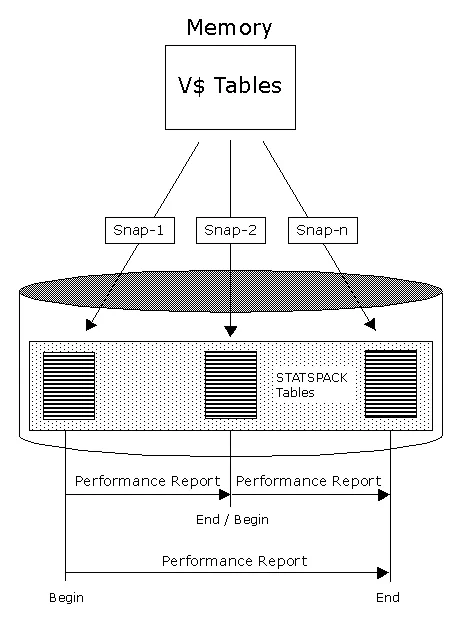
Fonte: http://www.akadia.com/img/ora\_statspack\_tables.gif

Por padrão o Statspack não vem instalado, então precisamos primeiro instalá-lo e configurá-lo para executar os snapshots. A documentação detalhada do utilitário você encontra em $ORACLE_HOME/rdbms/admin/spdoc.txt ou também tem esta documentação não oficial: SP Survival Guide. O procedimento que apresento aqui funciona desde o Oracle 8i até o 12c (preste atenção no detalhe* quando estiver criando o SP no CDB).
Antes de instalar o Statspack eu gosto sempre de criar uma tablespace exclusiva para ele:
SQL> create tablespace PERFSTAT datafile '+DATA' size 50M autoextend on next 50M maxsize 5G;

Tablespace created.
*Se você, assim como eu, estiver rodando o script de criação da estrutura do Statspack no CDB de um Oracle Database 12c altere o parâmetro “_oracle_script” para TRUE na sua sessão para não ter o erro apresentado referente ao nome do usuário comum PERFSTAT.
... Creating PERFSTAT user
create user perfstat
            *
ERROR at line 1:
ORA-65096: invalid common user or role name
Com o usuário SYS rode os seguintes scripts:
SQL> alter session set "_oracle_script"=true;

Session altered.
SQL> @?/rdbms/admin/spcreate.sql
Choose the PERFSTAT user's password
-----------------------------------
Not specifying a password will result in the installation FAILING
Enter value for perfstat_password: oracle
oracle
Choose the Default tablespace for the PERFSTAT user
---------------------------------------------------
Below is the list of online tablespaces in this database which can
store user data. Specifying the SYSTEM tablespace for the user's
default tablespace will result in the installation FAILING, as
using SYSTEM for performance data is not supported.
Choose the PERFSTAT users's default tablespace. This is the tablespace
in which the STATSPACK tables and indexes will be created.
TABLESPACE_NAME CONTENTS STATSPACK DEFAULT TABLESPACE
------------------------------ --------- ----------------------------
PERFSTAT PERMANENT
SYSAUX PERMANENT *
USERS PERMANENT
Pressing <return> will result in STATSPACK's recommended default
tablespace (identified by *) being used.
Enter value for default_tablespace: PERFSTAT
Using tablespace PERFSTAT as PERFSTAT default tablespace.
Choose the Temporary tablespace for the PERFSTAT user
-----------------------------------------------------
Below is the list of online tablespaces in this database which can
store temporary data (e.g. for sort workareas). Specifying the SYSTEM
tablespace for the user's temporary tablespace will result in the
installation FAILING, as using SYSTEM for workareas is not supported.
Choose the PERFSTAT user's Temporary tablespace.
TABLESPACE_NAME CONTENTS DB DEFAULT TEMP TABLESPACE
------------------------------ --------- --------------------------
TEMP TEMPORARY *
Pressing <return> will result in the database's default Temporary
tablespace (identified by *) being used.
Enter value for temporary_tablespace:
Using tablespace TEMP as PERFSTAT temporary tablespace.
... Creating PERFSTAT user
... Installing required packages
... Creating views
... Granting privileges
NOTE:
SPCUSR complete. Please check spcusr.lis for any errors.
.
.
. Muitas linhas serão criadas, então resumi um pouco o resultado...
.
.
1 row created.
Commit complete.
Synonym created.
Synonym created.
NOTE:
SPCTAB complete. Please check spctab.lis for any errors.
SQL> -- Create the statistics Package
.
.
.
.
Creating Package STATSPACK...
Package created.
No errors.
Creating Package Body STATSPACK...
Package body created.
No errors.
NOTE:
SPCPKG complete. Please check spcpkg.lis for any errors.Certifique-se de que não houve nenhum erro no processo acessando os arquivos spcpkg.lis, spctab.lis e spcusr.lis.
Depois de estar com o Statspack instalado recomendo que você colete estatísticas do schema PERFSTAT, pois senão você poderá ter problemas na execução de algumas packages que consultam/gravam em tabelas do SP:
SQL> exec dbms_stats.gather_schema_stats('PERFSTAT');

PL/SQL procedure successfully completed.
Conecte-se com o usuário PERFSTAT e gere um snapshot inicial:
[oracle@loredata-srv ~]$ sqlplus perfstat/oracle

SQL*Plus: Release 12.1.0.2.0 Production on Wed Jul 20 13:00:29 2016

Copyright (c) 1982, 2014, Oracle.  All rights reserved.

Connected to:
Oracle Database 12c Enterprise Edition Release 12.1.0.2.0 - 64bit Production
With the Partitioning, Automatic Storage Management, OLAP, Advanced Analytics,
Real Application Testing and Unified Auditing options

SQL> exec statspack.snap;

PL/SQL procedure successfully completed.
Em seguida crie o job de coleta automática:
SQL> @?/rdbms/admin/spauto.sql

PL/SQL procedure successfully completed.

Job number for automated statistics collection for this instance
~~~~~~~~~~~~~~~~~~~~~~~~~~~~~~~~~~~~~~~~~~~~~~~~~~~~~~~~~~~~~~~~
Note that this job number is needed when modifying or removing
the job:

     JOBNO
----------
	 1

Job queue process
~~~~~~~~~~~~~~~~~
Below is the current setting of the job_queue_processes init.ora
parameter - the value for this parameter must be greater
than 0 to use automatic statistics gathering:

NAME				     TYPE	 VALUE
------------------------------------ ----------- ------------------------------
job_queue_processes		     integer	 1000

Next scheduled run
~~~~~~~~~~~~~~~~~~
The next scheduled run for this job is:

       JOB NEXT_DATE NEXT_SEC
---------- --------- --------
	 1 20-JUL-16 14:00:00
Verifique que o job foi realmente agendado:
SQL> alter session set nls_date_format='dd/mm/yyyy hh24:mi:ss';

Session altered.

SQL> select job, what, LAST_DATE, NEXT_DATE, TOTAL_TIME, BROKEN, FAILURES from dba_jobs where SCHEMA_USER='PERFSTAT';

       JOB WHAT 					      LAST_DATE 	  NEXT_DATE	      TOTAL_TIME B   FAILURES
---------- -------------------------------------------------- ------------------- ------------------- ---------- - ----------
	 1 statspack.snap;							  20/07/2016 14:00:00	       0 N
Diferentemente do relatório do AWR o relatório do Statspack tem informações menos detalhadas, mas é melhor do que nada, certo? O relatório gerado pelo Statspack também só é extraído em formato .txt, mas é fácil de ler.
Vou executar mais um snapshot para ter os 2 necessários para gerar um relatório:
SQL> exec statspack.snap;

PL/SQL procedure successfully completed.
Podemos consultar os snapshots na view stats$snapshot:
SQL>  select name, snap_id, to_char(snap_time, 'DD/MM/YYYY HH24:MI:SS') "Snapshot Time" from stats$snapshot,v$database;

NAME	     SNAP_ID Snapshot Time
--------- ---------- -------------------
LOREDB		   2 20/07/2016 13:44:18
LOREDB		   1 20/07/2016 13:01:16
Para gerar o relatório execute o script:
SQL> @?/rdbms/admin/spreport.sql

Current Instance
~~~~~~~~~~~~~~~~

   DB Id    DB Name	 Inst Num Instance
----------- ------------ -------- ------------
 1937271711 LOREDB		1 loredb

Instances in this Statspack schema
~~~~~~~~~~~~~~~~~~~~~~~~~~~~~~~~~~

   DB Id    Inst Num DB Name	  Instance     Host
----------- -------- ------------ ------------ ------------
 1937271711	   1 LOREDB	  loredb       loredata-srv
					       .localdomain

Using 1937271711 for database Id
Using	       1 for instance number

Specify the number of days of snapshots to choose from
~~~~~~~~~~~~~~~~~~~~~~~~~~~~~~~~~~~~~~~~~~~~~~~~~~~~~~
Entering the number of days (n) will result in the most recent
(n) days of snapshots being listed.  Pressing <return> without
specifying a number lists all completed snapshots.

Listing all Completed Snapshots

						       Snap
Instance     DB Name	    Snap Id   Snap Started    Level Comment
------------ ------------ --------- ----------------- ----- --------------------
loredb	     LOREDB		  1 20 Jul 2016 13:01	  5
				  2 20 Jul 2016 13:44	  5

Specify the Begin and End Snapshot Ids
~~~~~~~~~~~~~~~~~~~~~~~~~~~~~~~~~~~~~~
Enter value for begin_snap: 1
Begin Snapshot Id specified: 1

Enter value for end_snap: 2
End   Snapshot Id specified: 2

Specify the Report Name
~~~~~~~~~~~~~~~~~~~~~~~
The default report file name is sp_1_2.  To use this name,
press <return> to continue, otherwise enter an alternative.

Enter value for report_name: statspack_rpt.txt

Using the report name statspack_rpt.txt

STATSPACK report for

--RESULTADO DO RELATORIO........
.
.
.
End of Report ( statspack_rpt.txt )
O arquivo gerado pode ser aberto com qualquer editor de texto.
Por hoje é só galera. Espero que este artigo ajude de alguma maneira no dia-a-dia de vocês.
Em breve vou escrever um artigo sobre como fazer manutenção no Statspack para remover snapshots, criar jobs automáticos para remoção e como remover o Statspack por completo.
Abraços e até mais,
Franky
Comentários