
Hi everyone, I’m Bruno Tarnowski and this is my first article on the blog.
I’ve worked with databases for about 7 years, part of them at a software house, and more recently I’ve worked exclusively in services consulting, together with Franky.
My focus right now is Oracle, where I provide consulting for partners in the region and several customers, and I also end up working with SQL Server, MySQL and with some operating system demands, Windows and mostly Linux.
Well, enough talk, let’s get to the point!

Today we’ll install Zabbix Server 4.0 on Oracle Linux 7.5.
Zabbix is an open-source tool that can be used to monitor your whole infrastructure, from applications to the database layer, networks, the SNMP protocol, imap and a multitude of other items.
To use Zabbix we need a server that will collect the data from the hosts, and an agent on each host that will handle the communication with the server. There are other methods to collect the data, such as Zabbix Proxy, but I won’t go into detail, because there will always be a Zabbix Server to receive the collected data and that is the focus of today’s article.
After it is installed, data is collected continuously for monitoring, and when an abnormality is detected, alerts are issued visually and through communication systems such as e-mail and SMS. It is possible to keep the history of the collected data by configuring retention periods, and with them charts and monitoring dashboards can be generated.
The Zabbix server must be installed on Unix or Linux systems.
Zabbix Server 4.0 prerequisites
First we have to enable the PHP repository in yum, because some Zabbix Server packages depend on it.
To do that, we open the file “/etc/yum.repos.d/public-yum-ol7.repo” and change the “enabled” parameter of the “[ol7_developer_php72]” repository to the value “1”:
[root@hawkeye ~]# vi /etc/yum.repos.d/public-yum-ol7.repo
...
[ol7_developer_php72]
name=Oracle Linux $releasever PHP 7.2 Packages for Development and test ($basearch)
baseurl=https://yum.oracle.com/repo/OracleLinux/OL7/developer_php72/$basearch/
gpgkey=file:///etc/pki/rpm-gpg/RPM-GPG-KEY-oracle
gpgcheck=1
enabled=1
...
Next we install the Apache HTTP Server:
[root@hawkeye ~]# yum install httpd -y
Loaded plugins: ulninfo
ol7_UEKR4                                                                                                                                                                     | 1.2 kB  00:00:00
ol7_developer_php72                                                                                                                                                           | 1.2 kB  00:00:00
ol7_latest                                                                                                                                                                    | 1.4 kB  00:00:00
(1/7): ol7_developer_php72/x86_64/updateinfo                                                                                                                                  |  140 B  00:00:00
(2/7): ol7_developer_php72/x86_64/primary                                                                                                                                     |  78 kB  00:00:00
(3/7): ol7_UEKR4/x86_64/updateinfo                                                                                                                                            |  78 kB  00:00:00
(4/7): ol7_UEKR4/x86_64/primary                                                                                                                                               | 1.5 MB  00:00:01
(5/7): ol7_latest/x86_64/updateinfo                                                                                                                                           | 563 kB  00:00:00
(6/7): ol7_latest/x86_64/group                                                                                                                                                | 659 kB  00:00:01
(7/7): ol7_latest/x86_64/primary                                                                                                                                              | 7.7 MB  00:00:01
ol7_UEKR4                                                                                                                                                                                      96/96
ol7_developer_php72                                                                                                                                                                          282/282
ol7_latest                                                                                                                                                                                 8687/8687
Resolving Dependencies
--> Running transaction check
---> Package httpd.x86_64 0:2.4.6-80.0.1.el7_5.1 will be installed
--> Processing Dependency: httpd-tools = 2.4.6-80.0.1.el7_5.1 for package: httpd-2.4.6-80.0.1.el7_5.1.x86_64
--> Running transaction check
---> Package httpd-tools.x86_64 0:2.4.6-80.0.1.el7_5.1 will be installed
--> Finished Dependency Resolution

Dependencies Resolved

=====================================================================================================================================================================================================
 Package                                       Arch                                     Version                                                   Repository                                    Size
=====================================================================================================================================================================================================
Installing:
 httpd                                         x86_64                                   2.4.6-80.0.1.el7_5.1                                      ol7_latest                                   1.2 M
Installing for dependencies:
 httpd-tools                                   x86_64                                   2.4.6-80.0.1.el7_5.1                                      ol7_latest                                    89 k

Transaction Summary
=====================================================================================================================================================================================================
Install  1 Package (+1 Dependent package)

Total download size: 1.3 M
Installed size: 3.9 M
Downloading packages:
warning: /var/cache/yum/x86_64/7Server/ol7_latest/packages/httpd-tools-2.4.6-80.0.1.el7_5.1.x86_64.rpm: Header V3 RSA/SHA256 Signature, key ID ec551f03: NOKEY     ]  0.0 B/s |    0 B  --:--:-- ETA
Public key for httpd-tools-2.4.6-80.0.1.el7_5.1.x86_64.rpm is not installed
(1/2): httpd-tools-2.4.6-80.0.1.el7_5.1.x86_64.rpm                                                                                                                            |  89 kB  00:00:00
(2/2): httpd-2.4.6-80.0.1.el7_5.1.x86_64.rpm                                                                                                                                  | 1.2 MB  00:00:00
-----------------------------------------------------------------------------------------------------------------------------------------------------------------------------------------------------
Total                                                                                                                                                                1.4 MB/s | 1.3 MB  00:00:00
Retrieving key from file:///etc/pki/rpm-gpg/RPM-GPG-KEY-oracle
Importing GPG key 0xEC551F03:
 Userid     : "Oracle OSS group (Open Source Software group) <build@oss.oracle.com>"
 Fingerprint: 4214 4123 fecf c55b 9086 313d 72f9 7b74 ec55 1f03
 Package    : 7:oraclelinux-release-7.5-1.0.3.el7.x86_64 (@anaconda/7.5)
 From       : /etc/pki/rpm-gpg/RPM-GPG-KEY-oracle
Running transaction check
Running transaction test
Transaction test succeeded
Running transaction
  Installing : httpd-tools-2.4.6-80.0.1.el7_5.1.x86_64                                                                                                                                           1/2
  Installing : httpd-2.4.6-80.0.1.el7_5.1.x86_64                                                                                                                                                 2/2
  Verifying  : httpd-2.4.6-80.0.1.el7_5.1.x86_64                                                                                                                                                 1/2
  Verifying  : httpd-tools-2.4.6-80.0.1.el7_5.1.x86_64                                                                                                                                           2/2

Installed:
  httpd.x86_64 0:2.4.6-80.0.1.el7_5.1

Dependency Installed:
  httpd-tools.x86_64 0:2.4.6-80.0.1.el7_5.1

Complete!
Now we install some PHP packages that the Zabbix Server installation depends on:
[root@hawkeye ~]# yum install php php-cli php-common php-devel php-pear php-gd php-mbstring php-mysql php-xml php-bcmath -y
Loaded plugins: ulninfo
Package php-mysql is obsoleted by php-mysqlnd, trying to install php-mysqlnd-7.2.10-1.0.1.el7.x86_64 instead
Resolving Dependencies
--> Running transaction check
---> Package php.x86_64 0:7.2.10-1.0.1.el7 will be installed
---> Package php-bcmath.x86_64 0:7.2.10-1.0.1.el7 will be installed
---> Package php-cli.x86_64 0:7.2.10-1.0.1.el7 will be installed
---> Package php-common.x86_64 0:7.2.10-1.0.1.el7 will be installed
---> Package php-devel.x86_64 0:7.2.10-1.0.1.el7 will be installed
--> Processing Dependency: pcre-devel(x86-64) for package: php-devel-7.2.10-1.0.1.el7.x86_64
---> Package php-gd.x86_64 0:7.2.10-1.0.1.el7 will be installed
--> Processing Dependency: gd-last(x86-64) >= 2.1.1 for package: php-gd-7.2.10-1.0.1.el7.x86_64
--> Processing Dependency: libgd.so.3()(64bit) for package: php-gd-7.2.10-1.0.1.el7.x86_64
--> Processing Dependency: libXpm.so.4()(64bit) for package: php-gd-7.2.10-1.0.1.el7.x86_64
--> Processing Dependency: libX11.so.6()(64bit) for package: php-gd-7.2.10-1.0.1.el7.x86_64
--> Processing Dependency: libpng15.so.15()(64bit) for package: php-gd-7.2.10-1.0.1.el7.x86_64
---> Package php-mbstring.x86_64 0:7.2.10-1.0.1.el7 will be installed
---> Package php-mysqlnd.x86_64 0:7.2.10-1.0.1.el7 will be installed
--> Processing Dependency: php-pdo(x86-64) = 7.2.10-1.0.1.el7 for package: php-mysqlnd-7.2.10-1.0.1.el7.x86_64
---> Package php-pear.noarch 1:1.9.4-21.el7 will be installed
--> Processing Dependency: php-posix for package: 1:php-pear-1.9.4-21.el7.noarch
---> Package php-xml.x86_64 0:7.2.10-1.0.1.el7 will be installed
--> Processing Dependency: libxslt.so.1(LIBXML2_1.0.24)(64bit) for package: php-xml-7.2.10-1.0.1.el7.x86_64
--> Processing Dependency: libxslt.so.1(LIBXML2_1.0.13)(64bit) for package: php-xml-7.2.10-1.0.1.el7.x86_64
--> Processing Dependency: libxslt.so.1(LIBXML2_1.0.22)(64bit) for package: php-xml-7.2.10-1.0.1.el7.x86_64
--> Processing Dependency: libxslt.so.1(LIBXML2_1.0.18)(64bit) for package: php-xml-7.2.10-1.0.1.el7.x86_64
--> Processing Dependency: libxslt.so.1(LIBXML2_1.0.11)(64bit) for package: php-xml-7.2.10-1.0.1.el7.x86_64
--> Processing Dependency: libexslt.so.0()(64bit) for package: php-xml-7.2.10-1.0.1.el7.x86_64
--> Processing Dependency: libxslt.so.1()(64bit) for package: php-xml-7.2.10-1.0.1.el7.x86_64
--> Running transaction check
---> Package gd-last.x86_64 0:2.1.1-2.el7 will be installed
--> Processing Dependency: libtiff.so.5(LIBTIFF_4.0)(64bit) for package: gd-last-2.1.1-2.el7.x86_64
--> Processing Dependency: libtiff.so.5()(64bit) for package: gd-last-2.1.1-2.el7.x86_64
--> Processing Dependency: libvpx.so.1()(64bit) for package: gd-last-2.1.1-2.el7.x86_64
--> Processing Dependency: libfontconfig.so.1()(64bit) for package: gd-last-2.1.1-2.el7.x86_64
---> Package libX11.x86_64 0:1.6.5-1.el7 will be installed
--> Processing Dependency: libX11-common >= 1.6.5-1.el7 for package: libX11-1.6.5-1.el7.x86_64
--> Processing Dependency: libxcb.so.1()(64bit) for package: libX11-1.6.5-1.el7.x86_64
---> Package libXpm.x86_64 0:3.5.12-1.el7 will be installed
---> Package libpng.x86_64 2:1.5.13-7.el7_2 will be installed
---> Package libxslt.x86_64 0:1.1.28-5.0.1.el7 will be installed
---> Package pcre-devel.x86_64 0:8.32-17.el7 will be installed
---> Package php-pdo.x86_64 0:7.2.10-1.0.1.el7 will be installed
---> Package php-process.x86_64 0:7.2.10-1.0.1.el7 will be installed
--> Running transaction check
---> Package fontconfig.x86_64 0:2.10.95-11.el7 will be installed
--> Processing Dependency: fontpackages-filesystem for package: fontconfig-2.10.95-11.el7.x86_64
--> Processing Dependency: font(:lang=en) for package: fontconfig-2.10.95-11.el7.x86_64
---> Package libX11-common.noarch 0:1.6.5-1.el7 will be installed
---> Package libtiff.x86_64 0:4.0.3-27.el7_3 will be installed
--> Processing Dependency: libjbig.so.2.0()(64bit) for package: libtiff-4.0.3-27.el7_3.x86_64
---> Package libvpx.x86_64 0:1.3.0-5.el7_0 will be installed
---> Package libxcb.x86_64 0:1.12-1.el7 will be installed
--> Processing Dependency: libXau.so.6()(64bit) for package: libxcb-1.12-1.el7.x86_64
--> Running transaction check
---> Package fontpackages-filesystem.noarch 0:1.44-8.el7 will be installed
---> Package jbigkit-libs.x86_64 0:2.0-11.el7 will be installed
---> Package libXau.x86_64 0:1.0.8-2.1.el7 will be installed
---> Package stix-fonts.noarch 0:1.1.0-5.el7 will be installed
--> Finished Dependency Resolution
Dependencies Resolved
=====================================================================================================================================================================================================
Package Arch Version Repository Size
=====================================================================================================================================================================================================
Installing:
php x86_64 7.2.10-1.0.1.el7 ol7_developer_php72 2.8 M
php-bcmath x86_64 7.2.10-1.0.1.el7 ol7_developer_php72 64 k
php-cli x86_64 7.2.10-1.0.1.el7 ol7_developer_php72 4.3 M
php-common x86_64 7.2.10-1.0.1.el7 ol7_developer_php72 1.1 M
php-devel x86_64 7.2.10-1.0.1.el7 ol7_developer_php72 1.1 M
php-gd x86_64 7.2.10-1.0.1.el7 ol7_developer_php72 71 k
php-mbstring x86_64 7.2.10-1.0.1.el7 ol7_developer_php72 614 k
php-mysqlnd x86_64 7.2.10-1.0.1.el7 ol7_developer_php72 228 k
php-pear noarch 1:1.9.4-21.el7 ol7_latest 356 k
php-xml x86_64 7.2.10-1.0.1.el7 ol7_developer_php72 198 k
Installing for dependencies:
fontconfig x86_64 2.10.95-11.el7 ol7_latest 229 k
fontpackages-filesystem noarch 1.44-8.el7 ol7_latest 9.4 k
gd-last x86_64 2.1.1-2.el7 ol7_developer_php72 140 k
jbigkit-libs x86_64 2.0-11.el7 ol7_latest 46 k
libX11 x86_64 1.6.5-1.el7 ol7_latest 606 k
libX11-common noarch 1.6.5-1.el7 ol7_latest 163 k
libXau x86_64 1.0.8-2.1.el7 ol7_latest 28 k
libXpm x86_64 3.5.12-1.el7 ol7_latest 55 k
libpng x86_64 2:1.5.13-7.el7_2 ol7_latest 212 k
libtiff x86_64 4.0.3-27.el7_3 ol7_latest 169 k
libvpx x86_64 1.3.0-5.el7_0 ol7_latest 497 k
libxcb x86_64 1.12-1.el7 ol7_latest 210 k
libxslt x86_64 1.1.28-5.0.1.el7 ol7_latest 241 k
pcre-devel x86_64 8.32-17.el7 ol7_latest 479 k
php-pdo x86_64 7.2.10-1.0.1.el7 ol7_developer_php72 118 k
php-process x86_64 7.2.10-1.0.1.el7 ol7_developer_php72 74 k
stix-fonts noarch 1.1.0-5.el7 ol7_latest 1.3 M
Transaction Summary
=====================================================================================================================================================================================================
Install 10 Packages (+17 Dependent packages)
Total download size: 15 M
Installed size: 64 M
Downloading packages:
(1/27): fontpackages-filesystem-1.44-8.el7.noarch.rpm | 9.4 kB 00:00:00
(2/27): fontconfig-2.10.95-11.el7.x86_64.rpm | 229 kB 00:00:00
(3/27): jbigkit-libs-2.0-11.el7.x86_64.rpm | 46 kB 00:00:00
(4/27): libX11-1.6.5-1.el7.x86_64.rpm | 606 kB 00:00:00
(5/27): libX11-common-1.6.5-1.el7.noarch.rpm | 163 kB 00:00:00
(6/27): libXau-1.0.8-2.1.el7.x86_64.rpm | 28 kB 00:00:00
(7/27): libXpm-3.5.12-1.el7.x86_64.rpm | 55 kB 00:00:00
(8/27): libpng-1.5.13-7.el7_2.x86_64.rpm | 212 kB 00:00:00
(9/27): libtiff-4.0.3-27.el7_3.x86_64.rpm | 169 kB 00:00:00
(10/27): libvpx-1.3.0-5.el7_0.x86_64.rpm | 497 kB 00:00:00
(11/27): libxcb-1.12-1.el7.x86_64.rpm | 210 kB 00:00:00
(12/27): libxslt-1.1.28-5.0.1.el7.x86_64.rpm | 241 kB 00:00:00
(13/27): pcre-devel-8.32-17.el7.x86_64.rpm | 479 kB 00:00:00
(14/27): php-7.2.10-1.0.1.el7.x86_64.rpm | 2.8 MB 00:00:01
(15/27): php-bcmath-7.2.10-1.0.1.el7.x86_64.rpm | 64 kB 00:00:00
(16/27): php-cli-7.2.10-1.0.1.el7.x86_64.rpm | 4.3 MB 00:00:00
(17/27): php-common-7.2.10-1.0.1.el7.x86_64.rpm | 1.1 MB 00:00:00
(18/27): gd-last-2.1.1-2.el7.x86_64.rpm | 140 kB 00:00:05
(19/27): php-gd-7.2.10-1.0.1.el7.x86_64.rpm | 71 kB 00:00:00
(20/27): php-mbstring-7.2.10-1.0.1.el7.x86_64.rpm | 614 kB 00:00:00
(21/27): php-mysqlnd-7.2.10-1.0.1.el7.x86_64.rpm | 228 kB 00:00:00
(22/27): php-pdo-7.2.10-1.0.1.el7.x86_64.rpm | 118 kB 00:00:00
(23/27): php-process-7.2.10-1.0.1.el7.x86_64.rpm | 74 kB 00:00:00
(24/27): php-xml-7.2.10-1.0.1.el7.x86_64.rpm | 198 kB 00:00:00
(25/27): php-pear-1.9.4-21.el7.noarch.rpm | 356 kB 00:00:00
(26/27): stix-fonts-1.1.0-5.el7.noarch.rpm | 1.3 MB 00:00:00
(27/27): php-devel-7.2.10-1.0.1.el7.x86_64.rpm | 1.1 MB 00:00:04
-----------------------------------------------------------------------------------------------------------------------------------------------------------------------------------------------------
Total 2.0 MB/s | 15 MB 00:00:07
Running transaction check
Running transaction test
Transaction test succeeded
Running transaction
Installing : php-common-7.2.10-1.0.1.el7.x86_64 1/27
Installing : php-cli-7.2.10-1.0.1.el7.x86_64 2/27
Installing : fontpackages-filesystem-1.44-8.el7.noarch 3/27
Installing : 2:libpng-1.5.13-7.el7_2.x86_64 4/27
Installing : stix-fonts-1.1.0-5.el7.noarch 5/27
Installing : fontconfig-2.10.95-11.el7.x86_64 6/27
Installing : php-pdo-7.2.10-1.0.1.el7.x86_64 7/27
Installing : php-process-7.2.10-1.0.1.el7.x86_64 8/27
Installing : libvpx-1.3.0-5.el7_0.x86_64 9/27
Installing : libXau-1.0.8-2.1.el7.x86_64 10/27
Installing : libxcb-1.12-1.el7.x86_64 11/27
Installing : libX11-common-1.6.5-1.el7.noarch 12/27
Installing : libX11-1.6.5-1.el7.x86_64 13/27
Installing : libXpm-3.5.12-1.el7.x86_64 14/27
Installing : jbigkit-libs-2.0-11.el7.x86_64 15/27
Installing : libtiff-4.0.3-27.el7_3.x86_64 16/27
Installing : gd-last-2.1.1-2.el7.x86_64 17/27
Installing : libxslt-1.1.28-5.0.1.el7.x86_64 18/27
Installing : php-xml-7.2.10-1.0.1.el7.x86_64 19/27
Installing : pcre-devel-8.32-17.el7.x86_64 20/27
Installing : php-devel-7.2.10-1.0.1.el7.x86_64 21/27
Installing : 1:php-pear-1.9.4-21.el7.noarch 22/27
PHP Parse error: syntax error, unexpected 'new' (T_NEW) in /usr/share/pear/PEAR/Frontend.php on line 91
PHP Parse error: syntax error, unexpected 'new' (T_NEW) in /usr/share/pear/PEAR/Frontend.php on line 91
PHP Parse error: syntax error, unexpected 'new' (T_NEW) in /usr/share/pear/PEAR/Frontend.php on line 91
PHP Parse error: syntax error, unexpected 'new' (T_NEW) in /usr/share/pear/PEAR/Frontend.php on line 91
PHP Parse error: syntax error, unexpected 'new' (T_NEW) in /usr/share/pear/PEAR/Frontend.php on line 91
PHP Parse error: syntax error, unexpected 'new' (T_NEW) in /usr/share/pear/PEAR/Frontend.php on line 91
Installing : php-gd-7.2.10-1.0.1.el7.x86_64 23/27
Installing : php-mysqlnd-7.2.10-1.0.1.el7.x86_64 24/27
Installing : php-7.2.10-1.0.1.el7.x86_64 25/27
Installing : php-mbstring-7.2.10-1.0.1.el7.x86_64 26/27
Installing : php-bcmath-7.2.10-1.0.1.el7.x86_64 27/27
Verifying : libX11-1.6.5-1.el7.x86_64 1/27
Verifying : libtiff-4.0.3-27.el7_3.x86_64 2/27
Verifying : php-mbstring-7.2.10-1.0.1.el7.x86_64 3/27
Verifying : php-mysqlnd-7.2.10-1.0.1.el7.x86_64 4/27
Verifying : php-common-7.2.10-1.0.1.el7.x86_64 5/27
Verifying : pcre-devel-8.32-17.el7.x86_64 6/27
Verifying : 2:libpng-1.5.13-7.el7_2.x86_64 7/27
Verifying : php-xml-7.2.10-1.0.1.el7.x86_64 8/27
Verifying : php-bcmath-7.2.10-1.0.1.el7.x86_64 9/27
Verifying : fontpackages-filesystem-1.44-8.el7.noarch 10/27
Verifying : stix-fonts-1.1.0-5.el7.noarch 11/27
Verifying : libxslt-1.1.28-5.0.1.el7.x86_64 12/27
Verifying : gd-last-2.1.1-2.el7.x86_64 13/27
Verifying : php-pdo-7.2.10-1.0.1.el7.x86_64 14/27
Verifying : php-gd-7.2.10-1.0.1.el7.x86_64 15/27
Verifying : libXpm-3.5.12-1.el7.x86_64 16/27
Verifying : php-7.2.10-1.0.1.el7.x86_64 17/27
Verifying : libxcb-1.12-1.el7.x86_64 18/27
Verifying : jbigkit-libs-2.0-11.el7.x86_64 19/27
Verifying : libX11-common-1.6.5-1.el7.noarch 20/27
Verifying : libXau-1.0.8-2.1.el7.x86_64 21/27
Verifying : php-devel-7.2.10-1.0.1.el7.x86_64 22/27
Verifying : fontconfig-2.10.95-11.el7.x86_64 23/27
Verifying : php-cli-7.2.10-1.0.1.el7.x86_64 24/27
Verifying : php-process-7.2.10-1.0.1.el7.x86_64 25/27
Verifying : libvpx-1.3.0-5.el7_0.x86_64 26/27
Verifying : 1:php-pear-1.9.4-21.el7.noarch 27/27
Installed:
php.x86_64 0:7.2.10-1.0.1.el7 php-bcmath.x86_64 0:7.2.10-1.0.1.el7 php-cli.x86_64 0:7.2.10-1.0.1.el7 php-common.x86_64 0:7.2.10-1.0.1.el7 php-devel.x86_64 0:7.2.10-1.0.1.el7
php-gd.x86_64 0:7.2.10-1.0.1.el7 php-mbstring.x86_64 0:7.2.10-1.0.1.el7 php-mysqlnd.x86_64 0:7.2.10-1.0.1.el7 php-pear.noarch 1:1.9.4-21.el7 php-xml.x86_64 0:7.2.10-1.0.1.el7
Dependency Installed:
fontconfig.x86_64 0:2.10.95-11.el7 fontpackages-filesystem.noarch 0:1.44-8.el7 gd-last.x86_64 0:2.1.1-2.el7 jbigkit-libs.x86_64 0:2.0-11.el7 libX11.x86_64 0:1.6.5-1.el7
libX11-common.noarch 0:1.6.5-1.el7 libXau.x86_64 0:1.0.8-2.1.el7 libXpm.x86_64 0:3.5.12-1.el7 libpng.x86_64 2:1.5.13-7.el7_2 libtiff.x86_64 0:4.0.3-27.el7_3
libvpx.x86_64 0:1.3.0-5.el7_0 libxcb.x86_64 0:1.12-1.el7 libxslt.x86_64 0:1.1.28-5.0.1.el7 pcre-devel.x86_64 0:8.32-17.el7 php-pdo.x86_64 0:7.2.10-1.0.1.el7
php-process.x86_64 0:7.2.10-1.0.1.el7 stix-fonts.noarch 0:1.1.0-5.el7
Complete!Next we install the database that will store the data consumed by the Zabbix Server.
Oracle Linux 7.5 does not have MySQL libraries (a bit odd, since MySQL belongs to Oracle), so we’ll install MariaDB (😈), which has practically the same database structure and is certified.
[root@hawkeye ~]# yum install mariadb-server -y
Loaded plugins: ulninfo
Resolving Dependencies
--> Running transaction check
---> Package mariadb-server.x86_64 1:5.5.60-1.el7_5 will be installed
--> Processing Dependency: mariadb-libs(x86-64) = 1:5.5.60-1.el7_5 for package: 1:mariadb-server-5.5.60-1.el7_5.x86_64
--> Processing Dependency: mariadb(x86-64) = 1:5.5.60-1.el7_5 for package: 1:mariadb-server-5.5.60-1.el7_5.x86_64
--> Processing Dependency: perl-DBD-MySQL for package: 1:mariadb-server-5.5.60-1.el7_5.x86_64
--> Processing Dependency: libaio.so.1(LIBAIO_0.4)(64bit) for package: 1:mariadb-server-5.5.60-1.el7_5.x86_64
--> Processing Dependency: perl-DBI for package: 1:mariadb-server-5.5.60-1.el7_5.x86_64
--> Processing Dependency: libaio.so.1(LIBAIO_0.1)(64bit) for package: 1:mariadb-server-5.5.60-1.el7_5.x86_64
--> Processing Dependency: libaio.so.1()(64bit) for package: 1:mariadb-server-5.5.60-1.el7_5.x86_64
--> Running transaction check
---> Package libaio.x86_64 0:0.3.109-13.el7 will be installed
---> Package mariadb.x86_64 1:5.5.60-1.el7_5 will be installed
---> Package mariadb-libs.x86_64 1:5.5.56-2.el7 will be updated
---> Package mariadb-libs.x86_64 1:5.5.60-1.el7_5 will be an update
---> Package perl-DBD-MySQL.x86_64 0:4.023-6.0.1.el7 will be installed
---> Package perl-DBI.x86_64 0:1.627-4.el7 will be installed
--> Processing Dependency: perl(RPC::PlServer) >= 0.2001 for package: perl-DBI-1.627-4.el7.x86_64
--> Processing Dependency: perl(RPC::PlClient) >= 0.2000 for package: perl-DBI-1.627-4.el7.x86_64
--> Running transaction check
---> Package perl-PlRPC.noarch 0:0.2020-14.el7 will be installed
--> Processing Dependency: perl(Net::Daemon) >= 0.13 for package: perl-PlRPC-0.2020-14.el7.noarch
--> Processing Dependency: perl(Net::Daemon::Log) for package: perl-PlRPC-0.2020-14.el7.noarch
--> Processing Dependency: perl(Net::Daemon::Test) for package: perl-PlRPC-0.2020-14.el7.noarch
--> Running transaction check
---> Package perl-Net-Daemon.noarch 0:0.48-5.el7 will be installed
--> Finished Dependency Resolution
Dependencies Resolved
=====================================================================================================================================================================================================
Package Arch Version Repository Size
=====================================================================================================================================================================================================
Installing:
mariadb-server x86_64 1:5.5.60-1.el7_5 ol7_latest 11 M
Installing for dependencies:
libaio x86_64 0.3.109-13.el7 ol7_latest 24 k
mariadb x86_64 1:5.5.60-1.el7_5 ol7_latest 8.9 M
perl-DBD-MySQL x86_64 4.023-6.0.1.el7 ol7_latest 140 k
perl-DBI x86_64 1.627-4.el7 ol7_latest 801 k
perl-Net-Daemon noarch 0.48-5.el7 ol7_latest 50 k
perl-PlRPC noarch 0.2020-14.el7 ol7_latest 35 k
Updating for dependencies:
mariadb-libs x86_64 1:5.5.60-1.el7_5 ol7_latest 758 k
Transaction Summary
=====================================================================================================================================================================================================
Install 1 Package (+6 Dependent packages)
Upgrade ( 1 Dependent package)
Total download size: 21 M
Downloading packages:
Delta RPMs disabled because /usr/bin/applydeltarpm not installed.
(1/8): libaio-0.3.109-13.el7.x86_64.rpm | 24 kB 00:00:00
(2/8): mariadb-libs-5.5.60-1.el7_5.x86_64.rpm | 758 kB 00:00:00
(3/8): mariadb-server-5.5.60-1.el7_5.x86_64.rpm | 11 MB 00:00:01
(4/8): perl-DBD-MySQL-4.023-6.0.1.el7.x86_64.rpm | 140 kB 00:00:00
(5/8): perl-DBI-1.627-4.el7.x86_64.rpm | 801 kB 00:00:00
(6/8): perl-Net-Daemon-0.48-5.el7.noarch.rpm | 50 kB 00:00:00
(7/8): perl-PlRPC-0.2020-14.el7.noarch.rpm | 35 kB 00:00:00
(8/8): mariadb-5.5.60-1.el7_5.x86_64.rpm | 8.9 MB 00:00:03
-----------------------------------------------------------------------------------------------------------------------------------------------------------------------------------------------------
Total 5.6 MB/s | 21 MB 00:00:03
Running transaction check
Running transaction test
Transaction test succeeded
Running transaction
Updating : 1:mariadb-libs-5.5.60-1.el7_5.x86_64 1/9
Installing : 1:mariadb-5.5.60-1.el7_5.x86_64 2/9
Installing : libaio-0.3.109-13.el7.x86_64 3/9
Installing : perl-Net-Daemon-0.48-5.el7.noarch 4/9
Installing : perl-PlRPC-0.2020-14.el7.noarch 5/9
Installing : perl-DBI-1.627-4.el7.x86_64 6/9
Installing : perl-DBD-MySQL-4.023-6.0.1.el7.x86_64 7/9
Installing : 1:mariadb-server-5.5.60-1.el7_5.x86_64 8/9
Cleanup : 1:mariadb-libs-5.5.56-2.el7.x86_64 9/9
Verifying : 1:mariadb-server-5.5.60-1.el7_5.x86_64 1/9
Verifying : perl-Net-Daemon-0.48-5.el7.noarch 2/9
Verifying : 1:mariadb-libs-5.5.60-1.el7_5.x86_64 3/9
Verifying : perl-DBD-MySQL-4.023-6.0.1.el7.x86_64 4/9
Verifying : 1:mariadb-5.5.60-1.el7_5.x86_64 5/9
Verifying : perl-DBI-1.627-4.el7.x86_64 6/9
Verifying : libaio-0.3.109-13.el7.x86_64 7/9
Verifying : perl-PlRPC-0.2020-14.el7.noarch 8/9
Verifying : 1:mariadb-libs-5.5.56-2.el7.x86_64 9/9
Installed:
mariadb-server.x86_64 1:5.5.60-1.el7_5
Dependency Installed:
libaio.x86_64 0:0.3.109-13.el7 mariadb.x86_64 1:5.5.60-1.el7_5 perl-DBD-MySQL.x86_64 0:4.023-6.0.1.el7 perl-DBI.x86_64 0:1.627-4.el7 perl-Net-Daemon.noarch 0:0.48-5.el7
perl-PlRPC.noarch 0:0.2020-14.el7
Dependency Updated:
mariadb-libs.x86_64 1:5.5.60-1.el7_5
Complete!Let’s enable the Apache HTTP Server and MariaDB to start automatically at OS boot and then start the service:
[root@hawkeye ~]# systemctl enable httpd
Created symlink from /etc/systemd/system/multi-user.target.wants/httpd.service to /usr/lib/systemd/system/httpd.service.
[root@hawkeye ~]# systemctl start httpd
[root@hawkeye ~]# systemctl enable mariadb
Created symlink from /etc/systemd/system/multi-user.target.wants/mariadb.service to /usr/lib/systemd/system/mariadb.service.
[root@hawkeye ~]# systemctl start mariadb
It is important to make some changes to MariaDB’s security policies, including changing the database root password:
[root@hawkeye ~]# mysql_secure_installation

NOTE: RUNNING ALL PARTS OF THIS SCRIPT IS RECOMMENDED FOR ALL MariaDB
      SERVERS IN PRODUCTION USE!  PLEASE READ EACH STEP CAREFULLY!

In order to log into MariaDB to secure it, we'll need the current
password for the root user.  If you've just installed MariaDB, and
you haven't set the root password yet, the password will be blank,
so you should just press enter here.

Enter current password for root (enter for none):
OK, successfully used password, moving on...

Setting the root password ensures that nobody can log into the MariaDB
root user without the proper authorisation.

Set root password? [Y/n] Y
New password:
Re-enter new password:
Password updated successfully!
Reloading privilege tables..
 ... Success!

By default, a MariaDB installation has an anonymous user, allowing anyone
to log into MariaDB without having to have a user account created for
them.  This is intended only for testing, and to make the installation
go a bit smoother.  You should remove them before moving into a
production environment.

Remove anonymous users? [Y/n] Y
 ... Success!

Normally, root should only be allowed to connect from 'localhost'.  This
ensures that someone cannot guess at the root password from the network.

Disallow root login remotely? [Y/n] Y
 ... Success!

By default, MariaDB comes with a database named 'test' that anyone can
access.  This is also intended only for testing, and should be removed
before moving into a production environment.

Remove test database and access to it? [Y/n] Y
 - Dropping test database...
 ... Success!
 - Removing privileges on test database...
 ... Success!

Reloading the privilege tables will ensure that all changes made so far
will take effect immediately.

Reload privilege tables now? [Y/n] Y
 ... Success!

Cleaning up...

All done!  If you've completed all of the above steps, your MariaDB
installation should now be secure.

Thanks for using MariaDB!
Zabbix Server 4.0 installation and configuration
Let’s import the Zabbix repository encryption key on our server so the files can be verified for authenticity, and then download version 4.0 of Zabbix Server to the machine:
[root@hawkeye ~]# rpm --import http://repo.zabbix.com/RPM-GPG-KEY-ZABBIX
[root@hawkeye ~]# rpm -ivh https://repo.zabbix.com/zabbix/4.0/rhel/7/x86_64/zabbix-release-4.0-1.el7.noarch.rpm
Retrieving https://repo.zabbix.com/zabbix/4.0/rhel/7/x86_64/zabbix-release-4.0-1.el7.noarch.rpm
warning: /var/tmp/rpm-tmp.EkZZ94: Header V4 RSA/SHA512 Signature, key ID a14fe591: NOKEY
Preparing...                          ################################# [100%]
Updating / installing...
   1:zabbix-release-4.0-1.el7         ################################# [100%]
After importing the Zabbix packages into the repository, let’s install them:
[root@hawkeye ~]# yum install zabbix-server-mysql zabbix-agent zabbix-get zabbix-sender zabbix-java-gateway -y
Loaded plugins: ulninfo
Resolving Dependencies
--> Running transaction check
---> Package zabbix-agent.x86_64 0:4.0.0-2.el7 will be installed
---> Package zabbix-get.x86_64 0:4.0.0-2.el7 will be installed
---> Package zabbix-java-gateway.x86_64 0:4.0.0-2.el7 will be installed
--> Processing Dependency: java-headless >= 1.6.0 for package: zabbix-java-gateway-4.0.0-2.el7.x86_64
---> Package zabbix-sender.x86_64 0:4.0.0-2.el7 will be installed
---> Package zabbix-server-mysql.x86_64 0:4.0.0-2.el7 will be installed
--> Processing Dependency: fping for package: zabbix-server-mysql-4.0.0-2.el7.x86_64
--> Processing Dependency: libnetsnmp.so.31()(64bit) for package: zabbix-server-mysql-4.0.0-2.el7.x86_64
--> Processing Dependency: libiksemel.so.3()(64bit) for package: zabbix-server-mysql-4.0.0-2.el7.x86_64
--> Processing Dependency: libOpenIPMIposix.so.0()(64bit) for package: zabbix-server-mysql-4.0.0-2.el7.x86_64
--> Processing Dependency: libevent-2.0.so.5()(64bit) for package: zabbix-server-mysql-4.0.0-2.el7.x86_64
--> Processing Dependency: libOpenIPMI.so.0()(64bit) for package: zabbix-server-mysql-4.0.0-2.el7.x86_64
--> Processing Dependency: libodbc.so.2()(64bit) for package: zabbix-server-mysql-4.0.0-2.el7.x86_64
--> Running transaction check
---> Package OpenIPMI-libs.x86_64 0:2.0.23-2.el7 will be installed
--> Processing Dependency: OpenIPMI-modalias = 2.0.23-2.el7 for package: OpenIPMI-libs-2.0.23-2.el7.x86_64
---> Package fping.x86_64 0:3.10-1.el7 will be installed
---> Package iksemel.x86_64 0:1.4-2.el7.centos will be installed
---> Package java-1.8.0-openjdk-headless.x86_64 1:1.8.0.181-3.b13.el7_5 will be installed
--> Processing Dependency: tzdata-java >= 2015d for package: 1:java-1.8.0-openjdk-headless-1.8.0.181-3.b13.el7_5.x86_64
--> Processing Dependency: nss(x86-64) >= 3.36.0 for package: 1:java-1.8.0-openjdk-headless-1.8.0.181-3.b13.el7_5.x86_64
--> Processing Dependency: nss-softokn(x86-64) >= 3.36.0 for package: 1:java-1.8.0-openjdk-headless-1.8.0.181-3.b13.el7_5.x86_64
--> Processing Dependency: copy-jdk-configs >= 2.2 for package: 1:java-1.8.0-openjdk-headless-1.8.0.181-3.b13.el7_5.x86_64
--> Processing Dependency: jpackage-utils for package: 1:java-1.8.0-openjdk-headless-1.8.0.181-3.b13.el7_5.x86_64
--> Processing Dependency: lksctp-tools(x86-64) for package: 1:java-1.8.0-openjdk-headless-1.8.0.181-3.b13.el7_5.x86_64
---> Package libevent.x86_64 0:2.0.21-4.el7 will be installed
---> Package net-snmp-libs.x86_64 1:5.7.2-33.0.1.el7_5.2 will be installed
---> Package unixODBC.x86_64 0:2.3.1-11.el7 will be installed
--> Processing Dependency: libltdl.so.7()(64bit) for package: unixODBC-2.3.1-11.el7.x86_64
--> Running transaction check
---> Package OpenIPMI-modalias.x86_64 0:2.0.23-2.el7 will be installed
---> Package copy-jdk-configs.noarch 0:3.3-10.el7_5 will be installed
---> Package javapackages-tools.noarch 0:3.4.1-11.el7 will be installed
--> Processing Dependency: python-javapackages = 3.4.1-11.el7 for package: javapackages-tools-3.4.1-11.el7.noarch
---> Package libtool-ltdl.x86_64 0:2.4.2-22.el7_3 will be installed
---> Package lksctp-tools.x86_64 0:1.0.17-2.el7 will be installed
---> Package nss.x86_64 0:3.34.0-4.el7 will be updated
--> Processing Dependency: nss = 3.34.0-4.el7 for package: nss-sysinit-3.34.0-4.el7.x86_64
--> Processing Dependency: nss(x86-64) = 3.34.0-4.el7 for package: nss-tools-3.34.0-4.el7.x86_64
---> Package nss.x86_64 0:3.36.0-7.el7_5 will be an update
--> Processing Dependency: nss-util >= 3.36.0-1 for package: nss-3.36.0-7.el7_5.x86_64
--> Processing Dependency: nspr >= 4.19.0 for package: nss-3.36.0-7.el7_5.x86_64
---> Package nss-softokn.x86_64 0:3.34.0-2.0.1.el7 will be updated
---> Package nss-softokn.x86_64 0:3.36.0-5.0.1.el7_5 will be an update
--> Processing Dependency: nss-softokn-freebl(x86-64) >= 3.36.0-5.0.1.el7_5 for package: nss-softokn-3.36.0-5.0.1.el7_5.x86_64
---> Package tzdata-java.noarch 0:2018e-3.el7 will be installed
--> Running transaction check
---> Package nspr.x86_64 0:4.17.0-1.el7 will be updated
---> Package nspr.x86_64 0:4.19.0-1.el7_5 will be an update
---> Package nss-softokn-freebl.x86_64 0:3.34.0-2.0.1.el7 will be updated
---> Package nss-softokn-freebl.x86_64 0:3.36.0-5.0.1.el7_5 will be an update
---> Package nss-sysinit.x86_64 0:3.34.0-4.el7 will be updated
---> Package nss-sysinit.x86_64 0:3.36.0-7.el7_5 will be an update
---> Package nss-tools.x86_64 0:3.34.0-4.el7 will be updated
---> Package nss-tools.x86_64 0:3.36.0-7.el7_5 will be an update
---> Package nss-util.x86_64 0:3.34.0-2.el7 will be updated
---> Package nss-util.x86_64 0:3.36.0-1.el7_5 will be an update
---> Package python-javapackages.noarch 0:3.4.1-11.el7 will be installed
--> Processing Dependency: python-lxml for package: python-javapackages-3.4.1-11.el7.noarch
--> Running transaction check
---> Package python-lxml.x86_64 0:3.2.1-4.el7 will be installed
--> Finished Dependency Resolution
Dependencies Resolved
=====================================================================================================================================================================================================
Package Arch Version Repository Size
=====================================================================================================================================================================================================
Installing:
zabbix-agent x86_64 4.0.0-2.el7 zabbix 379 k
zabbix-get x86_64 4.0.0-2.el7 zabbix 268 k
zabbix-java-gateway x86_64 4.0.0-2.el7 zabbix 746 k
zabbix-sender x86_64 4.0.0-2.el7 zabbix 280 k
zabbix-server-mysql x86_64 4.0.0-2.el7 zabbix 2.1 M
Installing for dependencies:
OpenIPMI-libs x86_64 2.0.23-2.el7 ol7_latest 520 k
OpenIPMI-modalias x86_64 2.0.23-2.el7 ol7_latest 15 k
copy-jdk-configs noarch 3.3-10.el7_5 ol7_latest 21 k
fping x86_64 3.10-1.el7 zabbix-non-supported 40 k
iksemel x86_64 1.4-2.el7.centos zabbix-non-supported 49 k
java-1.8.0-openjdk-headless x86_64 1:1.8.0.181-3.b13.el7_5 ol7_latest 32 M
javapackages-tools noarch 3.4.1-11.el7 ol7_latest 72 k
libevent x86_64 2.0.21-4.el7 ol7_latest 208 k
libtool-ltdl x86_64 2.4.2-22.el7_3 ol7_latest 48 k
lksctp-tools x86_64 1.0.17-2.el7 ol7_latest 87 k
net-snmp-libs x86_64 1:5.7.2-33.0.1.el7_5.2 ol7_latest 748 k
python-javapackages noarch 3.4.1-11.el7 ol7_latest 31 k
python-lxml x86_64 3.2.1-4.el7 ol7_latest 758 k
tzdata-java noarch 2018e-3.el7 ol7_latest 184 k
unixODBC x86_64 2.3.1-11.el7 ol7_latest 412 k
Updating for dependencies:
nspr x86_64 4.19.0-1.el7_5 ol7_latest 126 k
nss x86_64 3.36.0-7.el7_5 ol7_latest 834 k
nss-softokn x86_64 3.36.0-5.0.1.el7_5 ol7_latest 315 k
nss-softokn-freebl x86_64 3.36.0-5.0.1.el7_5 ol7_latest 222 k
nss-sysinit x86_64 3.36.0-7.el7_5 ol7_latest 62 k
nss-tools x86_64 3.36.0-7.el7_5 ol7_latest 514 k
nss-util x86_64 3.36.0-1.el7_5 ol7_latest 77 k
Transaction Summary
=====================================================================================================================================================================================================
Install 5 Packages (+15 Dependent packages)
Upgrade ( 7 Dependent packages)
Total download size: 41 M
Downloading packages:
Delta RPMs disabled because /usr/bin/applydeltarpm not installed.
(1/27): OpenIPMI-modalias-2.0.23-2.el7.x86_64.rpm | 15 kB 00:00:00
(2/27): OpenIPMI-libs-2.0.23-2.el7.x86_64.rpm | 520 kB 00:00:00
(3/27): fping-3.10-1.el7.x86_64.rpm | 40 kB 00:00:00
(4/27): iksemel-1.4-2.el7.centos.x86_64.rpm | 49 kB 00:00:01
(5/27): copy-jdk-configs-3.3-10.el7_5.noarch.rpm | 21 kB 00:00:04
(6/27): javapackages-tools-3.4.1-11.el7.noarch.rpm | 72 kB 00:00:03
(7/27): libevent-2.0.21-4.el7.x86_64.rpm | 208 kB 00:00:00
(8/27): libtool-ltdl-2.4.2-22.el7_3.x86_64.rpm | 48 kB 00:00:00
(9/27): lksctp-tools-1.0.17-2.el7.x86_64.rpm | 87 kB 00:00:03
(10/27): net-snmp-libs-5.7.2-33.0.1.el7_5.2.x86_64.rpm | 748 kB 00:00:00
(11/27): nspr-4.19.0-1.el7_5.x86_64.rpm | 126 kB 00:00:00
(12/27): nss-3.36.0-7.el7_5.x86_64.rpm | 834 kB 00:00:00
(13/27): nss-softokn-3.36.0-5.0.1.el7_5.x86_64.rpm | 315 kB 00:00:00
(14/27): nss-softokn-freebl-3.36.0-5.0.1.el7_5.x86_64.rpm | 222 kB 00:00:00
(15/27): nss-sysinit-3.36.0-7.el7_5.x86_64.rpm | 62 kB 00:00:00
(16/27): nss-tools-3.36.0-7.el7_5.x86_64.rpm | 514 kB 00:00:00
(17/27): nss-util-3.36.0-1.el7_5.x86_64.rpm | 77 kB 00:00:00
(18/27): python-javapackages-3.4.1-11.el7.noarch.rpm | 31 kB 00:00:03
(19/27): python-lxml-3.2.1-4.el7.x86_64.rpm | 758 kB 00:00:04
(20/27): tzdata-java-2018e-3.el7.noarch.rpm | 184 kB 00:00:03
(21/27): unixODBC-2.3.1-11.el7.x86_64.rpm | 412 kB 00:00:00
warning: /var/cache/yum/x86_64/7Server/zabbix/packages/zabbix-agent-4.0.0-2.el7.x86_64.rpm: Header V4 RSA/SHA512 Signature, key ID a14fe591: NOKEY ] 1.0 MB/s | 20 MB 00:00:20 ETA
Public key for zabbix-agent-4.0.0-2.el7.x86_64.rpm is not installed
(22/27): zabbix-agent-4.0.0-2.el7.x86_64.rpm | 379 kB 00:00:01
(23/27): zabbix-java-gateway-4.0.0-2.el7.x86_64.rpm | 746 kB 00:00:00
(24/27): zabbix-get-4.0.0-2.el7.x86_64.rpm | 268 kB 00:00:01
(25/27): zabbix-sender-4.0.0-2.el7.x86_64.rpm | 280 kB 00:00:00
(26/27): zabbix-server-mysql-4.0.0-2.el7.x86_64.rpm | 2.1 MB 00:00:00
(27/27): java-1.8.0-openjdk-headless-1.8.0.181-3.b13.el7_5.x86_64.rpm | 32 MB 00:00:47
-----------------------------------------------------------------------------------------------------------------------------------------------------------------------------------------------------
Total 863 kB/s | 41 MB 00:00:48
Retrieving key from file:///etc/pki/rpm-gpg/RPM-GPG-KEY-ZABBIX-A14FE591
Importing GPG key 0xA14FE591:
Userid : "Zabbix LLC <packager@zabbix.com>"
Fingerprint: a184 8f53 52d0 22b9 471d 83d0 082a b56b a14f e591
Package : zabbix-release-4.0-1.el7.noarch (installed)
From : /etc/pki/rpm-gpg/RPM-GPG-KEY-ZABBIX-A14FE591
Running transaction check
Running transaction test
Transaction test succeeded
Running transaction
Warning: RPMDB altered outside of yum.
Updating : nspr-4.19.0-1.el7_5.x86_64 1/34
Updating : nss-util-3.36.0-1.el7_5.x86_64 2/34
Updating : nss-softokn-freebl-3.36.0-5.0.1.el7_5.x86_64 3/34
Updating : nss-softokn-3.36.0-5.0.1.el7_5.x86_64 4/34
Updating : nss-sysinit-3.36.0-7.el7_5.x86_64 5/34
Updating : nss-3.36.0-7.el7_5.x86_64 6/34
Installing : 1:net-snmp-libs-5.7.2-33.0.1.el7_5.2.x86_64 7/34
Installing : tzdata-java-2018e-3.el7.noarch 8/34
Installing : iksemel-1.4-2.el7.centos.x86_64 9/34
Installing : libevent-2.0.21-4.el7.x86_64 10/34
Installing : lksctp-tools-1.0.17-2.el7.x86_64 11/34
Installing : libtool-ltdl-2.4.2-22.el7_3.x86_64 12/34
Installing : unixODBC-2.3.1-11.el7.x86_64 13/34
Installing : copy-jdk-configs-3.3-10.el7_5.noarch 14/34
Installing : OpenIPMI-modalias-2.0.23-2.el7.x86_64 15/34
Installing : OpenIPMI-libs-2.0.23-2.el7.x86_64 16/34
Installing : python-lxml-3.2.1-4.el7.x86_64 17/34
Installing : python-javapackages-3.4.1-11.el7.noarch 18/34
Installing : javapackages-tools-3.4.1-11.el7.noarch 19/34
Installing : 1:java-1.8.0-openjdk-headless-1.8.0.181-3.b13.el7_5.x86_64 20/34
Installing : fping-3.10-1.el7.x86_64 21/34
Installing : zabbix-server-mysql-4.0.0-2.el7.x86_64 22/34
Installing : zabbix-java-gateway-4.0.0-2.el7.x86_64 23/34
Updating : nss-tools-3.36.0-7.el7_5.x86_64 24/34
Installing : zabbix-agent-4.0.0-2.el7.x86_64 25/34
Installing : zabbix-get-4.0.0-2.el7.x86_64 26/34
Installing : zabbix-sender-4.0.0-2.el7.x86_64 27/34
Cleanup : nss-tools-3.34.0-4.el7.x86_64 28/34
Cleanup : nss-sysinit-3.34.0-4.el7.x86_64 29/34
Cleanup : nss-3.34.0-4.el7.x86_64 30/34
Cleanup : nss-softokn-3.34.0-2.0.1.el7.x86_64 31/34
Cleanup : nss-softokn-freebl-3.34.0-2.0.1.el7.x86_64 32/34
Cleanup : nss-util-3.34.0-2.el7.x86_64 33/34
Cleanup : nspr-4.17.0-1.el7.x86_64 34/34
sed: can't read /etc/sysconfig/ipmi: No such file or directory
Verifying : fping-3.10-1.el7.x86_64 1/34
Verifying : zabbix-sender-4.0.0-2.el7.x86_64 2/34
Verifying : zabbix-get-4.0.0-2.el7.x86_64 3/34
Verifying : nss-softokn-3.36.0-5.0.1.el7_5.x86_64 4/34
Verifying : python-lxml-3.2.1-4.el7.x86_64 5/34
Verifying : nss-3.36.0-7.el7_5.x86_64 6/34
Verifying : OpenIPMI-modalias-2.0.23-2.el7.x86_64 7/34
Verifying : nss-softokn-freebl-3.36.0-5.0.1.el7_5.x86_64 8/34
Verifying : OpenIPMI-libs-2.0.23-2.el7.x86_64 9/34
Verifying : nss-util-3.36.0-1.el7_5.x86_64 10/34
Verifying : copy-jdk-configs-3.3-10.el7_5.noarch 11/34
Verifying : python-javapackages-3.4.1-11.el7.noarch 12/34
Verifying : libtool-ltdl-2.4.2-22.el7_3.x86_64 13/34
Verifying : lksctp-tools-1.0.17-2.el7.x86_64 14/34
Verifying : 1:java-1.8.0-openjdk-headless-1.8.0.181-3.b13.el7_5.x86_64 15/34
Verifying : unixODBC-2.3.1-11.el7.x86_64 16/34
Verifying : libevent-2.0.21-4.el7.x86_64 17/34
Verifying : nss-tools-3.36.0-7.el7_5.x86_64 18/34
Verifying : zabbix-agent-4.0.0-2.el7.x86_64 19/34
Verifying : javapackages-tools-3.4.1-11.el7.noarch 20/34
Verifying : nss-sysinit-3.36.0-7.el7_5.x86_64 21/34
Verifying : nspr-4.19.0-1.el7_5.x86_64 22/34
Verifying : zabbix-server-mysql-4.0.0-2.el7.x86_64 23/34
Verifying : iksemel-1.4-2.el7.centos.x86_64 24/34
Verifying : tzdata-java-2018e-3.el7.noarch 25/34
Verifying : zabbix-java-gateway-4.0.0-2.el7.x86_64 26/34
Verifying : 1:net-snmp-libs-5.7.2-33.0.1.el7_5.2.x86_64 27/34
Verifying : nss-softokn-freebl-3.34.0-2.0.1.el7.x86_64 28/34
Verifying : nss-softokn-3.34.0-2.0.1.el7.x86_64 29/34
Verifying : nss-tools-3.34.0-4.el7.x86_64 30/34
Verifying : nss-sysinit-3.34.0-4.el7.x86_64 31/34
Verifying : nspr-4.17.0-1.el7.x86_64 32/34
Verifying : nss-3.34.0-4.el7.x86_64 33/34
Verifying : nss-util-3.34.0-2.el7.x86_64 34/34
Installed:
zabbix-agent.x86_64 0:4.0.0-2.el7 zabbix-get.x86_64 0:4.0.0-2.el7 zabbix-java-gateway.x86_64 0:4.0.0-2.el7 zabbix-sender.x86_64 0:4.0.0-2.el7 zabbix-server-mysql.x86_64 0:4.0.0-2.el7
Dependency Installed:
OpenIPMI-libs.x86_64 0:2.0.23-2.el7 OpenIPMI-modalias.x86_64 0:2.0.23-2.el7 copy-jdk-configs.noarch 0:3.3-10.el7_5 fping.x86_64 0:3.10-1.el7
iksemel.x86_64 0:1.4-2.el7.centos java-1.8.0-openjdk-headless.x86_64 1:1.8.0.181-3.b13.el7_5 javapackages-tools.noarch 0:3.4.1-11.el7 libevent.x86_64 0:2.0.21-4.el7
libtool-ltdl.x86_64 0:2.4.2-22.el7_3 lksctp-tools.x86_64 0:1.0.17-2.el7 net-snmp-libs.x86_64 1:5.7.2-33.0.1.el7_5.2 python-javapackages.noarch 0:3.4.1-11.el7
python-lxml.x86_64 0:3.2.1-4.el7 tzdata-java.noarch 0:2018e-3.el7 unixODBC.x86_64 0:2.3.1-11.el7
Dependency Updated:
nspr.x86_64 0:4.19.0-1.el7_5 nss.x86_64 0:3.36.0-7.el7_5 nss-softokn.x86_64 0:3.36.0-5.0.1.el7_5 nss-softokn-freebl.x86_64 0:3.36.0-5.0.1.el7_5 nss-sysinit.x86_64 0:3.36.0-7.el7_5
nss-tools.x86_64 0:3.36.0-7.el7_5 nss-util.x86_64 0:3.36.0-1.el7_5
Complete!In the list above, zabbix-web-mysql was left out; it adds some packages and is part of the Zabbix Server front-end configuration. When we try to install it, we get an error saying that the PHP version found/installed is incompatible with the one required, as below:
[root@hawkeye ~]# yum install zabbix-web-mysql
Loaded plugins: ulninfo
ol7_UEKR4                                                                                                                                        | 1.2 kB  00:00:00
ol7_developer_php72                                                                                                                              | 1.2 kB  00:00:00
ol7_latest                                                                                                                                       | 1.4 kB  00:00:00
zabbix                                                                                                                                           | 2.9 kB  00:00:00
zabbix-non-supported                                                                                                                             |  951 B  00:00:00
(1/4): ol7_UEKR4/x86_64/updateinfo                                                                                                               |  79 kB  00:00:00
(2/4): ol7_latest/x86_64/updateinfo                                                                                                              | 564 kB  00:00:01
(3/4): ol7_UEKR4/x86_64/primary                                                                                                                  | 2.0 MB  00:00:01
(4/4): ol7_latest/x86_64/primary                                                                                                                 | 7.7 MB  00:00:02
ol7_UEKR4                                                                                                                                                       103/103
ol7_latest                                                                                                                                                    8691/8691
Resolving Dependencies
--> Running transaction check
---> Package zabbix-web-mysql.noarch 0:4.0.0-2.el7 will be installed
--> Processing Dependency: php-mysql for package: zabbix-web-mysql-4.0.0-2.el7.noarch
Package php-mysql-5.4.16-45.el7.x86_64 is obsoleted by php-mysqlnd-7.2.10-1.0.1.el7.x86_64 which is already installed
--> Finished Dependency Resolution
Error: Package: zabbix-web-mysql-4.0.0-2.el7.noarch (zabbix)
           Requires: php-mysql
           Available: php-mysql-5.4.16-45.el7.x86_64 (ol7_latest)
               php-mysql = 5.4.16-45.el7
 You could try using --skip-broken to work around the problem
 You could try running: rpm -Va --nofiles --nodigest
It turns out the yum repository already has version 7 and Zabbix is currently certified up to version 5.
So that we don’t have to manually download a specific PHP version and disable the repository (to avoid picking up the latest version automatically on a manual update), we’ll install zabbix-web, which is recommended for installations where the database is PostgreSQL; in our case, though, we only need the installation to create the front-end configuration files, since the PHP packages were already installed in previous steps.
Our only drawback will be the additional PostgreSQL packages that get installed, but they are not many and will not affect the normal use of the environment.
[root@hawkeye ~]# yum install zabbix-web -y
Loaded plugins: ulninfo
Resolving Dependencies
--> Running transaction check
---> Package zabbix-web.noarch 0:4.0.0-2.el7 will be installed
--> Processing Dependency: zabbix-web-database = 4.0.0-2.el7 for package: zabbix-web-4.0.0-2.el7.noarch
--> Processing Dependency: dejavu-sans-fonts for package: zabbix-web-4.0.0-2.el7.noarch
--> Processing Dependency: php-ldap for package: zabbix-web-4.0.0-2.el7.noarch
--> Running transaction check
---> Package dejavu-sans-fonts.noarch 0:2.33-6.el7 will be installed
--> Processing Dependency: dejavu-fonts-common = 2.33-6.el7 for package: dejavu-sans-fonts-2.33-6.el7.noarch
---> Package php-ldap.x86_64 0:7.2.10-1.0.1.el7 will be installed
---> Package zabbix-web-pgsql.noarch 0:4.0.0-2.el7 will be installed
--> Processing Dependency: php-pgsql for package: zabbix-web-pgsql-4.0.0-2.el7.noarch
--> Running transaction check
---> Package dejavu-fonts-common.noarch 0:2.33-6.el7 will be installed
---> Package php-pgsql.x86_64 0:7.2.10-1.0.1.el7 will be installed
--> Processing Dependency: libpq.so.5()(64bit) for package: php-pgsql-7.2.10-1.0.1.el7.x86_64
--> Running transaction check
---> Package postgresql-libs.x86_64 0:9.2.24-1.el7_5 will be installed
--> Finished Dependency Resolution

Dependencies Resolved

========================================================================================================================================================================
 Package                                     Arch                           Version                                   Repository                                   Size
========================================================================================================================================================================
Installing:
 zabbix-web                                  noarch                         4.0.0-2.el7                               zabbix                                      2.7 M
Installing for dependencies:
 dejavu-fonts-common                         noarch                         2.33-6.el7                                ol7_latest                                   64 k
 dejavu-sans-fonts                           noarch                         2.33-6.el7                                ol7_latest                                  1.4 M
 php-ldap                                    x86_64                         7.2.10-1.0.1.el7                          ol7_developer_php72                          64 k
 php-pgsql                                   x86_64                         7.2.10-1.0.1.el7                          ol7_developer_php72                         117 k
 postgresql-libs                             x86_64                         9.2.24-1.el7_5                            ol7_latest                                  233 k
 zabbix-web-pgsql                            noarch                         4.0.0-2.el7                               zabbix                                      7.8 k

Transaction Summary
========================================================================================================================================================================
Install  1 Package (+6 Dependent packages)

Total download size: 4.6 M
Installed size: 22 M
Is this ok [y/d/N]: y
Downloading packages:
(1/7): dejavu-fonts-common-2.33-6.el7.noarch.rpm                                                                                                 |  64 kB  00:00:00
(2/7): postgresql-libs-9.2.24-1.el7_5.x86_64.rpm                                                                                                 | 233 kB  00:00:00
(3/7): php-ldap-7.2.10-1.0.1.el7.x86_64.rpm                                                                                                      |  64 kB  00:00:00
(4/7): php-pgsql-7.2.10-1.0.1.el7.x86_64.rpm                                                                                                     | 117 kB  00:00:01
(5/7): dejavu-sans-fonts-2.33-6.el7.noarch.rpm                                                                                                   | 1.4 MB  00:00:00
(6/7): zabbix-web-pgsql-4.0.0-2.el7.noarch.rpm                                                                                                   | 7.8 kB  00:00:00
(7/7): zabbix-web-4.0.0-2.el7.noarch.rpm                                                                                                         | 2.7 MB  00:00:02
------------------------------------------------------------------------------------------------------------------------------------------------------------------------
Total                                                                                                                                   1.4 MB/s | 4.6 MB  00:00:03
Running transaction check
Running transaction test
Transaction test succeeded
Running transaction
  Installing : postgresql-libs-9.2.24-1.el7_5.x86_64                                                                                                                1/7
  Installing : php-pgsql-7.2.10-1.0.1.el7.x86_64                                                                                                                    2/7
  Installing : dejavu-fonts-common-2.33-6.el7.noarch                                                                                                                3/7
  Installing : dejavu-sans-fonts-2.33-6.el7.noarch                                                                                                                  4/7
  Installing : php-ldap-7.2.10-1.0.1.el7.x86_64                                                                                                                     5/7
  Installing : zabbix-web-pgsql-4.0.0-2.el7.noarch                                                                                                                  6/7
  Installing : zabbix-web-4.0.0-2.el7.noarch                                                                                                                        7/7
  Verifying  : php-ldap-7.2.10-1.0.1.el7.x86_64                                                                                                                     1/7
  Verifying  : php-pgsql-7.2.10-1.0.1.el7.x86_64                                                                                                                    2/7
  Verifying  : dejavu-fonts-common-2.33-6.el7.noarch                                                                                                                3/7
  Verifying  : dejavu-sans-fonts-2.33-6.el7.noarch                                                                                                                  4/7
  Verifying  : zabbix-web-4.0.0-2.el7.noarch                                                                                                                        5/7
  Verifying  : postgresql-libs-9.2.24-1.el7_5.x86_64                                                                                                                6/7
  Verifying  : zabbix-web-pgsql-4.0.0-2.el7.noarch                                                                                                                  7/7

Installed:
  zabbix-web.noarch 0:4.0.0-2.el7

Dependency Installed:
  dejavu-fonts-common.noarch 0:2.33-6.el7     dejavu-sans-fonts.noarch 0:2.33-6.el7     php-ldap.x86_64 0:7.2.10-1.0.1.el7     php-pgsql.x86_64 0:7.2.10-1.0.1.el7
  postgresql-libs.x86_64 0:9.2.24-1.el7_5     zabbix-web-pgsql.noarch 0:4.0.0-2.el7

Complete!
We have to make some PHP settings in the Apache HTTP Server so that it is compatible with the Zabbix Server recommendations. If these settings are wrong, when we start the Apache HTTP Server and open the Zabbix page, it will complain that the settings do not meet the recommended minimum.
The following settings must be set to the recommended minimum value in the file “/etc/php.ini”:
[root@hawkeye ~]# vi /etc/php.ini
...
php_value max_execution_time 300
php_value memory_limit 128M
php_value post_max_size 16M
php_value upload_max_filesize 2M
php_value max_input_time 300
php_value max_input_vars 10000
php_value always_populate_raw_post_data -1
php_value date.timezone America/Sao_Paulo
...
Let’s reload the PHP parameter file in the Apache HTTP Server so that it uses the new settings:
[root@hawkeye ~]# systemctl reload httpdNow we’ll configure the database for the Zabbix Server:
[root@hawkeye ~]# mysql -u root -p
Enter password:
Welcome to the MariaDB monitor.  Commands end with ; or \g.
Your MariaDB connection id is 10
Server version: 5.5.60-MariaDB MariaDB Server

Copyright (c) 2000, 2018, Oracle, MariaDB Corporation Ab and others.

Type 'help;' or '\h' for help. Type '\c' to clear the current input statement.

MariaDB [(none)]> create database zabbix character set utf8 collate utf8_bin;
Query OK, 1 row affected (0.00 sec)

MariaDB [(none)]> grant all privileges on zabbix.* to zabbix@localhost identified by 'zabbix';
Query OK, 0 rows affected (0.00 sec)

MariaDB [(none)]> flush privileges;
Query OK, 0 rows affected (0.00 sec)

MariaDB [(none)]> quit;
Bye
Next we import the initial data into the Zabbix Server database:
[root@hawkeye ~]# zcat /usr/share/doc/zabbix-server-mysql*/create.sql.gz | mysql -uzabbix -p zabbix
Enter password:
Let’s check the newly created database and its tables:
[root@hawkeye ~]# mysql -u root -p
Enter password:
Welcome to the MariaDB monitor.  Commands end with ; or \g.
Your MariaDB connection id is 17
Server version: 5.5.60-MariaDB MariaDB Server

Copyright (c) 2000, 2018, Oracle, MariaDB Corporation Ab and others.

Type 'help;' or '\h' for help. Type '\c' to clear the current input statement.

MariaDB [(none)]> show databases;
+--------------------+
| Database           |
+--------------------+
| information_schema |
| mysql              |
| performance_schema |
| zabbix             |
+--------------------+
4 rows in set (0.00 sec)

MariaDB [(none)]> use zabbix;
Reading table information for completion of table and column names
You can turn off this feature to get a quicker startup with -A

Database changed
MariaDB [zabbix]> show tables;
+----------------------------+
| Tables_in_zabbix           |
+----------------------------+
| acknowledges               |
| actions                    |
| alerts                     |
| application_discovery      |
| application_prototype      |
| application_template       |
| applications               |
| auditlog                   |
| auditlog_details           |
| autoreg_host               |
| conditions                 |
| config                     |
| corr_condition             |
| corr_condition_group       |
| corr_condition_tag         |
| corr_condition_tagpair     |
| corr_condition_tagvalue    |
| corr_operation             |
| correlation                |
| dashboard                  |
| dashboard_user             |
| dashboard_usrgrp           |
| dbversion                  |
| dchecks                    |
| dhosts                     |
| drules                     |
| dservices                  |
| escalations                |
| event_recovery             |
| event_suppress             |
| event_tag                  |
| events                     |
| expressions                |
| functions                  |
| globalmacro                |
| globalvars                 |
| graph_discovery            |
| graph_theme                |
| graphs                     |
| graphs_items               |
| group_discovery            |
| group_prototype            |
| history                    |
| history_log                |
| history_str                |
| history_text               |
| history_uint               |
| host_discovery             |
| host_inventory             |
| hostmacro                  |
| hosts                      |
| hosts_groups               |
| hosts_templates            |
| housekeeper                |
| hstgrp                     |
| httpstep                   |
| httpstep_field             |
| httpstepitem               |
| httptest                   |
| httptest_field             |
| httptestitem               |
| icon_map                   |
| icon_mapping               |
| ids                        |
| images                     |
| interface                  |
| interface_discovery        |
| item_application_prototype |
| item_condition             |
| item_discovery             |
| item_preproc               |
| items                      |
| items_applications         |
| maintenance_tag            |
| maintenances               |
| maintenances_groups        |
| maintenances_hosts         |
| maintenances_windows       |
| mappings                   |
| media                      |
| media_type                 |
| opcommand                  |
| opcommand_grp              |
| opcommand_hst              |
| opconditions               |
| operations                 |
| opgroup                    |
| opinventory                |
| opmessage                  |
| opmessage_grp              |
| opmessage_usr              |
| optemplate                 |
| problem                    |
| problem_tag                |
| profiles                   |
| proxy_autoreg_host         |
| proxy_dhistory             |
| proxy_history              |
| regexps                    |
| rights                     |
| screen_user                |
| screen_usrgrp              |
| screens                    |
| screens_items              |
| scripts                    |
| service_alarms             |
| services                   |
| services_links             |
| services_times             |
| sessions                   |
| slides                     |
| slideshow_user             |
| slideshow_usrgrp           |
| slideshows                 |
| sysmap_element_trigger     |
| sysmap_element_url         |
| sysmap_shape               |
| sysmap_url                 |
| sysmap_user                |
| sysmap_usrgrp              |
| sysmaps                    |
| sysmaps_elements           |
| sysmaps_link_triggers      |
| sysmaps_links              |
| tag_filter                 |
| task                       |
| task_acknowledge           |
| task_check_now             |
| task_close_problem         |
| task_remote_command        |
| task_remote_command_result |
| timeperiods                |
| trends                     |
| trends_uint                |
| trigger_depends            |
| trigger_discovery          |
| trigger_tag                |
| triggers                   |
| users                      |
| users_groups               |
| usrgrp                     |
| valuemaps                  |
| widget                     |
| widget_field               |
+----------------------------+
144 rows in set (0.00 sec)

MariaDB [zabbix]> quit
Bye
At this point we need to adjust the configuration parameters between the Zabbix Server instance and the database we created.
The DBHost and DBPassword parameters must be uncommented and set in the file “/etc/zabbix/zabbix_server.conf”:
[root@hawkeye ~]# vi /etc/zabbix/zabbix_server.confIf you have the firewall active on this machine, you need to create an exception for the HTTP service and open the two ports that will be used by the Zabbix Server:
[root@hawkeye ~]# firewall-cmd --permanent --add-service=http
success
[root@hawkeye ~]# firewall-cmd --permanent --add-port=10051/tcp
success
[root@hawkeye ~]# firewall-cmd --permanent --add-port=10050/tcp
success
[root@hawkeye ~]# firewall-cmd --reload
success
Let’s disable SELinux dynamically:
[root@hawkeye ~]# setenforce permissiveAnd then we change it in the configuration file so that it is not enabled again on the next boot.
For that we change the “SELINUX” parameter in the file “/etc/selinux/config” to “permissive”:
[root@hawkeye ~]# vi /etc/selinux/config
# This file controls the state of SELinux on the system.
# SELINUX= can take one of these three values:
#     enforcing - SELinux security policy is enforced.
#     permissive - SELinux prints warnings instead of enforcing.
#     disabled - No SELinux policy is loaded.
SELINUX=permissive
# SELINUXTYPE= can take one of three two values:
#     targeted - Targeted processes are protected,
#     minimum - Modification of targeted policy. Only selected processes are protected.
#     mls - Multi Level Security protection.
SELINUXTYPE=targeted
Now let’s enable the Zabbix Server service to start at boot:
[root@hawkeye ~]# systemctl enable zabbix-serverThen start it:
[root@hawkeye ~]# systemctl start zabbix-serverWe check whether the service started correctly:
[root@hawkeye ~]# systemctl status zabbix-server
● zabbix-server.service - Zabbix Server
   Loaded: loaded (/usr/lib/systemd/system/zabbix-server.service; enabled; vendor preset: disabled)
   Active: active (running) since Wed 2018-10-10 14:28:09 -03; 3min 17s ago
 Main PID: 1963 (zabbix_server)
   CGroup: /system.slice/zabbix-server.service
           ├─1963 /usr/sbin/zabbix_server -c /etc/zabbix/zabbix_server.conf
           ├─1968 /usr/sbin/zabbix_server: configuration syncer [synced configuration in 0.019887 sec, idle 60 sec]
           ├─1969 /usr/sbin/zabbix_server: alerter #1 started
           ├─1970 /usr/sbin/zabbix_server: alerter #2 started
           ├─1971 /usr/sbin/zabbix_server: alerter #3 started
           ├─1972 /usr/sbin/zabbix_server: housekeeper [startup idle for 30 minutes]
           ├─1973 /usr/sbin/zabbix_server: timer #1 [updated 0 hosts, suppressed 0 events in 0.000709 sec, idle 59 sec]
           ├─1974 /usr/sbin/zabbix_server: http poller #1 [got 0 values in 0.000752 sec, idle 5 sec]
           ├─1975 /usr/sbin/zabbix_server: discoverer #1 [processed 0 rules in 0.000665 sec, idle 60 sec]
           ├─1976 /usr/sbin/zabbix_server: history syncer #1 [processed 0 values, 0 triggers in 0.000012 sec, idle 1 sec]
           ├─1977 /usr/sbin/zabbix_server: history syncer #2 [processed 0 values, 0 triggers in 0.000007 sec, idle 1 sec]
           ├─1978 /usr/sbin/zabbix_server: history syncer #3 [processed 0 values, 0 triggers in 0.000013 sec, idle 1 sec]
           ├─1983 /usr/sbin/zabbix_server: history syncer #4 [processed 0 values, 0 triggers in 0.000013 sec, idle 1 sec]
           ├─1984 /usr/sbin/zabbix_server: escalator #1 [processed 0 escalations in 0.001238 sec, idle 3 sec]
           ├─1985 /usr/sbin/zabbix_server: proxy poller #1 [exchanged data with 0 proxies in 0.000003 sec, idle 5 sec]
           ├─1986 /usr/sbin/zabbix_server: self-monitoring [processed data in 0.000011 sec, idle 1 sec]
           ├─1987 /usr/sbin/zabbix_server: task manager [processed 0 task(s) in 0.000606 sec, idle 5 sec]
           ├─1988 /usr/sbin/zabbix_server: poller #1 [got 0 values in 0.000003 sec, idle 5 sec]
           ├─1989 /usr/sbin/zabbix_server: poller #2 [got 1 values in 0.000104 sec, idle 5 sec]
           ├─1990 /usr/sbin/zabbix_server: poller #3 [got 0 values in 0.000002 sec, idle 5 sec]
           ├─1991 /usr/sbin/zabbix_server: poller #4 [got 0 values in 0.000002 sec, idle 5 sec]
           ├─1992 /usr/sbin/zabbix_server: poller #5 [got 0 values in 0.000003 sec, idle 5 sec]
           ├─1993 /usr/sbin/zabbix_server: unreachable poller #1 [got 0 values in 0.000046 sec, idle 2 sec]
           ├─1994 /usr/sbin/zabbix_server: trapper #1 [processed data in 0.000000 sec, waiting for connection]
           ├─1995 /usr/sbin/zabbix_server: trapper #2 [processed data in 0.000000 sec, waiting for connection]
           ├─1996 /usr/sbin/zabbix_server: trapper #3 [processed data in 0.000000 sec, waiting for connection]
           ├─1997 /usr/sbin/zabbix_server: trapper #4 [processed data in 0.000000 sec, waiting for connection]
           ├─1998 /usr/sbin/zabbix_server: trapper #5 [processed data in 0.000000 sec, waiting for connection]
           ├─1999 /usr/sbin/zabbix_server: icmp pinger #1 [got 0 values in 0.000004 sec, idle 5 sec]
           ├─2000 /usr/sbin/zabbix_server: alert manager #1 [sent 0, failed 0 alerts, idle 5.010293 sec during 5.010298 sec]
           ├─2001 /usr/sbin/zabbix_server: preprocessing manager #1 [queued 0, processed 2 values, idle 5.985315 sec during 5.985429 sec]
           ├─2002 /usr/sbin/zabbix_server: preprocessing worker #1 started
           ├─2011 /usr/sbin/zabbix_server: preprocessing worker #2 started
           └─2012 /usr/sbin/zabbix_server: preprocessing worker #3 started

Oct 10 14:28:09 hawkeye.loredata.com.br systemd[1]: Starting Zabbix Server...
Oct 10 14:28:09 hawkeye.loredata.com.br systemd[1]: Started Zabbix Server.
As we can see above, the service is “Active: active (running)”.
Let’s also enable the Zabbix Agent to start automatically at server boot. It is the one that will collect the data from the Zabbix Server itself.
[root@hawkeye tmp]# systemctl enable zabbix-agent
Created symlink from /etc/systemd/system/multi-user.target.wants/zabbix-agent.service to /usr/lib/systemd/system/zabbix-agent.service.
Now we start it and check whether it is running correctly:
[root@hawkeye tmp]# systemctl start zabbix-agent
[root@hawkeye tmp]# systemctl status zabbix-agent
● zabbix-agent.service - Zabbix Agent
   Loaded: loaded (/usr/lib/systemd/system/zabbix-agent.service; enabled; vendor preset: disabled)
   Active: active (running) since Thu 2018-10-11 14:12:43 -03; 1min 37s ago
 Main PID: 23476 (zabbix_agentd)
   CGroup: /system.slice/zabbix-agent.service
           ├─23476 /usr/sbin/zabbix_agentd -c /etc/zabbix/zabbix_agentd.conf
           ├─23477 /usr/sbin/zabbix_agentd: collector [idle 1 sec]
           ├─23478 /usr/sbin/zabbix_agentd: listener #1 [waiting for connection]
           ├─23479 /usr/sbin/zabbix_agentd: listener #2 [waiting for connection]
           ├─23480 /usr/sbin/zabbix_agentd: listener #3 [waiting for connection]
           └─23481 /usr/sbin/zabbix_agentd: active checks #1 [idle 1 sec]

Oct 11 14:12:43 hawkeye.loredata.com.br systemd[1]: Starting Zabbix Agent...
Oct 11 14:12:43 hawkeye.loredata.com.br systemd[1]: Started Zabbix Agent.
Final Zabbix Server 4.0 settings in the web portal
Let’s access the front-end portal and make the final settings.
To access the web portal, the address is: http://[ip:port 80]/zabbix
The images below show the step by step of this configuration.
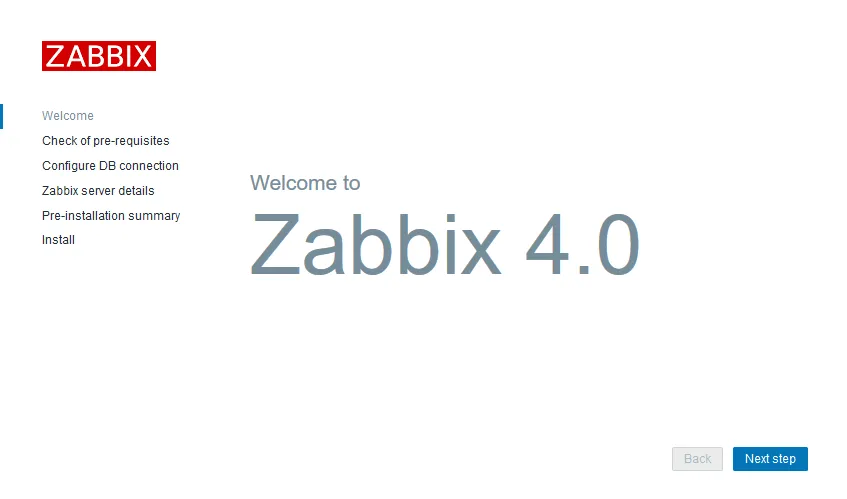
1. Initial portal
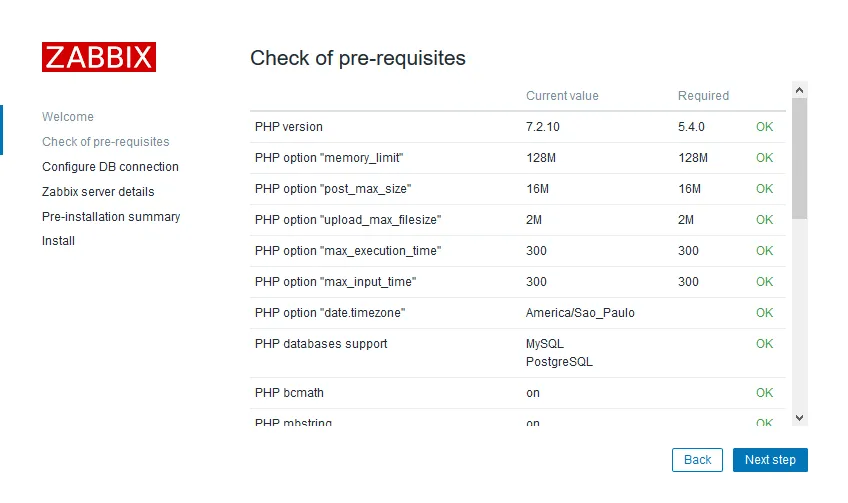
2. Prerequisites check. Since we already adjusted the file “/etc/php.ini”, everything is fine.
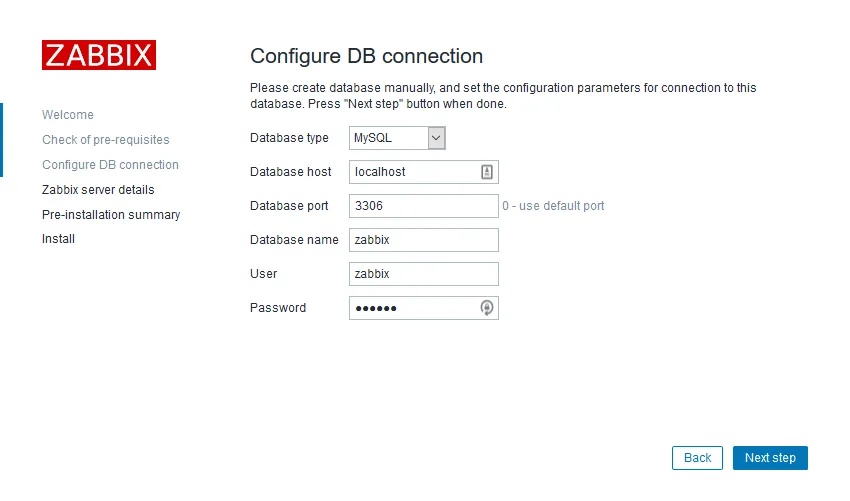
3. Database connection settings. Here we enter MariaDB’s port 3306 and the zabbix user’s password.
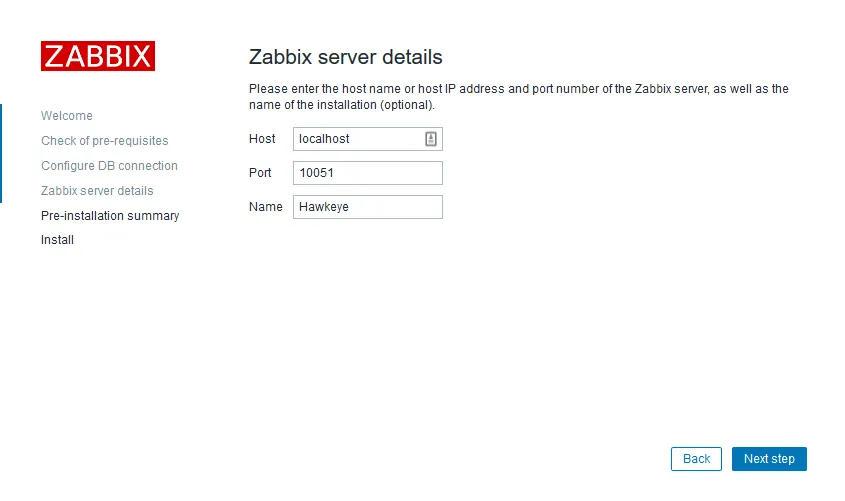
4. Service details. Here we just enter the name of the server we created.
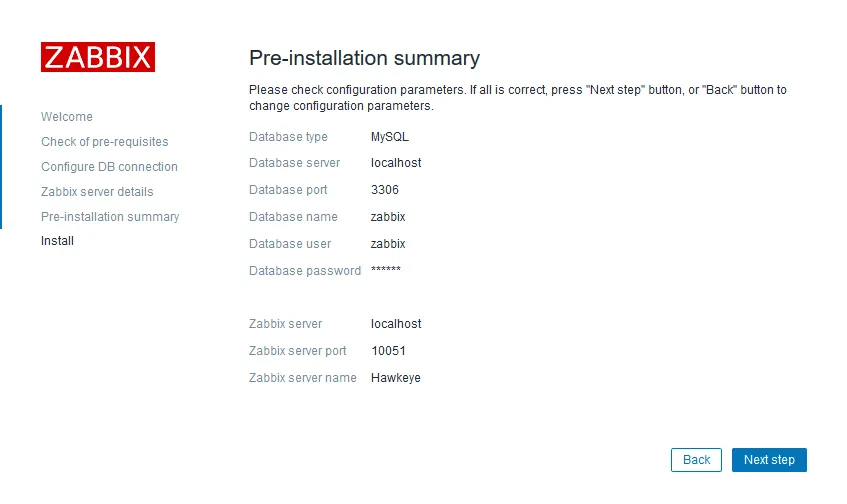
5. Summary of the settings made.
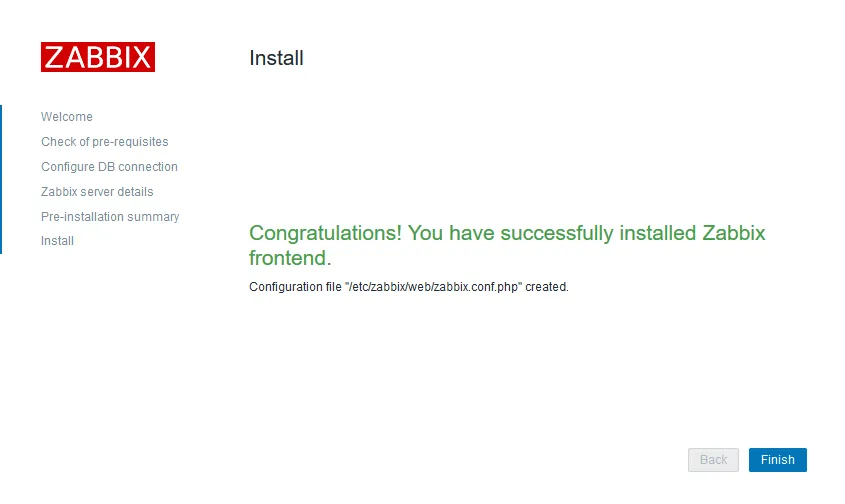
6. Final configuration page.
The login details for the portal are:
User: Admin
Password: zabbix
Cheers and see you next time!
Reviewed by: Franky Weber Faust
Comments