
Hi everyone, it has been quite a while I don’t publish anything. It is due to the amount of work I have for a few months. Things are becoming more stable now and I will be back to the blog more frequently.
Today I just want to bring to you all quickly how to extend a LVM based filesystem.
This is an Oracle Linux 6.9 virtual machine and the /u01 filesystem got full:
[root@oracle01 ~]# cat /etc/oracle-release
Oracle Linux Server release 6.9

[root@oracle01 ~]# df -h
Filesystem            Size  Used Avail Use% Mounted on
/dev/sda3              12G  4.9G  6.3G  44% /
tmpfs                 3.9G  641M  3.3G  17% /dev/shm
/dev/sda1             2.0G  276K  2.0G   1% /boot/efi
/dev/mapper/vg_oracle-lvu01
                       58G   58G   16K 100% /u01
When that happens you start seeing this error everywhere: “Error message: Linux-x86_64 Error: 28: No space left on device”
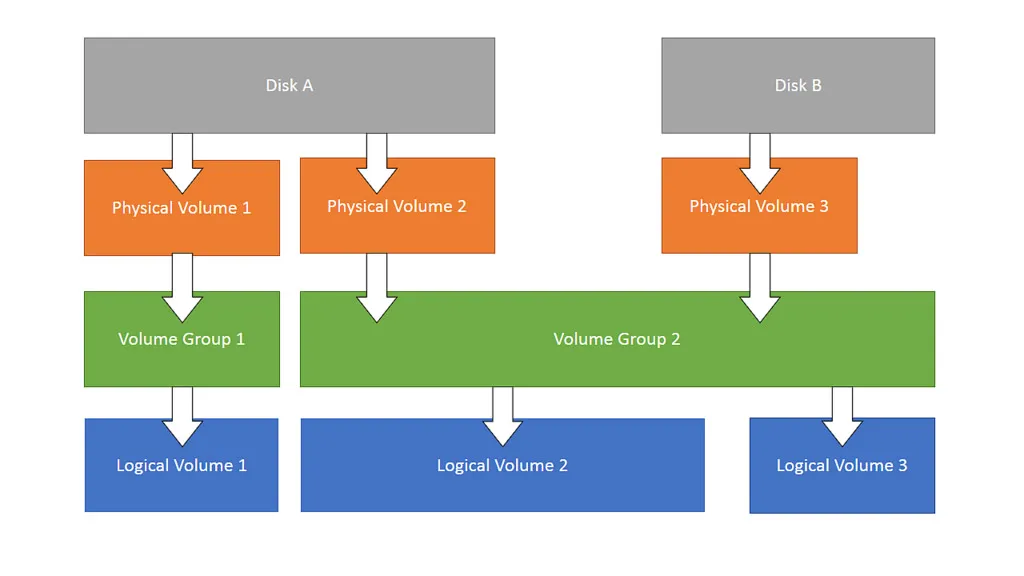
LVM architecture overview
I just added 3 new disks with 30GB size each.
If you pay attention here sda and sdc are being used already in vg_oracle Volume Group:
[root@oracle01 ~]# pvs
  PV         VG        Fmt  Attr PSize  PFree
  /dev/sda2  vg_oracle lvm2 a--u 30.00g    0
  /dev/sdc   vg_oracle lvm2 a--u 30.00g 1.99g
sdb is an ASM disk:
[root@oracle01 ~]# oracleasm querydisk -v -p /dev/sdb1
Device "/dev/sdb1" is marked an ASM disk with the label "DATA00"
So it remains from this list only sdd, sde and sdf:
[root@oracle01 ~]# ls -lh /dev/sd*
brw-rw----. 1 root disk 8,  0 Jan  7 10:15 /dev/sda
brw-rw----. 1 root disk 8,  1 Jan  7 10:15 /dev/sda1
brw-rw----. 1 root disk 8,  2 Feb  8 09:33 /dev/sda2
brw-rw----. 1 root disk 8,  3 Jan  7 10:15 /dev/sda3
brw-rw----. 1 root disk 8,  4 Jan  7 10:15 /dev/sda4
brw-rw----. 1 root disk 8, 16 Jan  7 10:15 /dev/sdb
brw-rw----. 1 root disk 8, 17 Jan  7 10:15 /dev/sdb1
brw-rw----. 1 root disk 8, 32 Feb  8 09:33 /dev/sdc
brw-rw----. 1 root disk 8, 48 Mar 15 18:03 /dev/sdd
brw-rw----. 1 root disk 8, 64 Mar 15 18:06 /dev/sde
brw-rw----. 1 root disk 8, 80 Mar 15 18:08 /dev/sdf
We could also check listing the block devices:
[root@oracle01 ~]# lsblk
NAME                       MAJ:MIN RM  SIZE RO TYPE MOUNTPOINT
sda                          8:0    0   60G  0 disk
|-sda1                       8:1    0    2G  0 part /boot/efi
|-sda2                       8:2    0   30G  0 part
| `-vg_oracle-lvu01 (dm-0) 251:0    0  118G  0 lvm  /u01
|-sda3                       8:3    0   12G  0 part /
`-sda4                       8:4    0    8G  0 part [SWAP]
sdb                          8:16   0  120G  0 disk
`-sdb1                       8:17   0  120G  0 part
sdc                          8:32   0   30G  0 disk
`-vg_oracle-lvu01 (dm-0)   251:0    0  118G  0 lvm  /u01
sdd                          8:48   0   30G  0 disk
`-vg_oracle-lvu01 (dm-0)   251:0    0  118G  0 lvm  /u01
sde                          8:64   0   30G  0 disk
`-vg_oracle-lvu01 (dm-0)   251:0    0  118G  0 lvm  /u01
sdf                          8:80   0   30G  0 disk
sr0                         11:0    1 1024M  0 rom
Now we will use the new disks to increase our filesystem.
First we create a Physical Volume for each one of them:
[root@oracle01 ~]# pvcreate /dev/sdd
  Physical volume "/dev/sdd" successfully created

[root@oracle01 ~]# pvcreate /dev/sde
  Physical volume "/dev/sde" successfully created

[root@oracle01 ~]# pvcreate /dev/sdf
  Physical volume "/dev/sdf" successfully created
We list the physical volumes to check if they were created as expected:
[root@oracle01 ~]# pvs
  PV         VG        Fmt  Attr PSize  PFree
  /dev/sda2  vg_oracle lvm2 a--u 30.00g     0
  /dev/sdc   vg_oracle lvm2 a--u 30.00g  1.99g
  /dev/sdd             lvm2 ---- 30.00g 30.00g
  /dev/sde             lvm2 ---- 30.00g 30.00g
  /dev/sdf             lvm2 ---- 30.00g 30.00g
Then we add the physical volumes to our volume group vg_oracle:
[root@oracle01 ~]# vgextend vg_oracle /dev/sdd
  Volume group "vg_oracle" successfully extended

[root@oracle01 ~]# vgextend vg_oracle /dev/sde
  Volume group "vg_oracle" successfully extended

[root@oracle01 ~]# vgextend vg_oracle /dev/sdf
  Volume group "vg_oracle" successfully extended
We can confirm the volume group was extended:
[root@oracle01 ~]# vgs
  VG        #PV #LV #SN Attr   VSize   VFree
  vg_oracle   5   1   0 wz--n- 149.98g 91.98g
Listing our Logical Volumes we see the lvu01 has 58GB in size:
[root@oracle01 ~]# lvs
  LV    VG        Attr       LSize  Pool Origin Data%  Meta%  Move Log Cpy%Sync Convert
  lvu01 vg_oracle -wi-ao---- 58.00g
We extend it adding 60GB:
[root@oracle01 ~]# lvextend -L +60G /dev/mapper/vg_oracle-lvu01
  Size of logical volume vg_oracle/lvu01 changed from 58.00 GiB (14848 extents) to 118.00 GiB (30208 extents).
  Logical volume lvu01 successfully resized.
Ok, done? No. If we check the filesystem size it was not yet increased:
[root@oracle01 ~]# df -h
Filesystem            Size  Used Avail Use% Mounted on
/dev/sda3              12G  4.9G  6.3G  44% /
tmpfs                 3.9G  641M  3.3G  17% /dev/shm
/dev/sda1             2.0G  276K  2.0G   1% /boot/efi
/dev/mapper/vg_oracle-lvu01
                       58G   58G   16K 100% /u01
Since we are using a XFS filesystem here we need to update the /u01 filesystem with the LVM data. In order to do that for a XFS filesystem we use the xfs_growfs command:
[root@oracle01 ~]# xfs_growfs /u01
meta-data=/dev/mapper/vg_oracle-lvu01 isize=256    agcount=12, agsize=1310720 blks
         =                       sectsz=4096  attr=2, projid32bit=1
         =                       crc=0        finobt=0
data     =                       bsize=4096   blocks=15204352, imaxpct=25
         =                       sunit=0      swidth=0 blks
naming   =version 2              bsize=4096   ascii-ci=0 ftype=0
log      =internal               bsize=4096   blocks=2560, version=2
         =                       sectsz=4096  sunit=1 blks, lazy-count=1
realtime =none                   extsz=4096   blocks=0, rtextents=0
data blocks changed from 15204352 to 30932992
Note: If you are using EXT3 or EXT4 you should still use the resize2fs command instead of the xfs_growfs.
Now we see the filesystem /u01 has more space available:
[root@oracle01 ~]# df -h /u01
Filesystem            Size  Used Avail Use% Mounted on
/dev/mapper/vg_oracle-lvu01
                      118G   60G   59G  51% /u01
If we list the volume group vg_oracle again we will see that we still have available +30GB free, that’s because we added 3 disks of 30GB each and we only extended 60GB in our logical volume:
[root@oracle01 ~]# vgs
  VG        #PV #LV #SN Attr   VSize   VFree
  vg_oracle   5   1   0 wz--n- 149.98g 31.98g

[root@oracle01 ~]# vgdisplay vg_oracle
  --- Volume group ---
  VG Name               vg_oracle
  System ID
  Format                lvm2
  Metadata Areas        5
  Metadata Sequence No  10
  VG Access             read/write
  VG Status             resizable
  MAX LV                0
  Cur LV                1
  Open LV               1
  Max PV                0
  Cur PV                5
  Act PV                5
  VG Size               149.98 GiB
  PE Size               4.00 MiB
  Total PE              38395
  Alloc PE / Size       30208 / 118.00 GiB
  Free  PE / Size       8187 / 31.98 GiB
  VG UUID               wC9kc3-0bAa-VsLB-Rcov-cLlz-H471-H0cYy0
That’s all for today folks. In case of any doubt leave a comment.
Franky
Comments