
Hi everyone, today we will see how to query the size of each AWR component and how to estimate AWR size.
First, let me clear a thing… AWR means Automatic Workload Repository, which is a data repository regarding to environment’s workload. We can generate a report of the repository to analyze changes in the workload, but that is not what we are doing here. If you want to know more about the AWR and AWR Report you can read this post.
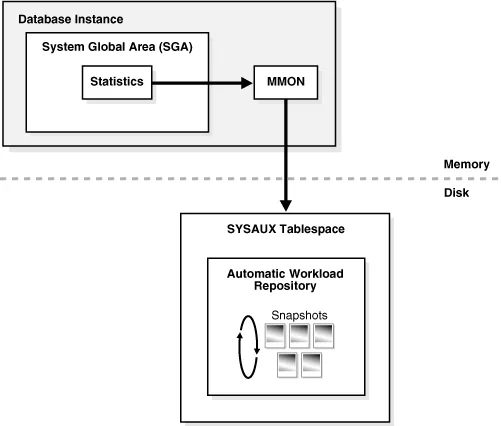
AWR contents
Let us check now how to easily query AWR contents. To do that Oracle provides a simple script called awrinfo.sql and it comes by default in every installation.
We can run it directly from SQL*Plus:
SQL> @?/rdbms/admin/awrinfo

This script will report general AWR information
~~~~~~~~~~~~~~~~~~~~~~~~~~~~~~~~~~~~~~~~~~~~~~~

Specify the Report File Name
~~~~~~~~~~~~~~~~~~~~~~~~~~~~
The default report file name is awrinfo.txt.  To use this name,
press <return> to continue, otherwise enter an alternative.

Enter value for report_name:

Using the report name awrinfo.txt
No errors.
No errors.
~~~~~~~~~~~~~~~
AWR INFO Report
~~~~~~~~~~~~~~~

******other output lines omitted******
If you do not provide any specific name for the report it will be generated with the default name awrinfo.txt.
This report has many sections regarding AWR contents:
(I) AWR Snapshots Information
(1a) SYSAUX usage - Schema breakdown (dba_segments)
(1b) SYSAUX occupants space usage (v$sysaux_occupants)
(1c) SYSAUX usage - Unregistered Schemas
(1d) SYSAUX usage - Unaccounted space in registered schemas
(2) Size estimates for AWR snapshots
(3a) Space usage by AWR components (per database)
(3b) Space usage within AWR Components (> 500K)
(4) Space usage by non-AWR components (> 500K)
(5a) AWR snapshots - last 50
(5b) AWR snapshots with errors or invalid
(5c) AWR snapshots -- OLDEST Non-Baselined snapshots
(6) AWR Control Settings - interval, retention
(7a) AWR Contents - row counts for each snapshots
(7b) AWR Contents - average row counts per snapshot
(7c) AWR total item counts - names, text, plans
(II) Advisor Framework Info
(1) Advisor Tasks - Last 50
(2) Advisor Task - Oldest 5
(3) Advisor Tasks With Errors - Last 50
(III) ASH Usage Info
(1a) ASH histogram (past 3 days)
(1b) ASH histogram (past 1 day)
(2a) ASH details (past 3 days)
(2b) ASH details (past 1 day)
(2c) ASH sessions (Fg Vs Bg) (past 1 day across all instances in RAC)
Click this link to see the report generated as an example for this article.
Estimating AWR and SYSAUX tablespace size
We just saw how to generate the report to query AWR contents and now we are going to see how to estimate AWR size based on our specification.
This script also generates a report and it also comes by default in any Oracle Database installation.
To generate the report we can execute the following script via SQL*Plus:
SQL> @?/rdbms/admin/utlsyxsz

This script estimates the space required for the SYSAUX tablespace.
~~~~~~~~~~~~~~~~~~~~~~~~~~~~~~~~~~~~~~~~~~~~~~~~~~~~~~~~~~~~~~~~~~~
******other output lines omitted******
You will see that you have to provide some data regarding your needs for the estimates to be more precise.
Those input data are the following:
~~~~~~~~~~~~~~~~~~~~
AWR Space Estimation
~~~~~~~~~~~~~~~~~~~~

| To estimate the size of the Automatic Workload Repository (AWR)
| in SYSAUX, we need the following values:
|
|     - Interval Setting (minutes)
|     - Retention Setting (days)
|     - Number of Instances
|     - Average Number of Active Sessions
|     - Number of Datafiles
Some output like this will be generated:
| ***************************************************
| Estimated size of AWR:                   2,145.6 MB
|
|   The AWR estimate was computed using
|   the following values:
|
|            Interval -        15 minutes
|           Retention -     30.00 days
|       Num Instances -         1
|     Active Sessions -     12.00
|           Datafiles -         5
| ***************************************************
Then you can estimate also the size of Statistics History providing some more data:
~~~~~~~~~~~~~~~~~~~~~~~~~~~~~~~~~~~~~~~
Optimizer Stat History Space Estimation
~~~~~~~~~~~~~~~~~~~~~~~~~~~~~~~~~~~~~~~

| To estimate the size of the Optimizer Statistics History
| we need the following values:
|
|     - Number of Tables in the Database
|     - Number of Partitions in the Database
|     - Statistics Retention Period (days)
|     - DML Activity in the Database (level)
The output will be similar to this:
| ***************************************************
| Estimated size of Stats history             21.9 MB
|
|   The space for Optimizer Statistics history was
|   estimated using the following values:
|
|                         Tables -      88
|                        Indexes -     100
|                        Columns -     990
|                     Partitions -       0
|          Indexes on Partitions -       0
|          Columns in Partitions -       0
|        Stats Retention in Days -      31
|          Level of DML Activity -  Medium
| ***************************************************
In the end the report will be ready according to the provided name.
Check the report used in this article here.
I hope you like it, that is all for today.
Franky
Comments