
Hi everyone, here I bring you a brief introduction to the Oracle In-Memory feature, available from Oracle Database version 12.1.0.2.
The goal is to cover this content briefly so that we can continue with it in the next articles.
Background
For a few years now we have seen a growing trend in real-time data analysis. Today the analytical environment is not what it used to be; a lot of things are not what they used to be…
Although today we still find many DataWarehouse environments stored on HDDs, this is not the trend for the future, and neither are SSDs, because they are still too slow to reach the Online or Real Time processing that everyone talks about these days. So what can we do to give these environments the performance we want?
In the modern context of analytical computing we talk about mass processing directly in RAM/DRAM (Dynamic RAM). For that we need to get the most benefit out of it, and that is where the Oracle Database In-Memory Column Store feature comes in.
Oracle In-Memory
The Oracle In-Memory Column Store requires some hardware resources to be used efficiently: servers with a good number of cores for parallel processing, SIMD and, of course, plenty of available RAM.
Data is stored in row form in the Oracle Database Buffer Cache, and this is called Row-Major Format. This kind of storage works very well for OLTP environments, where there is a large number of concurrent DMLs and queries that read few rows.
Row-Major Format
In analytical environments, we usually have a large volume of data that will be queried and also aggregated by only a few columns, and this is where the In-Memory Column Store takes advantage, because the storage happens in columnar form in the In-Memory Area, which is also part of the SGA.

Column-Store Format
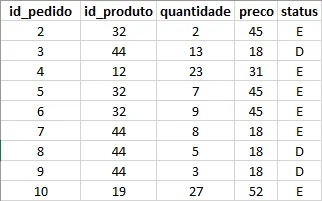
Look at the two ways of storing data and compare a query where you want to know how many orders of product 32 have status E. In the Row-Major model you would have to read all the rows of the table that contain product 32 and status E. In the Column-Store model you only need to read the “rows” (transposed columns) for the product and the status, instead of reading all the other columns.
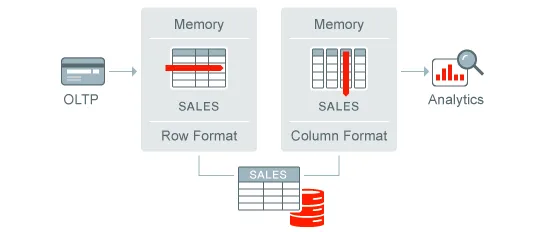
In the next articles we’ll see how this becomes much faster for analytical queries.
We can store tables and table partitions in the In-Memory Area using IMCS. These objects can be stored In-Memory only or in Dual Format. We can also prioritize the objects that we want to benefit most from the IMCS feature and compress them to save resources. It is also possible to get rid of indexes that will no longer be needed for these analytical queries.
See below how the In-Memory Area is populated when a user runs a query:
- The user runs a select on a table that is a candidate for the IMCS feature;
- If the data is not yet in the Buffer Cache, Oracle reads the disk and puts it there;
- If there is enough space in the In-Memory Area, this data is stored in columnar format and then compressed;
- When the user requests this data again, Oracle decompresses it and returns it from the IMCS;
- If this data is not yet fully populated in the IMCS, the data is returned from the Buffer Cache.
When a table is already in the IMCS, the order is to read the data from there, otherwise from the Buffer Cache, otherwise from disk.
Oracle In-Memory architecture
Some terms must be clarified when we talk about Oracle In-Memory:
- IMCS: In-Memory Column Store is the area of the In-Memory Area that stores the IMCUs;
- IMCU: In-Memory Compression Units, instead of blocks, is a Read-Only area;
- IMEU: In-Memory Expression Unit is a storage area for In-Memory Expressions and virtual columns;
- SMU: Snapshot Metadata Unit is the Transaction Journal that maps which IMCUs were changed in the Buffer Cache and need to be updated in the IMCS.

In-Memory Area
When we run a select on the v$inmemory_area view we’ll see two pools:
- 1MB Pool: the data pool (Columnar Data Pool)
- 64KB Pool: the metadata pool (Metadata Pool)
Some processes are involved in the operation of the In-Memory Area:
- IMCO: In-Memory Coordinator is responsible for triggering the population of data in the Columnar Data Pool;
- SMCO: Space Management Coordinator: is responsible for coordinating the worker processes with regard to space management.
- Wnnn: Space Management Worker: is responsible for populating and repopulating data in the Columnar Data Pool, and also creates the IMCUs, SMUs and IMEUs.
We saw some components of Oracle In-Memory, and it’s good to make clear that the In-Memory Area is not a data cache. To help those who are just starting out, the In-Memory Advisor checks which objects are best to include in the In-Memory Area. Oracle In-Memory is an extra-cost option, sold separately and available only for Oracle Database Enterprise Edition.
That’s it for today, folks. I hope you liked this brief look at Oracle In-Memory.
Hugs,
Franky
References
Bom dia.
Ótimo artigo! Queria compartilhar que fiz um teste com uma aplicação OLTP e o in-memory não foi eficiente, o tempo de resposta caiu mas nada significativo, mesmo acabando com os índices das tabelas.