
Hi everyone, here is a quick tip about the Data Guard Protection Mode that I had been meaning to write for a few days.
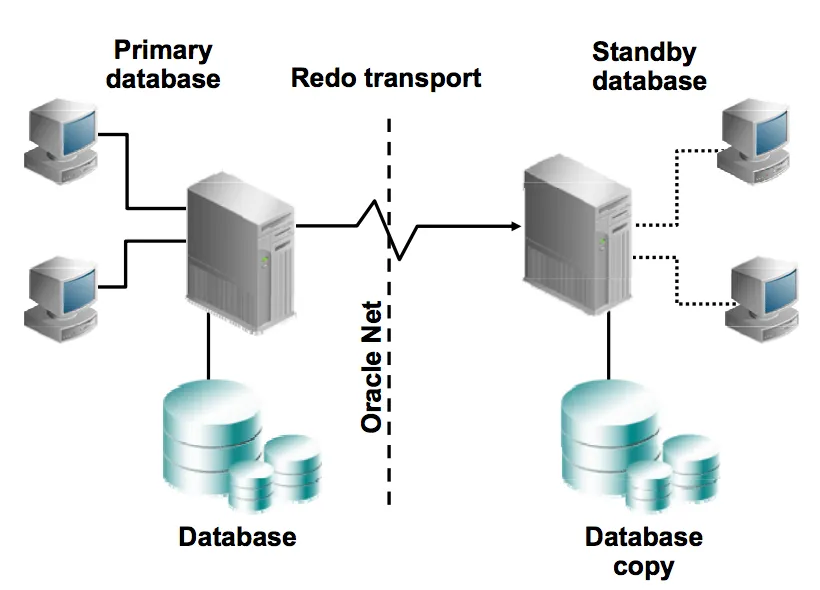
In some scenarios, a company cannot lose data, no matter the circumstances. In other situations, database availability may be more important than any potential data loss. And in yet another scope, some applications require maximum database performance at all times and can therefore tolerate a small amount of data loss if a component fails. The following descriptions summarize the three distinct data protection modes: Maximum Protection, Maximum Availability and Maximum Performance.
When you change the Data Guard Protection Mode from Maximum Performance to Maximum Protection, Oracle needs to shut down the Primary. The problem is that it only warns you after you have already run the command.
Let’s go to the scenario…
The current DR configuration is Maximum Performance:
DGMGRL> show configuration;

Configuration - DR_ORCL

Protection Mode: MaxPerformance
Members:
orcl - Primary database
storcl - Physical standby database

Fast-Start Failover: DISABLED

Configuration Status:
SUCCESS (status updated 22 seconds ago)
I’ll change it to Maximum Protection, and notice what happens:
DGMGRL> edit configuration set protection mode as maxprotection;
Operation requires shut down of instance "orcl" on database "orcl"
Shutting down instance "orcl"...
Database closed.
Database dismounted.
ORACLE instance shut down.
Operation requires start up of instance "orcl" on database "orcl"
Starting instance "orcl"...
ORACLE instance started.
Database mounted.
Database opened.
See that the protection mode was changed, but the primary database was shut down:
DGMGRL> show configuration;

Configuration - DR_ORCL

Protection Mode: MaxProtection
Members:
orcl - Primary database
storcl - Physical standby database

Fast-Start Failover: DISABLED

Configuration Status:
SUCCESS (status updated 58 seconds ago)
To do the reverse, from Maximum Protection to Maximum Performance, no shutdown is needed:
DGMGRL> edit configuration set protection mode as maxperformance;
Succeeded.
Back in Maximum Performance:
DGMGRL> show configuration;

Configuration - DR_ORCL

Protection Mode: MaxPerformance
Members:
orcl - Primary database
storcl - Physical standby database

Fast-Start Failover: DISABLED

Configuration Status:
SUCCESS (status updated 30 seconds ago)
To change from Maximum Performance to Maximum Protection without the shutdown, we can first go to Maximum Availability and then to Maximum Protection:
DGMGRL> edit configuration set protection mode as maxavailability;
Succeeded.

DGMGRL> edit configuration set protection mode as maxprotection;
Succeeded.
So every time you need to change the protection mode from Maximum Performance to Maximum Protection, remember this post.
If you liked it, subscribe to the blog and share it with your friends.
Hugs and see you next time,
Franky
Comments