
Hi folks, the goal here is to get to know the Flex Disk Group a little better. Here we’ll see what a File Group is.
In a Flex Disk Group we can separate our databases, whether they are PDBs, CDBs or non-CDBs, into different File Groups.
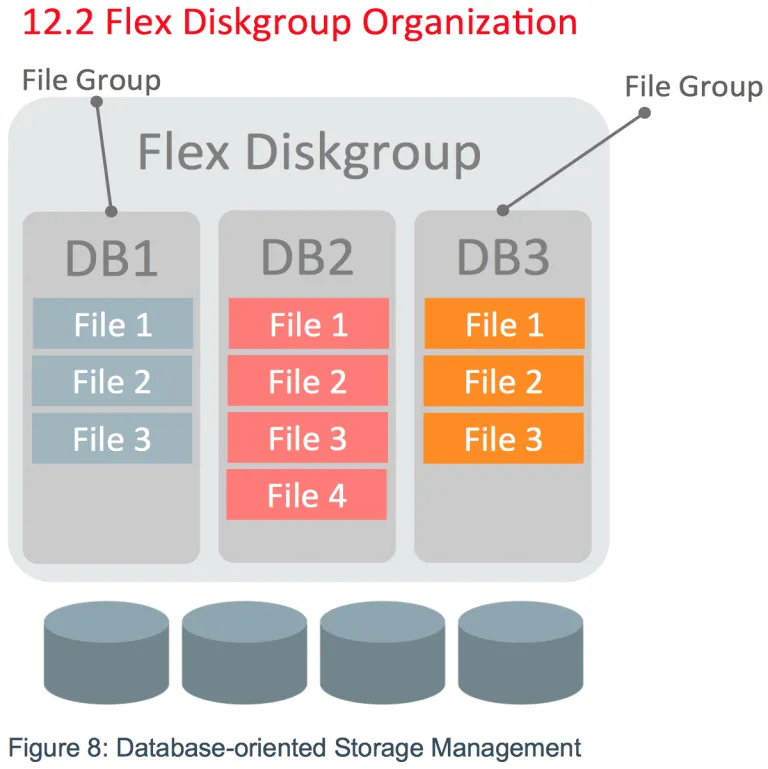
Each File Group belongs to one, and only one, Disk Group.
To demonstrate a few examples, let’s recreate the PDB pdb1 only in the FLEX Disk Group:
SQL> alter pluggable pdb1 database close;

Pluggable database altered.

SQL> drop pluggable database pdb1 including datafiles;

Pluggable database dropped.

SQL> alter session set db_create_file_dest='+FLEX';

Session altered.

SQL> create pluggable database pdb1 admin user pdbadmin identified by oracle default tablespace pdb1tbs datafile size 200M autoextend off storage (maxsize 800M);

Pluggable database created.

SQL> alter pluggable database pdb1 open;

Pluggable database altered.
Now I query to see where the files of the PDB pdb1 were created:
SQL> select c.name container, d.file_name, bytes/1024/1024 size_mb
from v$containers c, cdb_data_files d
where c.con_id=d.con_id and c.name='PDB1';

CONTAINER  FILE_NAME									       								   SIZE_MB
---------- -------------------------------------------------------------------------------- ----------
PDB1	   +FLEX/ORCL/56C143A8D6DA159EE0536538A8C0E7F3/DATAFILE/system.258.952034417		       210
PDB1	   +FLEX/ORCL/56C143A8D6DA159EE0536538A8C0E7F3/DATAFILE/sysaux.257.952034417		       165
PDB1	   +FLEX/ORCL/56C143A8D6DA159EE0536538A8C0E7F3/DATAFILE/undotbs1.256.952034417		       135
PDB1	   +FLEX/ORCL/56C143A8D6DA159EE0536538A8C0E7F3/DATAFILE/pdb1tbs.260.952034445		       200

4 rows selected.
Let’s create a File Group, but first let’s look at the current state of the FLEX Disk Group:
SQL> select filegroup_number, name filegroup, client_name, guid from v$asm_filegroup;

FILEGROUP_NUMBER FILEGROUP			            CLIENT_NAME	         GUID
---------------- ------------------------------ -------------------- --------------------------------
	           0 DEFAULT_FILEGROUP
	           1 PDB1				            PDB1		         56C143A8D6DA159EE0536538A8C0E7F3
See that there is already a File Group DEFAULT_FILEGROUP and another one with the same name as our PDB: PDB1.
I’ll create another PDB so we can check the behavior:
SQL> alter session set db_create_file_dest='+FLEX';

Session altered.

SQL> create pluggable database pdb2 admin user pdbadmin identified by oracle default tablespace pdb2tbs datafile size 2M autoextend off storage (maxsize 800M);

Pluggable database created.

SQL> alter pluggable database pdb2 open;

Pluggable database altered.
We confirm that the PDB pdb2 is stored entirely in the FLEX Disk Group:
SQL> select c.name container, d.file_name, bytes/1024/1024 size_mb
from v$containers c, cdb_data_files d
where c.con_id=d.con_id and c.name='PDB2';

CONTAINER  FILE_NAME									       								   SIZE_MB
---------- -------------------------------------------------------------------------------- ----------
PDB2	   +FLEX/ORCL/56C143A8D6E4159EE0536538A8C0E7F3/DATAFILE/system.261.952035801		       210
PDB2	   +FLEX/ORCL/56C143A8D6E4159EE0536538A8C0E7F3/DATAFILE/sysaux.262.952035801		       165
PDB2	   +FLEX/ORCL/56C143A8D6E4159EE0536538A8C0E7F3/DATAFILE/undotbs1.263.952035801		       135
PDB2	   +FLEX/ORCL/56C143A8D6E4159EE0536538A8C0E7F3/DATAFILE/pdb2tbs.265.952035821		         2

4 rows selected.
Again I check the existing File Groups:
SQL> select filegroup_number, name filegroup, client_name, guid from v$asm_filegroup

FILEGROUP_NUMBER FILEGROUP						CLIENT_NAME	     	 GUID
---------------- ------------------------------ -------------------- --------------------------------
	           0 DEFAULT_FILEGROUP
	           1 PDB1							PDB1		     	 56C143A8D6DA159EE0536538A8C0E7F3
	           2 PDB2							PDB2		     	 56C143A8D6E4159EE0536538A8C0E7F3

2 rows selected.
So I confirm that for each PDB created, a File Group with the same name is also created.
Now let’s see how to create a new File Group. For that we run the following command in SQL*Plus on the ASM instance:
SQL> alter diskgroup FLEX add filegroup FILEGROUP_PDB1 database PDB1;

Diskgroup altered.
See that I gave the name of the File Group and also the database that will be stored in it.
Let’s see how it looks now:
SQL> select filegroup_number, name filegroup, client_name, guid from v$asm_filegroup

FILEGROUP_NUMBER FILEGROUP					 	CLIENT_NAME	         GUID
---------------- ------------------------------ -------------------- --------------------------------
	       0 DEFAULT_FILEGROUP
	       1 PDB1				    			PDB1		     	 56C143A8D6DA159EE0536538A8C0E7F3
	       2 PDB2				    			PDB2		     	 56C143A8D6E4159EE0536538A8C0E7F3
	       3 FILEGROUP_PDB1 					PDB1

4 rows selected.
See that when trying to drop the PDB1 File Group, an error occurs saying there are files inside it:
SQL> alter diskgroup FLEX drop filegroup pdb1;
alter diskgroup FLEX drop filegroup pdb1
*
ERROR at line 1:
ORA-15032: not all alterations performed
ORA-15387: existing files are associated with file group 'PDB1'
So let’s do the following… I’ll create a new File Group, then a new PDB, and then store it in this File Group:
SQL> alter diskgroup FLEX add filegroup FILEGROUP_PDB3 database PDB3;

Diskgroup altered.
Now I’ll create the PDB pdb3:
SQL> alter session set db_create_file_dest='+FLEX';

Session altered.

SQL> create pluggable database pdb3 admin user pdbadmin identified by oracle default tablespace pdb3tbs datafile size 2M autoextend off storage (maxsize 800M);

Pluggable database created.

SQL> alter pluggable database pdb3 open;

Pluggable database altered.
See that this time the PDB was created and stored correctly in the desired File Group, and ASM did not create a default File Group with the PDB’s name:
SQL> select filegroup_number, name filegroup, client_name, guid from v$asm_filegroup;

FILEGROUP_NUMBER FILEGROUP						CLIENT_NAME	     	 GUID
---------------- ------------------------------ -------------------- --------------------------------
	       0 DEFAULT_FILEGROUP
	       1 PDB1								PDB1		     	 56C143A8D6DA159EE0536538A8C0E7F3
	       2 PDB2								PDB2		     	 56C143A8D6E4159EE0536538A8C0E7F3
	       3 FILEGROUP_PDB1 					PDB1
	       4 FILEGROUP_PDB3 					PDB3		     	 56C143A8D6E7159EE0536538A8C0E7F3

5 rows selected.
To conclude… If you want to use Flex Disk Groups, remember to create the File Group first and only then create your databases.
I did a few tests moving datafiles from one Disk Group to another, but so far I haven’t found out whether there is a way to move an ASM File to another File Group. The documentation about the Flex Disk Group is still quite poor.
I’ll write a few more articles about this Oracle 12cR2 feature, so stay tuned.
Hugs,
Franky
Comments