
Hi everyone, here is a short article about a possible bug I found in the Oracle Database 12.2 migration from nonCDB to PDB. The problem can be worked around, and I present the solution here too.
After I reported it to Mike Dietrich (Master Product Manager – Database Upgrades & Migrations), he raised the question with the person responsible for the noncdb_to_pdb.sql script, and if necessary a bug will be opened for the case.
The scenario I found
For this scenario I followed Tim Hall’s article exactly: https://oracle-base.com/articles/12c/multitenant-hot-clone-remote-pdb-or-non-cdb-12cr2
The problem I had was caused by a parameter with a lower value than Oracle expected. Let’s see what happened…
The goal was to migrate the database named noncdb1, which was on version 12.2.0.1, to a PDB in the database named cdb3, also on version 12.2.0.1.
After setting up the environment as in Tim Hall’s article, I ran the steps shown below…
In the cdb3 database:
SQL> CREATE PLUGGABLE DATABASE pdb4 FROM NON$CDB@clone_link;

Pluggable database created.
My PDB pdb4 was created successfully from the noncdb1 database. Let’s see the status of the PDBs:
SQL> column name format a30
SELECT
    d.con_id,
    p.name,
    p.open_mode,
    d.status,
    TO_CHAR(
        p.open_time,
        'DD/MM/YYYY HH24:MI:SS'
    ) open_time,
    p.total_size / 1024 / 1024 total_mb,
    p.max_size / 1024 / 1024 max_mb,
    p.local_undo,
    d.refresh_mode
FROM
    v$pdbs p,
    dba_pdbs d
WHERE
    p.name = d.pdb_name
ORDER BY 1;

    CON_ID NAME 			  OPEN_MODE  STATUS	    OPEN_TIME	          TOTAL_MB	   MAX_MB LOCAL_UNDO REFRES
---------- ------------------ ---------- ---------- ------------------- ---------- ---------- ---------- ------
	     2 PDB$SEED			  READ ONLY  NORMAL	    28/06/2017 21:51:04	       744		    0	       1 NONE
	     3 PDB1 			  MOUNTED    NORMAL	    			                 0		    0	       1 NONE
	     4 PDB4 			  MOUNTED    NEW	    28/06/2017 22:08:54	         0		    0	       1 NONE
	     5 PDB2 			  READ WRITE NORMAL	    28/06/2017 21:51:05	      3537		    0	       1 NONE
	     6 PDB3 			  READ WRITE NORMAL	    28/06/2017 21:51:05	      3902		    0	       1 NONE

Elapsed: 00:00:00.02
With that done, I pointed the session to the new pdb4:
SQL> alter session set container=pdb4;

Session altered.

Elapsed: 00:00:00.00
Since I already know about the problem, I check the job_queue_processes parameter:
SQL> sho parameter job_queue

NAME                                 TYPE        VALUE
------------------------------------ ----------- ------------------------------
job_queue_processes                  integer     4000
See that job_queue_processes is set to 4000 for my PDB.
Then I ran the nonCDB to PDB conversion script in this same session:
SQL> @?/rdbms/admin/noncdb_to_pdb.sql

--...MUITAS LINHAS DE EXECUÇÃO NÃO APRESENTADAS AQUI POR NÃO INFLUENCIAREM NO CONTEXTO APRESENTADO

22:28:29 DOC>#
22:28:29 SQL>
22:28:29 SQL> DECLARE
22:28:29 2 threads pls_integer := &&1;
22:28:29 3 BEGIN
22:28:29 4 utl_recomp.recomp_parallel(threads);
22:28:29 5 END;
22:28:29 6 /
DECLARE
*
ERROR at line 1:
ORA-20000: Unable to gather statistics concurrently: the job_queue_processes
parameter is less than 4
ORA-06512: at "SYS.UTL_RECOMP", line 899
ORA-06512: at "SYS.DBMS_STATS", line 36873
ORA-06512: at "SYS.DBMS_STATS", line 4298
ORA-06512: at "SYS.DBMS_STATS", line 36652
ORA-06512: at "SYS.UTL_RECOMP", line 260
ORA-06512: at "SYS.UTL_RECOMP", line 803
ORA-06512: at line 4

Disconnected from Oracle Database 12c Enterprise Edition Release 12.2.0.1.0 - 64bit Production
[oracle@oracle-srv ~]$
Notice that the error returned by the script, after quite a long run, refers to the parameter being set to a value below 4, yet we checked that the parameter was 4000 before running the script. This error happens in the object compilation step, where Oracle tries to run with a parallelism of 4 and can’t because the parameter value is lower. But I believe this is a problem in the script, because I don’t think it should expect an exact value, and we did verify that the job_queue_processes parameter of pdb4 was 4000 before the run.
When I checked my noncdb database, the one that was copied and then converted in this migration, I found that the value set for job_queue_processes in it was 3:
[oracle@oracle-srv ~]$ . oraenv
ORACLE_SID = [cdb2] ? noncdb1
The Oracle base remains unchanged with value /u01/app/oracle
[oracle@oracle-srv ~]$ sqlplus / as sysdba

SQL*Plus: Release 12.2.0.1.0 Production on Wed Jun 28 22:25:18 2017

Copyright (c) 1982, 2016, Oracle. All rights reserved.

Connected to:
Oracle Database 12c Enterprise Edition Release 12.2.0.1.0 - 64bit Production

SQL> sho parameter db_name

NAME                                 TYPE        VALUE
------------------------------------ ----------- ------------------------------
db_name                              string      noncdb1

SQL> sho parameter job_queue

NAME                                 TYPE        VALUE
------------------------------------ ----------- ------------------------------
job_queue_processes                  integer     3
So at some point Oracle saves the old parameter and tries to reuse it in this conversion.
To fix it you don’t need to change the parameter in the nonCDB database and copy it again. Let’s see how to solve it after the migration.
Let’s see how pdb4 looks now, after the script ran with an error:
SQL> column name format a30
SELECT
    d.con_id,
    p.name,
    p.open_mode,
    d.status,
    TO_CHAR(
        p.open_time,
        'DD/MM/YYYY HH24:MI:SS'
    ) open_time,
    p.total_size / 1024 / 1024 total_mb,
    p.max_size / 1024 / 1024 max_mb,
    p.local_undo,
    d.refresh_mode
FROM
    v$pdbs p,
    dba_pdbs d
WHERE
    p.name = d.pdb_name
ORDER BY 1;

    CON_ID NAME 			              OPEN_MODE  STATUS	    OPEN_TIME	          TOTAL_MB     MAX_MB LOCAL_UNDO REFRES
---------- ------------------------------ ---------- ---------- ------------------- ---------- ---------- ---------- ------
	     2 PDB$SEED			              READ ONLY  NORMAL	    28/06/2017 21:51:04	       744		    0	       1 NONE
	     3 PDB1 			              MOUNTED    NORMAL	    			                 0		    0	       1 NONE
	     4 PDB4 			              READ WRITE NEW	    28/06/2017 22:28:18	      3000		    0	       1 NONE
	     5 PDB2 			              READ WRITE NORMAL	    28/06/2017 21:51:05	      3537		    0	       1 NONE
	     6 PDB3 			              READ WRITE NORMAL	    28/06/2017 21:51:05	      3902		    0	       1 NONE

Elapsed: 00:00:00.02
See that pdb4 is in read write mode. That’s because during its execution the script runs an “open upgrade” on the PDB.
Let’s check the parameter:
SQL> alter session set container=pdb4;

Session altered.

Elapsed: 00:00:00.05

SQL> sho parameter job_queue

NAME                                 TYPE        VALUE
------------------------------------ ----------- ------------------------------
job_queue_processes                  integer     3
The parameter is now set to 3. Let’s change it to 4 and close pdb4, leaving it in mount mode:
SQL> alter system set job_queue_processes=4;

System altered.

Elapsed: 00:00:00.03

SQL> alter pluggable database close;

Pluggable database altered.

Elapsed: 00:00:01.74
Now we run the noncdb_to_pdb.sql script again:
SQL> show con_name

CON_NAME
------------------------------
PDB4

SQL> @?/rdbms/admin/noncdb_to_pdb.sql
-- MUITAS LINHAS AQUI, MAS O SCRIPT FINALIZA SEM ERROS...
This time it finishes successfully, with no errors.
Let’s then open pdb4 and finish the nonCDB to PDB migration process:
SQL> sho con_name

CON_NAME
------------------------------
PDB4

SQL> select open_mode from v$pdbs;

OPEN_MODE
----------
MOUNTED

1 row selected.

Elapsed: 00:00:00.01

SQL> alter pluggable database open;

Pluggable database altered.

Elapsed: 00:00:11.49
PDB opened successfully.
In the PDB_PLUG_IN_VIOLATIONS view we can see that the error from the noncdb_to_pdb.sql script run has the status “RESOLVED”, but there is still a warning about the services that existed in the noncdb1 database:
SQL> select * from PDB_PLUG_IN_VIOLATIONS;

TIME                           NAME  CAUSE                          TYPE      ERROR_NUMBER       LINE MESSAGE                                            STATUS    ACTION                             CON_ID
------------------------------ ----- ------------------------------ --------- ------------ ---------- -------------------------------------------------- --------- ------------------------------ ----------
28-JUN-17 11.00.36.534704 PM   PDB4  Non-CDB to PDB                 ERROR                0          1 PDB plugged in is a non-CDB, requires noncdb_to_pd RESOLVED  Run noncdb_to_pdb.sql.                  4
                                                                                                      b.sql be run.

28-JUN-17 11.00.36.760384 PM   PDB4  Service Name Conflict          WARNING              0          1 Service name or network name of service noncdb1XDB in PENDING   Drop the service and recreate         4
                                                                                                       the PDB is invalid or conflicts with an existing            it with an appropriate name.
                                                                                                      service name or network name in the CDB.

2 rows selected.

Elapsed: 00:00:00.00
To remove these services we can query:
SQL> select name from dba_services;

NAME
------------------------------
noncdb1XDB
noncdb1
pdb4.localdomain

3 rows selected.

Elapsed: 00:00:00.00
Since we are connected to pdb4, there should be no services named ‘%cdb%’. So let’s remove them:
SQL> exec dbms_service.delete_service('noncdb1XDB');

PL/SQL procedure successfully completed.

Elapsed: 00:00:00.06

SQL> exec dbms_service.delete_service('noncdb1');

PL/SQL procedure successfully completed.

Elapsed: 00:00:00.01
And then I restart pdb4 to check the new status of the PDB_PLUG_IN_VIOLATIONS view:
SQL> alter pluggable database close;

Pluggable database altered.

Elapsed: 00:00:00.41

SQL>  alter pluggable database open;

Pluggable database altered.

Elapsed: 00:00:01.40
I query the view again and see that all the errors and warnings are resolved:
SQL> select * from PDB_PLUG_IN_VIOLATIONS;

TIME                           NAME                           CAUSE                          TYPE      ERROR_NUMBER       LINE MESSAGE                                            STATUS    ACTION                             CON_ID
------------------------------ ------------------------------ ------------------------------ --------- ------------ ---------- -------------------------------------------------- --------- ------------------------------ ----------
28-JUN-17 11.00.36.534704 PM   PDB4                           Non-CDB to PDB                 ERROR                0          1 PDB plugged in is a non-CDB, requires noncdb_to_pd RESOLVED  Run noncdb_to_pdb.sql.                  4
                                                                                                                               b.sql be run.

28-JUN-17 11.08.37.826200 PM   PDB4                           Service Name Conflict          WARNING              0          1 Service name or network name of service noncdb1XDB in RESOLVED  Drop the service and recreate         4
                                                                                                                                the PDB is invalid or conflicts with an existing            it with an appropriate name.
                                                                                                                               service name or network name in the CDB.

2 rows selected.

Elapsed: 00:00:00.02
Workaround proposed by Mike
After I talked to Mike Dietrich, he tested it several times and gave me another workaround: disable concurrent statistics gathering in the PDB in question.
To disable it, run:
SQL> EXEC DBMS_STATS.SET_GLOBAL_PREFS('CONCURRENT','FALSE');

PL/SQL procedure successfully completed.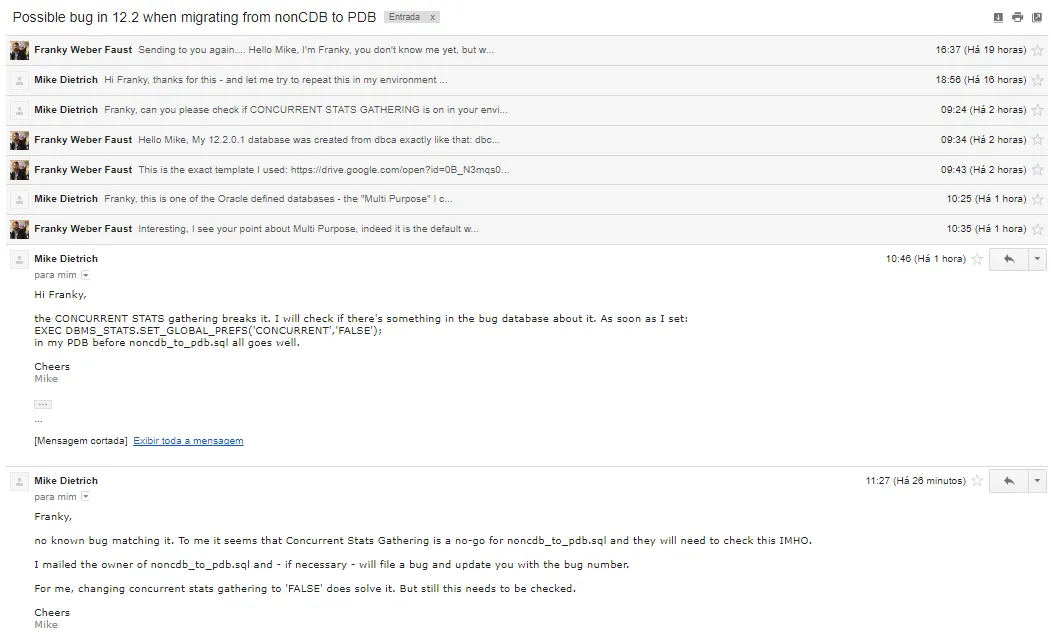
Well folks, that’s it for today. I hope it helps when you have to do this kind of migration.
Hugs,
Franky
Comments