
Hi everyone, the purpose here is just to document the procedure needed to authorize a user as a participant in an Oracle Database Vault Realm and then unauthorize them. This whole procedure can be done through Enterprise Manager, but since it is not always available, I will leave it documented here for when someone, including me, needs it.
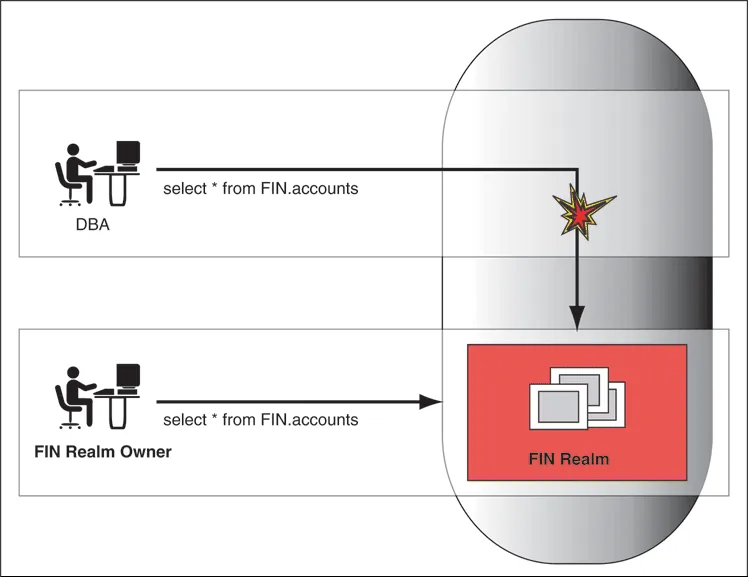
As the DV_MANAGER user, query which Realm the protected table is in:
SQL> col NAME for a30
SQL> col OWNER for a30
SQL> col OBJECT_NAME for a20
SQL> SELECT r.name,
r.audit_options,
r.realm_type,
r.enabled,
ro.owner,
ro.object_name,
ro.object_type
FROM dvsys.dba_dv_realm r
LEFT OUTER JOIN dvsys.dba_dv_realm_object ro
ON r.name = ro.realm_name
WHERE ro.object_name = 'TABELA_PROTEGIDA';

NAME                           AUDIT_OPTIONS REALM_TYP E OWNER                          OBJECT_NAME          OBJECT_TYPE
------------------------------ ------------- --------- - ------------------------------ -------------------- -----------
SENSITIVE_DATA_REALM                       3   REGULAR Y                            APP	    TABELA_PROTEGIDA       TABLE
Authorize the SYSTEM user in the REALM in question:
SQL> BEGIN
DBMS_MACADM.ADD_AUTH_TO_REALM(
realm_name => 'SENSITIVE_DATA_REALM',
grantee => 'SYSTEM',
auth_options => DBMS_MACUTL.G_REALM_AUTH_PARTICIPANT);
END;
/

PL/SQL procedure successfully completed.
As the SYSTEM user, perform the operations:
SQL> delete from APP.TABELA_PROTEGIDA where ID=200;

1 row deleted;
Again as the DV_MANAGER user, unauthorize the user after performing the necessary operations:
SQL> BEGIN
DBMS_MACADM.DELETE_AUTH_FROM_REALM(
realm_name => 'SENSITIVE_DATA_REALM',
grantee => 'SYSTEM');
END;
/

PL/SQL procedure successfully completed.
Database Vault is a fairly complex Oracle feature; to learn more, see the documentation.
If you have questions, just leave a comment.
Regards,
Franky
References:
http://www.oracle.com/technetwork/pt/articles/idm/realm-oracle-database-vault-3076147-ptb.html
Comments