
Hi everyone, the purpose of this article is to quickly present and document the procedure for configuring bonding (network card redundancy) on Linux.
Although the procedure was done on Oracle Linux 6.6, it is also valid for other versions and distributions, but check the documentation before applying it to make sure.
Bonding lets us configure two network cards to work as if they were a single one. This way we have redundancy in the network cards, that is, if one of the cards burns out or has some problem, all the traffic goes through the surviving card. See the illustration below.
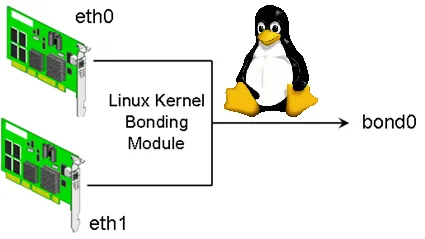
First, make sure your network cards are configured with a static IP. Let’s check.
Listing the network cards, we can see that both have an IP address assigned.
[root@lore-srv ~]# ifconfig -a
eth0      Link encap:Ethernet  HWaddr 08:00:27:5B:A0:9B
inet addr:192.168.15.13  Bcast:192.168.15.255  Mask:255.255.255.0
inet6 addr: fe80::a00:27ff:fe5b:a09b/64 Scope:Link
UP BROADCAST RUNNING MULTICAST  MTU:1500  Metric:1
RX packets:23659 errors:0 dropped:0 overruns:0 frame:0
TX packets:2023 errors:0 dropped:0 overruns:0 carrier:0
collisions:0 txqueuelen:1000
RX bytes:32192158 (30.7 MiB)  TX bytes:159875 (156.1 KiB)</code>

eth1      Link encap:Ethernet  HWaddr 08:00:27:38:CE:7F
inet addr:192.168.15.14  Bcast:192.168.15.255  Mask:255.255.255.0
inet6 addr: fe80::a00:27ff:fe38:ce7f/64 Scope:Link
UP BROADCAST RUNNING MULTICAST  MTU:1500  Metric:1
RX packets:23621 errors:0 dropped:0 overruns:0 frame:0
TX packets:316 errors:0 dropped:0 overruns:0 carrier:0
collisions:0 txqueuelen:1000
RX bytes:32184307 (30.6 MiB)  TX bytes:35396 (34.5 KiB)

eth2      Link encap:Ethernet  HWaddr 08:00:27:C6:C4:8E
inet addr:192.168.15.15  Bcast:192.168.15.255  Mask:255.255.255.0
inet6 addr: fe80::a00:27ff:fec6:c48e/64 Scope:Link
UP BROADCAST RUNNING MULTICAST  MTU:1500  Metric:1
RX packets:23682 errors:0 dropped:0 overruns:0 frame:0
TX packets:312 errors:0 dropped:0 overruns:0 carrier:0
collisions:0 txqueuelen:1000
RX bytes:32192675 (30.7 MiB)  TX bytes:34552 (33.7 KiB)

eth3      Link encap:Ethernet  HWaddr 08:00:27:C2:EC:BE
inet addr:192.168.15.16  Bcast:192.168.15.255  Mask:255.255.255.0
inet6 addr: fe80::a00:27ff:fec2:ecbe/64 Scope:Link
UP BROADCAST RUNNING MULTICAST  MTU:1500  Metric:1
RX packets:23784 errors:0 dropped:0 overruns:0 frame:0
TX packets:313 errors:0 dropped:0 overruns:0 carrier:0
collisions:0 txqueuelen:1000
RX bytes:32195783 (30.7 MiB)  TX bytes:34622 (33.8 KiB)

lo        Link encap:Local Loopback
inet addr:127.0.0.1  Mask:255.0.0.0
inet6 addr: ::1/128 Scope:Host
UP LOOPBACK RUNNING  MTU:65536  Metric:1
RX packets:71 errors:0 dropped:0 overruns:0 frame:0
TX packets:71 errors:0 dropped:0 overruns:0 carrier:0
collisions:0 txqueuelen:0
RX bytes:6344 (6.1 KiB)  TX bytes:6344 (6.1 KiB)
In the files /etc/sysconfig/network-scripts/ifcfg-eth0 and /etc/sysconfig/network-scripts/ifcfg-eth1 we can see that the IP addresses assigned to both network cards are defined statically. Look at the BOOTPROTO parameter in the files.
[root@lore-srv ~]# cat /etc/sysconfig/network-scripts/ifcfg-eth0
DEVICE=eth0
TYPE=Ethernet
UUID=99b21e7f-160f-44a5-8240-3a7d0fb07568
ONBOOT=yes
NM_CONTROLLED=yes
BOOTPROTO=static
IPADDR=192.168.15.13
NETMASK=255.255.255.0
HWADDR=08:00:27:5B:A0:9B
DEFROUTE=yes
PEERDNS=yes
PEERROUTES=yes
IPV4_FAILURE_FATAL=yes
IPV6INIT=no
NAME="System eth0"
[root@lore-srv ~]# cat /etc/sysconfig/network-scripts/ifcfg-eth1
DEVICE=eth1
TYPE=Ethernet
UUID=1d6cc9e2-4643-4dab-9c6e-a195cc7d64bc
ONBOOT=yes
NM_CONTROLLED=yes
BOOTPROTO=static
IPADDR=192.168.15.14
NETMASK=255.255.255.0
HWADDR=08:00:27:38:CE:7F
DEFROUTE=yes
PEERDNS=yes
PEERROUTES=yes
IPV4_FAILURE_FATAL=yes
IPV6INIT=no
NAME="System eth1"We need to edit or create (if it does not exist yet) the file /etc/modprobe.d/bonding.conf and add some parameters for the corresponding bonding.
[root@lore-srv ~]# vi /etc/modprobe.d/bonding.conf
alias bond0 bonding
options bond0 mode=active-backup miimon=100 downdelay=200 updelay=200 fail_over_mac=1
The parameters we configured are the following:
alias: name of the virtual network card that acts as the bonding.
options: options to be set for the bond0 bonding.
mode=1: active-backup mode configuration. One of the slaves is active for the bonding and, if this network card fails, the other slave takes over the communication.
miimon=100: how often, in milliseconds, the link monitor checks the status of the network cards that are part of the bonding.
downdelay=200: the time in milliseconds until the slave is disabled after a link failure is detected.
updelay=200: the time in milliseconds until the slave is enabled after the link recovery is detected. This value must be a multiple of the miimon parameter, otherwise it is set to the nearest multiple.
fail_over_mac=1: makes the bonding interface use the MAC Address of the remaining card after a failover between the physical network cards. (if you are using a virtual machine, this parameter must be set)
For more details about the parameters, see the file /usr/share/doc/iputils-*/README.bonding
To bring up the bonding we need to create the file /etc/sysconfig/network-scripts/bond0, which will bring up the virtual network card and provide the redundancy between the two physical network cards we have installed.
[root@lore-srv ~]# vi /etc/sysconfig/network-scripts/ifcfg-bond0
#alias bond bonding
#options bond0 mode=1 miimon=100 downdelay=200 updelay=200
DEVICE=bond0
IPADDR=192.168.15.13
NETMASK=255.255.255.0
ONBOOT=yes
BOOTPROTO=static
USERCTL=no
Note that the IP address can be the same one used on one of the network cards that will serve as slaves. In this scenario I used the IP of the eth0 card.
Now let’s configure the network cards eth0 and eth1 to serve as slaves of bond0.
[root@lore-srv ~]# vi /etc/sysconfig/network-scripts/ifcfg-eth0
DEVICE=eth0
TYPE=Ethernet
UUID=99b21e7f-160f-44a5-8240-3a7d0fb07568
ONBOOT=yes
NM_CONTROLLED=yes
HWADDR=08:00:27:5B:A0:9B
NAME="System eth0"
MASTER=bond0
SLAVE=yes
[root@lore-srv ~]# vi /etc/sysconfig/network-scripts/ifcfg-eth1
DEVICE=eth1
TYPE=Ethernet
UUID=1d6cc9e2-4643-4dab-9c6e-a195cc7d64bc
ONBOOT=yes
NM_CONTROLLED=yes
HWADDR=08:00:27:38:CE:7F
NAME="System eth1"
MASTER=bond0
SLAVE=yesIt is best to do all of this configuration from a connection through a third network card or directly on the host’s terminal, because you will probably lose communication with the host when you make these changes.
Once that is done, reboot to check that everything comes up correctly. If you have any problem, you can leave a comment and I will try to help.
Check whether bond0 came up.
[root@lore-srv ~]# ifconfig
bond0     Link encap:Ethernet  HWaddr 08:00:27:5B:A0:9B
          inet addr:192.168.15.13  Bcast:192.168.15.255  Mask:255.255.255.0
          inet6 addr: fe80::a00:27ff:fe5b:a09b/64 Scope:Link
          UP BROADCAST RUNNING MASTER MULTICAST  MTU:1500  Metric:1
          RX packets:276 errors:0 dropped:60 overruns:0 frame:0
          TX packets:152 errors:0 dropped:0 overruns:0 carrier:0
          collisions:0 txqueuelen:0
          RX bytes:34339 (33.5 KiB)  TX bytes:21983 (21.4 KiB)

eth0      Link encap:Ethernet  HWaddr 08:00:27:5B:A0:9B
          inet addr:192.168.15.13  Bcast:192.168.15.255  Mask:255.255.255.0
          UP BROADCAST RUNNING SLAVE MULTICAST  MTU:1500  Metric:1
          RX packets:213 errors:0 dropped:0 overruns:0 frame:0
          TX packets:165 errors:0 dropped:0 overruns:0 carrier:0
          collisions:0 txqueuelen:1000
          RX bytes:24359 (23.7 KiB)  TX bytes:23965 (23.4 KiB)

eth1      Link encap:Ethernet  HWaddr 08:00:27:38:CE:7F
          inet addr:192.168.15.13  Bcast:192.168.15.255  Mask:255.255.255.0
          UP BROADCAST RUNNING SLAVE MULTICAST  MTU:1500  Metric:1
          RX packets:70 errors:0 dropped:60 overruns:0 frame:0
          TX packets:0 errors:0 dropped:0 overruns:0 carrier:0
          collisions:0 txqueuelen:1000
          RX bytes:10400 (10.1 KiB)  TX bytes:0 (0.0 b)

eth2      Link encap:Ethernet  HWaddr 08:00:27:C6:C4:8E
          inet addr:192.168.15.12  Bcast:192.168.15.255  Mask:255.255.255.0
          inet6 addr: fe80::a00:27ff:fec6:c48e/64 Scope:Link
          UP BROADCAST RUNNING MULTICAST  MTU:1500  Metric:1
          RX packets:99 errors:0 dropped:0 overruns:0 frame:0
          TX packets:45 errors:0 dropped:0 overruns:0 carrier:0
          collisions:0 txqueuelen:1000
          RX bytes:12348 (12.0 KiB)  TX bytes:4986 (4.8 KiB)

eth3      Link encap:Ethernet  HWaddr 08:00:27:C2:EC:BE
          inet addr:192.168.15.16  Bcast:192.168.15.255  Mask:255.255.255.0
          inet6 addr: fe80::a00:27ff:fec2:ecbe/64 Scope:Link
          UP BROADCAST RUNNING MULTICAST  MTU:1500  Metric:1
          RX packets:35 errors:0 dropped:0 overruns:0 frame:0
          TX packets:16 errors:0 dropped:0 overruns:0 carrier:0
          collisions:0 txqueuelen:1000
          RX bytes:5322 (5.1 KiB)  TX bytes:2436 (2.3 KiB)

lo        Link encap:Local Loopback
          inet addr:127.0.0.1  Mask:255.0.0.0
          inet6 addr: ::1/128 Scope:Host
          UP LOOPBACK RUNNING  MTU:65536  Metric:1
          RX packets:44 errors:0 dropped:0 overruns:0 frame:0
          TX packets:44 errors:0 dropped:0 overruns:0 carrier:0
          collisions:0 txqueuelen:0
          RX bytes:4064 (3.9 KiB)  TX bytes:4064 (3.9 KiB)
As we can see, our bond0 network card is active, with the IP 192.168.15.13 and the MAC Address of eth0.
Check the dynamic file /proc/net/boding/bond0, where bond0 is the name of the bonding virtual card.
[root@lore-srv ~]# cat /proc/net/bonding/bond0
Ethernet Channel Bonding Driver: v3.7.1 (April 27, 2011)</code>

Bonding Mode: fault-tolerance (active-backup) (fail_over_mac active)
Primary Slave: None
Currently Active Slave: eth0
MII Status: up
MII Polling Interval (ms): 100
Up Delay (ms): 200
Down Delay (ms): 200

Slave Interface: eth0
MII Status: up
Speed: 1000 Mbps
Duplex: full
Link Failure Count: 1
Permanent HW addr: 08:00:27:5b:a0:9b
Slave queue ID: 0

Slave Interface: eth1
MII Status: up
Speed: 1000 Mbps
Duplex: full
Link Failure Count: 1
Permanent HW addr: 08:00:27:38:ce:7f
Slave queue ID: 0
Let’s test whether the bonding is working. To do that, we will pull the network cable from one of our network cards. I will disconnect eth0 first. Since I am using VirtualBox, I will disconnect the cable virtually.
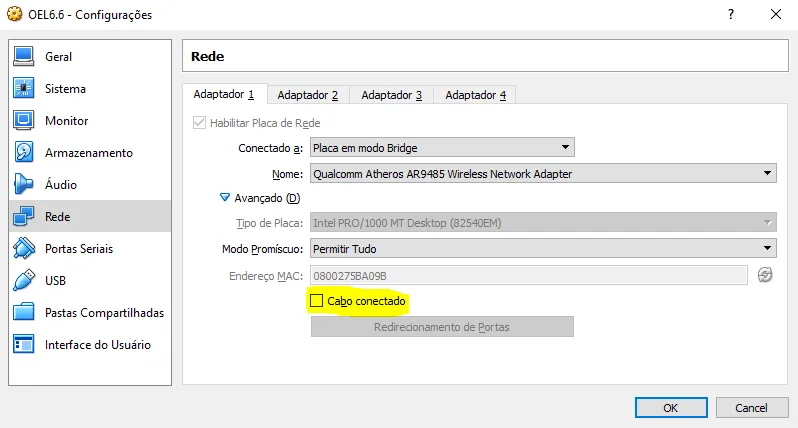
After doing that, look again at the dynamic file /proc/net/bonding/bond0 and you will see that the eth0 network card has the status down.
[root@lore-srv ~]# cat /proc/net/bonding/bond0
Ethernet Channel Bonding Driver: v3.7.1 (April 27, 2011)</code>

Bonding Mode: fault-tolerance (active-backup) (fail_over_mac active)
Primary Slave: None
Currently Active Slave: eth1
MII Status: up
MII Polling Interval (ms): 100
Up Delay (ms): 200
Down Delay (ms): 200

Slave Interface: eth0
MII Status: down
Speed: Unknown
Duplex: Unknown
Link Failure Count: 2
Permanent HW addr: 08:00:27:5b:a0:9b
Slave queue ID: 0

Slave Interface: eth1
MII Status: up
Speed: 1000 Mbps
Duplex: full
Link Failure Count: 1
Permanent HW addr: 08:00:27:38:ce:7f
Slave queue ID: 0
Plug the cable back in, check the bonding status and do the same process for the other card to make sure everything is working as it should.
This way we guarantee redundancy in our network cards. I hope this article is useful to you at some point.
If you have questions or problems, just leave them in the comments.
Regards,
Franky
Boa tarde, eu deixo so uma bond com vlan fica ok, mas quando crio duas vlan dai nao fuciona nenhuma.