
Today we’re going to talk about something that is a very common activity in a DBA’s day-to-day: moving datafiles.
To explore it, we’ll go through the various techniques we can use for this purpose. We’ll see everything from moving datafiles with operating system commands to Oracle-specific commands, covering both offline and online moves, from the filesystem to ASM and vice versa.
Without further ado…
Moving datafiles offline with SQL*Plus and asmcmd
First, let’s look at the size, names and directories of our datafiles. We also need to check whether the destination we’re moving them to has enough space to hold them.
SQL> set pagesize 200 linesize 200

SQL> col file_name for a60

SQL> select tablespace_name, file_name, bytes/1024/1024 MB, status from dba_data_files order by 1,2;

TABLESPACE_NAME                FILE_NAME                                                              MB         STATUS
------------------------------ ---------------------------------------------------------------------- ---------- ---------
SYSAUX                         +DATA/LOREDB/DATAFILE/sysaux.256.901303363                             630        AVAILABLE
SYSTEM                         +DATA/LOREDB/DATAFILE/system.257.901303423                             790        AVAILABLE
UNDOTBS1                       +DATA/LOREDB/DATAFILE/undotbs1.259.901303479                           165        AVAILABLE
USERS                          +DATA/LOREDB/DATAFILE/users.258.901303477                              5          AVAILABLE
USERS                          +DATA/LOREDB/DATAFILE/users.274.916489441                              100        AVAILABLE
The query above also shows that the datafiles have the available status, meaning they are available, and to move them we’ll need to take them offline. To take just one datafile of a tablespace offline, the database must be in Archivelog mode; otherwise the whole tablespace has to be taken offline. In this scenario we’ll work only with the USERS tablespace and its datafiles.
In this scenario my database is not in archivelog mode and it doesn’t make sense to enable it here, so I won’t be able to take any single datafile offline.
SQL> alter database datafile '+DATA/LOREDB/DATAFILE/users.274.916489441' offline;
alter database datafile '+DATA/LOREDB/DATAFILE/users.274.916489441' offline
*
ERROR at line 1:
ORA-01145: offline immediate disallowed unless media recovery enabled
So let’s take the USERS tablespace offline:
SQL> alter tablespace users offline;

Tablespace altered.
I’m going to move the datafile from ASM to the filesystem, and for that I need to access the +ASM instance:
SQL> exit
Disconnected from Oracle Database 12c Enterprise Edition Release 12.1.0.2.0 - 64bit Production
With the Partitioning, Automatic Storage Management, OLAP, Advanced Analytics,
Real Application Testing and Unified Auditing options
[oracle@loredata-srv ~]$ . oraenv
ORACLE_SID = [loredb] ? +ASM
The Oracle base remains unchanged with value /u01/app/oracle
[oracle@loredata-srv ~]$ asmcmd -p
ASMCMD [+] >
To navigate the ASM directories the commands are very similar, and some are even the same as the shell’s. The lsdg command lists the diskgroups:
ASMCMD [+] > lsdg
State    Type   Rebal Sector Block       AU Total_MB Free_MB  Req_mir_free_MB Usable_file_MB Offline_disks Voting_files Name
MOUNTED  EXTERN     N   512   4096  1048576     4094    4032                0           4032             0            N CRS/
MOUNTED  EXTERN     N   512   4096  1048576    12284    6715                0           6715             0            N DATA/
Let’s go to the directory where the datafile we want to move is:
ASMCMD [+] > cd +DATA/LOREDB/DATAFILE
ASMCMD [+DATA/LOREDB/DATAFILE] > ls -l
Type     Redund Striped Time            Sys Name
DATAFILE UNPROT  COARSE JUL 06 12:00:00 Y   SYSAUX.256.901303363
DATAFILE UNPROT  COARSE JUL 06 12:00:00 Y   SYSTEM.257.901303423
DATAFILE UNPROT  COARSE JUL 06 12:00:00 Y   UNDOTBS1.259.901303479
DATAFILE UNPROT  COARSE JUL 06 12:00:00 Y   USERS.258.901303477
DATAFILE UNPROT  COARSE JUL 06 12:00:00 Y   USERS.274.916489441

ASMCMD [+DATA/LOREDB/DATAFILE] > cp USERS.274.916489441 /u01/app/oracle/oradata
copying +DATA/LOREDB/DATAFILE/USERS.274.916489441 -> /u01/app/oracle/oradata/USERS.274.916489441
Back in SQL*Plus, we change the datafile name information in the controlfile:
SQL> alter database rename file '+DATA/LOREDB/DATAFILE/users.274.916489441' to '/u01/app/oracle/oradata/USERS.274.916489441';

Database altered.
Once that’s done, just bring the tablespace back online. If you’re not using Oracle Managed Files, you’ll have to remove the file from the old location.
SQL> alter tablespace users online;

Tablespace altered.
Let’s see how it looks:
SQL> col file_name for a60

SQL> select tablespace_name, file_name, bytes/1024/1024 MB, status from dba_data_files order by 1,2;

TABLESPACE_NAME                FILE_NAME                                                              MB         STATUS
------------------------------ ---------------------------------------------------------------------- ---------- ---------
SYSAUX                         +DATA/LOREDB/DATAFILE/sysaux.256.901303363                                    630 AVAILABLE
SYSTEM                         +DATA/LOREDB/DATAFILE/system.257.901303423                                    790 AVAILABLE
UNDOTBS1                       +DATA/LOREDB/DATAFILE/undotbs1.259.901303479                                  165 AVAILABLE
USERS                          +DATA/LOREDB/DATAFILE/users.258.901303477                                       5 AVAILABLE
USERS                          /u01/app/oracle/oradata/USERS.274.916489441                                   100 AVAILABLE
Moving datafiles offline with RMAN (1)
Let’s move the same file, but this time using only Recovery Manager (RMAN).
First, let’s connect to the database using RMAN and list the files:
[oracle@loredata-srv oradata]$ rman target /

Recovery Manager: Release 12.1.0.2.0 - Production on Wed Jul 6 12:47:02 2016

Copyright (c) 1982, 2014, Oracle and/or its affiliates. All rights reserved.

connected to target database: LOREDB (DBID=1937271711)

RMAN> report schema;

using target database control file instead of recovery catalog
Report of database schema for database with db_unique_name LOREDB

List of Permanent Datafiles
===========================
File Size(MB) Tablespace           RB segs Datafile Name
---- -------- -------------------- ------- ------------------------
1    790      SYSTEM               YES     +DATA/LOREDB/DATAFILE/system.257.901303423
3    630      SYSAUX               NO      +DATA/LOREDB/DATAFILE/sysaux.256.901303363
4    165      UNDOTBS1             YES     +DATA/LOREDB/DATAFILE/undotbs1.259.901303479
5    250      PDB$SEED:SYSTEM      NO      +DATA/LOREDB/FD9AC20F64D244D7E043B6A9E80A2F2F/DATAFILE/system.266.901303619
6    5        USERS                NO      +DATA/LOREDB/DATAFILE/users.258.901303477
7    490      PDB$SEED:SYSAUX      NO      +DATA/LOREDB/FD9AC20F64D244D7E043B6A9E80A2F2F/DATAFILE/sysaux.265.901303619
8    260      MYPDB:SYSTEM         NO      +DATA/LOREDB/FD9BD2B44413096FE043B6A9E80ABC28/DATAFILE/system.271.901304195
9    1170     MYPDB:SYSAUX         NO      +DATA/LOREDB/FD9BD2B44413096FE043B6A9E80ABC28/DATAFILE/sysaux.270.901304195
10   5        MYPDB:USERS          NO      +DATA/LOREDB/FD9BD2B44413096FE043B6A9E80ABC28/DATAFILE/users.272.901304195
11   1243     MYPDB:EXAMPLE        NO      +DATA/LOREDB/FD9BD2B44413096FE043B6A9E80ABC28/DATAFILE/example.269.901304195
13   100      USERS                NO      /u01/app/oracle/oradata/USERS.274.916489441

List of Temporary Files
=======================
File Size(MB) Tablespace           Maxsize(MB) Tempfile Name
---- -------- -------------------- ----------- --------------------
1    60       TEMP                 32767       +DATA/LOREDB/TEMPFILE/temp.264.901303609
2    20       PDB$SEED:TEMP        32767       +DATA/LOREDB/FD9AC20F64D244D7E043B6A9E80A2F2F/DATAFILE/pdbseed_temp012016-01-16_06-08-07-pm.dbf
3    118      MYPDB:TEMP           32767       +DATA/LOREDB/FD9BD2B44413096FE043B6A9E80ABC28/DATAFILE/mypdb_temp012016-01-16_06-19-54-pm.dbf
Let’s take the tablespace offline and then copy the datafile back to ASM:
RMAN> alter tablespace users offline;

Statement processed

RMAN> copy datafile 13 to '+DATA';

Starting backup at 06-JUL-16
allocated channel: ORA_DISK_1
channel ORA_DISK_1: SID=34 device type=DISK
channel ORA_DISK_1: starting datafile copy
input datafile file number=00013 name=/u01/app/oracle/oradata/USERS.274.916489441
output file name=+DATA/LOREDB/DATAFILE/users.274.916491023 tag=TAG20160706T125022 RECID=7 STAMP=916491028
channel ORA_DISK_1: datafile copy complete, elapsed time: 00:00:07
Finished backup at 06-JUL-16

Starting Control File and SPFILE Autobackup at 06-JUL-16
piece handle=/u01/app/oracle/product/12.1.0.2/dbhome_1/dbs/c-1937271711-20160706-00 comment=NONE
Finished Control File and SPFILE Autobackup at 06-JUL-16
RMAN makes an image copy of the file, and then we need to do the switch so the database starts using this copy of the datafile:
RMAN> switch datafile 13 to copy;

datafile 13 switched to datafile copy "+DATA/LOREDB/DATAFILE/users.274.916491023"
Now we just bring the tablespace back online and remove the old file:
RMAN> alter tablespace users online;

Statement processed

RMAN> delete datafilecopy "/u01/app/oracle/oradata/USERS.274.916489441";

released channel: ORA_DISK_1
allocated channel: ORA_DISK_1
channel ORA_DISK_1: SID=34 device type=DISK
List of Datafile Copies
=======================

Key     File S Completion Time Cup SCN    Ckp Time
------- ---- - --------------- ---------- ---------------
8         13 A 06-JUL-16          3627450 06-JUL-16
Name: /u01/app/oracle/oradata/USERS.274.916489441
Do you really want to delete the above objects (enter YES or NO)? yes
deleted datafile copy
datafile copy file name=/u01/app/oracle/oradata/USERS.274.916489441 RECID=8 STAMP=916491059
Deleted 1 objects
Let’s see how it looks:
RMAN> report schema;

Report of database schema for database with db_unique_name LOREDB

List of Permanent Datafiles
===========================
File Size(MB) Tablespace           RB segs Datafile Name
---- -------- -------------------- ------- ------------------------
1    790      SYSTEM               YES     +DATA/LOREDB/DATAFILE/system.257.901303423
3    630      SYSAUX               NO      +DATA/LOREDB/DATAFILE/sysaux.256.901303363
4    165      UNDOTBS1             YES     +DATA/LOREDB/DATAFILE/undotbs1.259.901303479
5    250      PDB$SEED:SYSTEM      NO      +DATA/LOREDB/FD9AC20F64D244D7E043B6A9E80A2F2F/DATAFILE/system.266.901303619
6    5        USERS                NO      +DATA/LOREDB/DATAFILE/users.258.901303477
7    490      PDB$SEED:SYSAUX      NO      +DATA/LOREDB/FD9AC20F64D244D7E043B6A9E80A2F2F/DATAFILE/sysaux.265.901303619
8    260      MYPDB:SYSTEM         NO      +DATA/LOREDB/FD9BD2B44413096FE043B6A9E80ABC28/DATAFILE/system.271.901304195
9    1170     MYPDB:SYSAUX         NO      +DATA/LOREDB/FD9BD2B44413096FE043B6A9E80ABC28/DATAFILE/sysaux.270.901304195
10   5        MYPDB:USERS          NO      +DATA/LOREDB/FD9BD2B44413096FE043B6A9E80ABC28/DATAFILE/users.272.901304195
11   1243     MYPDB:EXAMPLE        NO      +DATA/LOREDB/FD9BD2B44413096FE043B6A9E80ABC28/DATAFILE/example.269.901304195
13   100      USERS                NO      +DATA/LOREDB/DATAFILE/users.274.916491023

List of Temporary Files
=======================
File Size(MB) Tablespace           Maxsize(MB) Tempfile Name
---- -------- -------------------- ----------- --------------------
1    60       TEMP                 32767       +DATA/LOREDB/TEMPFILE/temp.264.901303609
2    20       PDB$SEED:TEMP        32767       +DATA/LOREDB/FD9AC20F64D244D7E043B6A9E80A2F2F/DATAFILE/pdbseed_temp012016-01-16_06-08-07-pm.dbf
3    118      MYPDB:TEMP           32767       +DATA/LOREDB/FD9BD2B44413096FE043B6A9E80ABC28/DATAFILE/mypdb_temp012016-01-16_06-19-54-pm.dbf
Moving datafiles offline with RMAN (2)
Another example very similar to the previous one, but with different commands.
RMAN> report schema;

Report of database schema for database with db_unique_name LOREDB

List of Permanent Datafiles
===========================
File Size(MB) Tablespace           RB segs Datafile Name
---- -------- -------------------- ------- ------------------------
1    790      SYSTEM               YES     +DATA/LOREDB/DATAFILE/system.257.901303423
3    630      SYSAUX               NO      +DATA/LOREDB/DATAFILE/sysaux.256.901303363
4    165      UNDOTBS1             YES     +DATA/LOREDB/DATAFILE/undotbs1.259.901303479
5    250      PDB$SEED:SYSTEM      NO      +DATA/LOREDB/FD9AC20F64D244D7E043B6A9E80A2F2F/DATAFILE/system.266.901303619
6    5        USERS                NO      +DATA/LOREDB/DATAFILE/users.258.901303477
7    490      PDB$SEED:SYSAUX      NO      +DATA/LOREDB/FD9AC20F64D244D7E043B6A9E80A2F2F/DATAFILE/sysaux.265.901303619
8    260      MYPDB:SYSTEM         NO      +DATA/LOREDB/FD9BD2B44413096FE043B6A9E80ABC28/DATAFILE/system.271.901304195
9    1170     MYPDB:SYSAUX         NO      +DATA/LOREDB/FD9BD2B44413096FE043B6A9E80ABC28/DATAFILE/sysaux.270.901304195
10   5        MYPDB:USERS          NO      +DATA/LOREDB/FD9BD2B44413096FE043B6A9E80ABC28/DATAFILE/users.272.901304195
11   1243     MYPDB:EXAMPLE        NO      +DATA/LOREDB/FD9BD2B44413096FE043B6A9E80ABC28/DATAFILE/example.269.901304195
13   100      USERS                NO      +DATA/LOREDB/DATAFILE/users.274.916491023

List of Temporary Files
=======================
File Size(MB) Tablespace           Maxsize(MB) Tempfile Name
---- -------- -------------------- ----------- --------------------
1    60       TEMP                 32767       +DATA/LOREDB/TEMPFILE/temp.264.901303609
2    20       PDB$SEED:TEMP        32767       +DATA/LOREDB/FD9AC20F64D244D7E043B6A9E80A2F2F/DATAFILE/pdbseed_temp012016-01-16_06-08-07-pm.dbf
3   118       MYPDB:TEMP           32767       +DATA/LOREDB/FD9BD2B44413096FE043B6A9E80ABC28/DATAFILE/mypdb_temp012016-01-16_06-19-54-pm.dbf

RMAN> alter tablespace users offline;

Statement processed

RMAN> backup as copy datafile 13 format '/u01/app/oracle/oradata/users.274.916491023';

Starting backup at 06-JUL-16
using channel ORA_DISK_1
channel ORA_DISK_1: starting datafile copy
input datafile file number=00013 name=+DATA/LOREDB/DATAFILE/users.274.916491023
output file name=/u01/app/oracle/oradata/users.274.916491023 tag=TAG20160706T130604 RECID=9 STAMP=916491970
channel ORA_DISK_1: datafile copy complete, elapsed time: 00:00:07
Finished backup at 06-JUL-16

Starting Control File and SPFILE Autobackup at 06-JUL-16
piece handle=/u01/app/oracle/product/12.1.0.2/dbhome_1/dbs/c-1937271711-20160706-01 comment=NONE
Finished Control File and SPFILE Autobackup at 06-JUL-16

RMAN> switch datafile 13 to copy;

datafile 13 switched to datafile copy "/u01/app/oracle/oradata/users.274.916491023"

RMAN> alter tablespace users online;

Statement processed

RMAN> delete datafilecopy "+DATA/LOREDB/DATAFILE/users.274.916491023";

released channel: ORA_DISK_1
allocated channel: ORA_DISK_1
channel ORA_DISK_1: SID=34 device type=DISK
List of Datafile Copies
=======================

Key     File S Completion Time Ckp SCN    Ckp Time
------- ---- - --------------- ---------- ---------------
10      13   A 06-JUL-16       3628718    06-JUL-16
Name: +DATA/LOREDB/DATAFILE/users.274.916491023
Tag: TAG20160706T125022
Do you really want to delete the above objects (enter YES or NO)? yes
deleted datafile copy
datafile copy file name=+DATA/LOREDB/DATAFILE/users.274.916491023 RECID=10 STAMP=916492017
Deleted 1 objects

RMAN> report schema;

Report of database schema for database with db_unique_name LOREDB

List of Permanent Datafiles
===========================
File Size(MB) Tablespace           RB segs Datafile Name
---- -------- -------------------- ------- ------------------------
1    790      SYSTEM               YES     +DATA/LOREDB/DATAFILE/system.257.901303423
3    630      SYSAUX               NO      +DATA/LOREDB/DATAFILE/sysaux.256.901303363
4    165      UNDOTBS1             YES     +DATA/LOREDB/DATAFILE/undotbs1.259.901303479
5    250      PDB$SEED:SYSTEM      NO      +DATA/LOREDB/FD9AC20F64D244D7E043B6A9E80A2F2F/DATAFILE/system.266.901303619
6    5        USERS                NO      +DATA/LOREDB/DATAFILE/users.258.901303477
7    490      PDB$SEED:SYSAUX      NO      +DATA/LOREDB/FD9AC20F64D244D7E043B6A9E80A2F2F/DATAFILE/sysaux.265.901303619
8    260      MYPDB:SYSTEM         NO      +DATA/LOREDB/FD9BD2B44413096FE043B6A9E80ABC28/DATAFILE/system.271.901304195
9    1170     MYPDB:SYSAUX         NO      +DATA/LOREDB/FD9BD2B44413096FE043B6A9E80ABC28/DATAFILE/sysaux.270.901304195
10   5        MYPDB:USERS          NO      +DATA/LOREDB/FD9BD2B44413096FE043B6A9E80ABC28/DATAFILE/users.272.901304195
11   1243     MYPDB:EXAMPLE        NO      +DATA/LOREDB/FD9BD2B44413096FE043B6A9E80ABC28/DATAFILE/example.269.901304195
13   100      USERS                NO      /u01/app/oracle/oradata/users.274.916491023

List of Temporary Files
=======================
File Size(MB) Tablespace           Maxsize(MB) Tempfile Name
---- -------- -------------------- ----------- --------------------
1    60       TEMP                 32767       +DATA/LOREDB/TEMPFILE/temp.264.901303609
2    20       PDB$SEED:TEMP        32767       +DATA/LOREDB/FD9AC20F64D244D7E043B6A9E80A2F2F/DATAFILE/pdbseed_temp012016-01-16_06-08-07-pm.dbf
3    118      MYPDB:TEMP           32767       +DATA/LOREDB/FD9BD2B44413096FE043B6A9E80ABC28/DATAFILE/mypdb_temp012016-01-16_06-19-54-pm.dbf
NOTE: If your database is in archivelog mode and you choose to take only the datafiles offline instead of the tablespace, you will need to recover the tablespace after the switch or rename and before bringing it online.
Moving datafiles online with SQL*Plus (12c new feature)
To finish, let’s look at one of the new features of Oracle Database 12c Enterprise Edition.
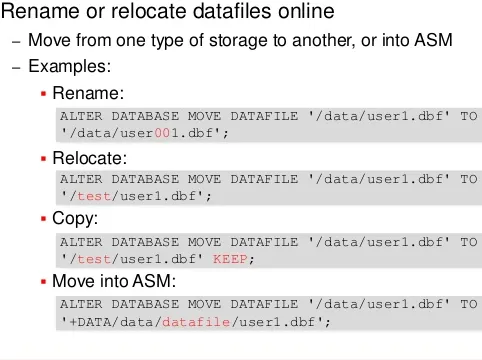
All it takes is one command to move a datafile from one place to another:
SQL> alter database move datafile 13 to '+DATA';

Database altered.

SQL> col file_name for a60
SQL> set pages 200 lin 200
SQL> select tablespace_name, file_name, bytes/1024/1024 MB, status from dba_data_files order by 1,2;

TABLESPACE_NAME                FILE_NAME                                                    MB         STATUS
------------------------------ ------------------------------------------------------------ ---------- ---------
SYSAUX                         +DATA/LOREDB/DATAFILE/sysaux.256.901303363                   630        AVAILABLE
SYSTEM                         +DATA/LOREDB/DATAFILE/system.257.901303423                   790        AVAILABLE
UNDOTBS1                       +DATA/LOREDB/DATAFILE/undotbs1.259.901303479                 165        AVAILABLE
USERS                          +DATA/LOREDB/DATAFILE/users.258.901303477                    5          AVAILABLE
USERS                          +DATA/LOREDB/DATAFILE/users.274.916492215                    100        AVAILABLE
If we list the datafile under the old name, we can see it no longer exists:
SQL> !ls -lh /u01/app/oracle/oradata/users.274.916491023
ls: impossível acessar /u01/app/oracle/oradata/users.274.916491023: Arquivo ou diretório não encontrado
That’s all for today. I think this will help a lot of the folks who are just starting out in the field. Moving datafiles is a simple task, but it must be done with great care. I hope you liked it, see you next time.
Regards,
Franky
Comments