
Hi everyone,
In this article we’ll get to know a little about ASM (Automatic Storage Management). ASM is software that manages the disks that will be used by the Oracle database we’re going to install later. Basic installations usually don’t use ASM, because it’s one more feature that has to be installed, configured and administered, but if you skip ASM you miss out on its benefits. To install it you need to download the Grid Infrastructure (GI) media, which contains the ASM and Clusterware components. After installing GI and getting ASM running, we can install the database software.
Automatic Storage Management
ASM is a volume manager and also a filesystem for Oracle database files, and it supports Oracle single-instance database configurations as well as databases that use Oracle Real Application Clusters (Oracle RAC). Oracle ASM is the storage management solution recommended by Oracle, and it provides an alternative to conventional volume managers, filesystems and raw devices.
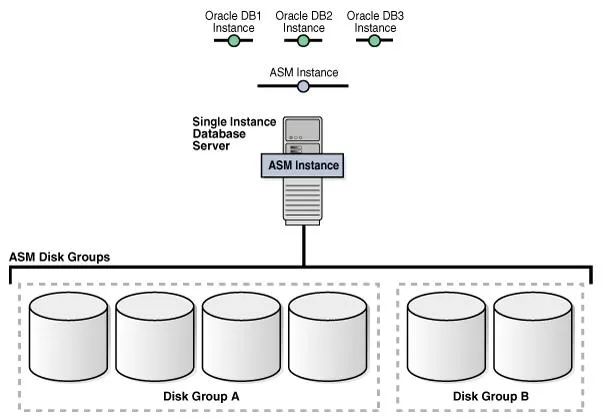
Oracle Automatic Storage Management uses diskgroups to store the datafiles; a diskgroup is a collection of disks that ASM manages as a unit. A diskgroup exposes a filesystem interface for Oracle database files. The contents of the files stored in a diskgroup are evenly distributed to eliminate hot-spots and to provide uniform performance across all disks.
Adding or removing disks from a diskgroup is a fully online operation. After either of them, ASM redistributes the data across all the remaining disks in the diskgroup. For example, say we have a diskgroup called DATA with redundancy at the storage level only. This diskgroup has 4 disks of 100GB each, 400GB in total, and we’re using only 200GB of data, so the balancing puts 50GB of data on each disk of the DATA diskgroup. In this case the math is “used space / number of disks”, so 200GB/4=50GB. If we remove a disk we’ll still have 300GB of total size in our diskgroup and the data distribution becomes 200GB/3, since we now have only 3 disks, so the rebalance operation will distribute approximately 66.67GB to each of the three remaining disks, and only after this rebalance operation finishes is the disk actually removed from the diskgroup; during the process the removed disk has a status of dropping. When adding disks, the operation works basically the same way. We have 4 disks of 100GB to store 200GB of data, so we have 50GB on each of the four disks; if we add a fifth disk we’ll have 200GB/5, and each disk will store 40GB of data when the rebalance operation finishes.
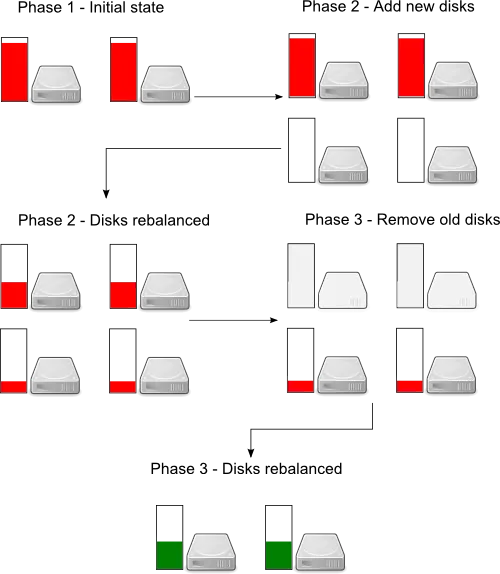
This image illustrates that the initial disks of the diskgroup are almost full, so 2 new, larger disks are added. After all the disks are balanced, the initial (smaller) disks are removed and the diskgroup is rebalanced again.
Advantages vs. disadvantages of ASM
Compared to standard volume managers and filesystems (both clustered filesystem and single filesystem), ASM has some advantages:
- It doesn’t need large amounts of memory for cache. The memory not needed for cache can be used for the SGA, which is more efficient. ASM will use a few hundred MB of memory for its internal management.
- It distributes “chunks” of data across all the logical disks in a diskgroup, and so removes hot-spots.
- ASM by itself doesn’t perform any I/O, so there is no “translation layer” between the Oracle I/O to the datafiles and the disk blocks. This reduces overhead and improves performance.
- There is no read-ahead when we use ASM, so the memory cache is never used by the database.
- With ASM we don’t need intensive tuning, such as correctly sizing stripes or any filesystem tuning. When we create a diskgroup in ASM we only need to define the Allocation Unit (AU). Configuration mistakes that cause performance problems become unlikely if the basic ASM configuration premises are followed.
- It doesn’t cause fragmentation (you might think the balancing ASM does is some kind of fragmentation, but allocation units are large enough (usually larger than 1MB) to allow small disk seeks for subsequent blocks (usually 8KB blocks).
- It doesn’t break large I/O operations (128KB) into multiple smaller ones (4KB or 8KB) the way some filesystems do. It’s faster to do one large I/O than several small ones.
- No extra consistency log is needed, because that is already the job of the Oracle Database redologs, so once again, compared with other filesystems, we would have overhead.
- We can administer ASM with the tools Oracle provides, so it doesn’t require any Unix administration (this can be an advantage or a disadvantage depending on the responsibilities of each administrator in the company).
- Adding or removing disks in ASM is very easy and doesn’t require all the careful planning you need with volume managers or filesystems. After you add new disks, ASM automatically rebalances the data across the disks, so all disks get equal utilization, and once again this brings performance gains.
- It runs on most operating systems and is platform independent (RHEL, OEL, Solaris, AIX, HP-UX, Windows, …).
It also has some disadvantages:
- Migrating datafiles from a filesystem to ASM may require downtime. This is no longer a problem from version 12c (12.1.0.1) on, where we can move datafiles online, but to migrate the controlfiles we still have to shut down the database.
- It’s hard (I believe impossible) to see the contents of ASM with OS tools. In some cases ASM data can be accidentally deleted by OS administrators who are using disks that look empty or unused to them. Even so, there are administrative methods to prevent that.
- We can’t back up the contents of ASM with plain operating system commands, so we need an integrated tool or native Oracle tools such as RMAN and asmcmd.
References
Comments