
Olá pessoal, aqui vou mostrar como instalar rapidamente o Ansible no OSX.
Um breve resumo do que o Ansible é:
Ninguém gosta de tarefas repetitivas. Com o Ansible, administradores de TI podem começar a automatizar o trabalho pesado de seu dia-a-dia. Automação liberta os admins para focar seus esforços de maneira que ajudem a entregar mais valor ao negócio aumentando a velocidade da entrega de aplicações e construindo uma cultura de sucesso. Ultimamente o Ansible tem dado aos times o que eles não conseguem ter o suficiente: tempo. Permitindo pessoas inteligentes focar em coisas inteligentes.
O Ansible é uma linguagem simples de automoção que pode perfeitamente descrever uma infraestrutura de TI. É fácil de aprender, é auto-documentado e não requer um nível de cientista da computação para lê-lo. Automação não deve ser mais complexa que as tarefas que substitui.

Instalação do Ansible
Primeiro precisamos instalar o PIP para depois podermos baixar o Ansible através dele:
Frankys-MBP:~ franky$  sudo easy_install pip
Password:
Searching for pip
Reading https://pypi.python.org/simple/pip/
Best match: pip 9.0.1
Downloading https://pypi.python.org/packages/11/b6/abcb525026a4be042b486df43905d6893fb04f05aac21c32c638e939e447/pip-9.0.1.tar.gz#md5=35f01da33009719497f01a4ba69d63c9
Processing pip-9.0.1.tar.gz
Writing /tmp/easy_install-s7HZSN/pip-9.0.1/setup.cfg
Running pip-9.0.1/setup.py -q bdist_egg --dist-dir /tmp/easy_install-s7HZSN/pip-9.0.1/egg-dist-tmp-GgKras
/System/Library/Frameworks/Python.framework/Versions/2.7/lib/python2.7/distutils/dist.py:267: UserWarning: Unknown distribution option: 'python_requires'
  warnings.warn(msg)
warning: no previously-included files found matching '.coveragerc'
warning: no previously-included files found matching '.mailmap'
warning: no previously-included files found matching '.travis.yml'
warning: no previously-included files found matching '.landscape.yml'
warning: no previously-included files found matching 'pip/_vendor/Makefile'
warning: no previously-included files found matching 'tox.ini'
warning: no previously-included files found matching 'dev-requirements.txt'
warning: no previously-included files found matching 'appveyor.yml'
no previously-included directories found matching '.github'
no previously-included directories found matching '.travis'
no previously-included directories found matching 'docs/_build'
no previously-included directories found matching 'contrib'
no previously-included directories found matching 'tasks'
no previously-included directories found matching 'tests'
creating /Library/Python/2.7/site-packages/pip-9.0.1-py2.7.egg
Extracting pip-9.0.1-py2.7.egg to /Library/Python/2.7/site-packages
Adding pip 9.0.1 to easy-install.pth file
Installing pip script to /usr/local/bin
Installing pip2.7 script to /usr/local/bin
Installing pip2 script to /usr/local/bin

Installed /Library/Python/2.7/site-packages/pip-9.0.1-py2.7.egg
Processing dependencies for pip
Finished processing dependencies for pip
Clique em install para concluir a instalação do PIP.
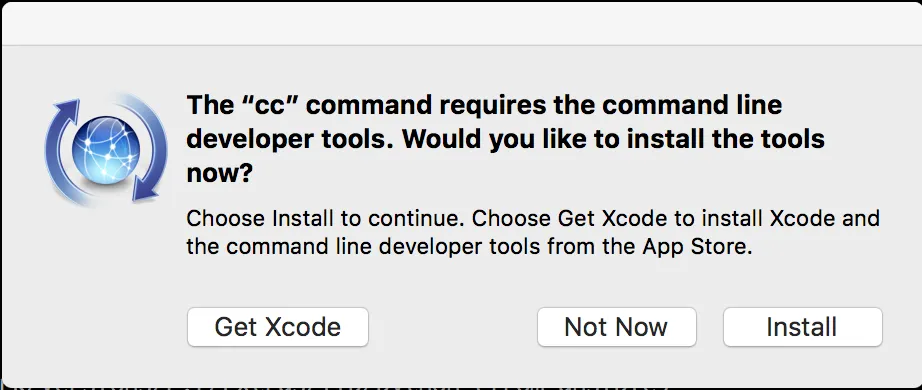
Agora usamos o PIP para fazer download e instalar o Ansible:
Frankys-MBP:~ franky$ sudo pip install ansible
The directory '/Users/franky/Library/Caches/pip/http' or its parent directory is not owned by the current user and the cache has been disabled. Please check the permissions and owner of that directory. If executing pip with sudo, you may want sudo's -H flag.
The directory '/Users/franky/Library/Caches/pip' or its parent directory is not owned by the current user and caching wheels has been disabled. check the permissions and owner of that directory. If executing pip with sudo, you may want sudo's -H flag.
Collecting ansible
  Downloading ansible-2.4.1.0.tar.gz (6.7MB)
    100% |████████████████████████████████| 6.7MB 195kB/s
Collecting jinja2 (from ansible)
  Downloading Jinja2-2.10-py2.py3-none-any.whl (126kB)
    100% |████████████████████████████████| 133kB 5.6MB/s
Collecting PyYAML (from ansible)
  Downloading PyYAML-3.12.tar.gz (253kB)
    100% |████████████████████████████████| 256kB 3.8MB/s
Collecting paramiko (from ansible)
  Downloading paramiko-2.4.0-py2.py3-none-any.whl (192kB)
    100% |████████████████████████████████| 194kB 4.4MB/s
Collecting cryptography (from ansible)
  Downloading cryptography-2.1.3-cp27-cp27m-macosx_10_6_intel.whl (1.5MB)
    100% |████████████████████████████████| 1.5MB 731kB/s
Requirement already satisfied: setuptools in /System/Library/Frameworks/Python.framework/Versions/2.7/Extras/lib/python (from ansible)
Collecting MarkupSafe>=0.23 (from jinja2->ansible)
  Downloading MarkupSafe-1.0.tar.gz
Collecting pyasn1>=0.1.7 (from paramiko->ansible)
  Downloading pyasn1-0.4.2-py2.py3-none-any.whl (71kB)
    100% |████████████████████████████████| 71kB 6.0MB/s
Collecting bcrypt>=3.1.3 (from paramiko->ansible)
  Downloading bcrypt-3.1.4-cp27-cp27m-macosx_10_6_intel.whl (51kB)
    100% |████████████████████████████████| 61kB 7.0MB/s
Collecting pynacl>=1.0.1 (from paramiko->ansible)
  Downloading PyNaCl-1.2.0-cp27-cp27m-macosx_10_6_intel.whl (243kB)
    100% |████████████████████████████████| 245kB 3.2MB/s
Requirement already satisfied: six>=1.4.1 in /System/Library/Frameworks/Python.framework/Versions/2.7/Extras/lib/python (from cryptography->ansible)
Collecting cffi>=1.7; platform_python_implementation != "PyPy" (from cryptography->ansible)
  Downloading cffi-1.11.2-cp27-cp27m-macosx_10_6_intel.whl (238kB)
    100% |████████████████████████████████| 245kB 4.2MB/s
Collecting enum34; python_version < "3" (from cryptography->ansible)
  Downloading enum34-1.1.6-py2-none-any.whl
Collecting idna>=2.1 (from cryptography->ansible)
  Downloading idna-2.6-py2.py3-none-any.whl (56kB)
    100% |████████████████████████████████| 61kB 7.6MB/s
Collecting asn1crypto>=0.21.0 (from cryptography->ansible)
  Downloading asn1crypto-0.23.0-py2.py3-none-any.whl (99kB)
    100% |████████████████████████████████| 102kB 7.1MB/s
Collecting ipaddress; python_version < "3" (from cryptography->ansible)
  Downloading ipaddress-1.0.18-py2-none-any.whl
Collecting pycparser (from cffi>=1.7; platform_python_implementation != "PyPy"->cryptography->ansible)
  Downloading pycparser-2.18.tar.gz (245kB)
    100% |████████████████████████████████| 256kB 1.6MB/s
Installing collected packages: MarkupSafe, jinja2, PyYAML, pyasn1, pycparser, cffi, bcrypt, enum34, idna, asn1crypto, ipaddress, cryptography, pynacl, paramiko, ansible
  Running setup.py install for MarkupSafe ... done
  Running setup.py install for PyYAML ... done
  Running setup.py install for pycparser ... done
  Running setup.py install for ansible ... done
Successfully installed MarkupSafe-1.0 PyYAML-3.12 ansible-2.4.1.0 asn1crypto-0.23.0 bcrypt-3.1.4 cffi-1.11.2 cryptography-2.1.3 enum34-1.1.6 idna-2.6 ipaddress-1.0.18 jinja2-2.10 paramiko-2.4.0 pyasn1-0.4.2 pycparser-2.18 pynacl-1.2.0
E estamos prontos para começar a usar o Ansible.
Frankys-MBP:~ franky$ ansible --version
ansible 2.4.1.0
  config file = None
  configured module search path = [u'/Users/franky/.ansible/plugins/modules', u'/usr/share/ansible/plugins/modules']
  ansible python module location = /Library/Python/2.7/site-packages/ansible
  executable location = /usr/local/bin/ansible
  python version = 2.7.10 (default, Jul 15 2017, 17:16:57) [GCC 4.2.1 Compatible Apple LLVM 9.0.0 (clang-900.0.31)]
Espero que seja útil para alguém.
Abraços,
Franky
Comentários